



'%3e%3cpath%20fill-rule='evenodd'%20clip-rule='evenodd'%20d='M21.4999%2010.9993C21.4999%205.20009%2016.7986%200.498901%2010.9993%200.498901C5.19994%200.498901%200.498657%205.20009%200.498657%2010.9993C0.498657%2016.2404%204.33858%2020.5844%209.35855%2021.3722V14.0346H6.69238V10.9993H9.35855V8.68594C9.35855%206.05427%2010.9262%204.60062%2013.3248%204.60062C14.4736%204.60062%2015.6753%204.80571%2015.6753%204.80571V7.38979H14.3512C13.0468%207.38979%2012.64%208.19921%2012.64%209.0296V10.9993H15.5523L15.0867%2014.0346H12.64V21.3722C17.66%2020.5844%2021.4999%2016.2404%2021.4999%2010.9993Z'%20fill='%231568EA'/%3e%3c/g%3e%3c/svg%3e)


'%3e%3cpath%20d='M2.42045%2022.1876H6.31818V12.7217L0.75%208.54553V20.5171C0.75%2021.4414%201.49892%2022.1876%202.42045%2022.1876Z'%20fill='%234285F4'/%3e%3cpath%20d='M19.682%2022.1876H23.5797C24.5041%2022.1876%2025.2502%2021.4387%2025.2502%2020.5171V8.54553L19.682%2012.7217'%20fill='%2334A853'/%3e%3cpath%20d='M19.682%205.48293V12.7216L25.2502%208.54543V6.31816C25.2502%204.25236%2022.8921%203.07469%2021.2411%204.31361'%20fill='%23FBBC04'/%3e%3cpath%20d='M6.31824%2012.7217V5.48303L13.0001%2010.4944L19.6819%205.48303V12.7217L13.0001%2017.733'%20fill='%23EA4335'/%3e%3cpath%20d='M0.75%206.31816V8.54543L6.31818%2012.7216V5.48293L4.75909%204.31361C3.10534%203.07469%200.75%204.25236%200.75%206.31816Z'%20fill='%23C5221F'/%3e%3c/g%3e%3cdefs%3e%3cclipPath%20id='clip0_2954_7305'%3e%3crect%20width='24.5'%20height='18.375'%20fill='white'%20transform='translate(0.75%203.8125)'/%3e%3c/clipPath%3e%3c/defs%3e%3c/svg%3e)


Quick answer: To open a file in Chrome, press Ctrl + O (Mac: ⌘ + O) and pick a local PDF, HTML, image, or text file—or drag it onto a tab. Chrome can open files you choose. What it blocks by design are website file:// links that try to reach your disk without you opening them first.
Searches for “chrome open file” usually mix four jobs: understand the security block, open a real local file anyway, deal with plain-text paths that are not hyperlinks, and (for developers) read/write files through modern browser APIs. This guide covers each layer in US-English Chrome on Windows and Mac.
Why Chrome blocks file:// links from websites
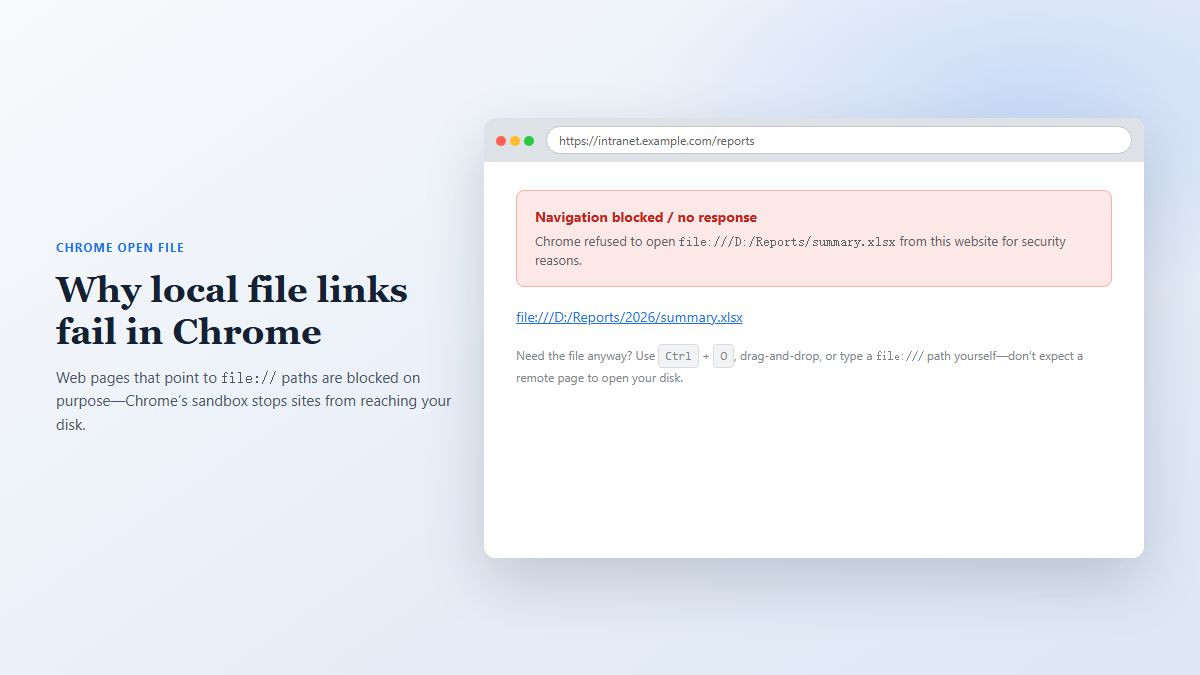
If you click a link that starts with file:/// on an intranet page, wiki, or email-rendered HTML and nothing happens—or Chrome reports access denied—that is the sandbox working as designed.
Web origin vs your disk: A normal
https://page must not silently readC:\or/Users/. Letting remote (or even local-network) pages open arbitrary files would be a serious data-leak risk.Same idea as CORS, different surface: Browsers isolate origins so one site cannot freely pull resources from another place you did not authorize. Local filesystem URLs are treated as a privileged zone, not a public website.
Not the same as “Chrome can’t open files”: You can still open local files when you initiate it (keyboard shortcut, drag-and-drop, Open with, typing
file:///yourself).
So the pain point is rarely “Chrome has no Open command.” It is “a webpage tried to open my computer for me, and Chrome said no.”
How to open a local file in Chrome (everyday methods)
Open a new tab.
Press Ctrl + O on Windows/Linux/Chromebook, or ⌘ + O on Mac.
Select the file and click Open.
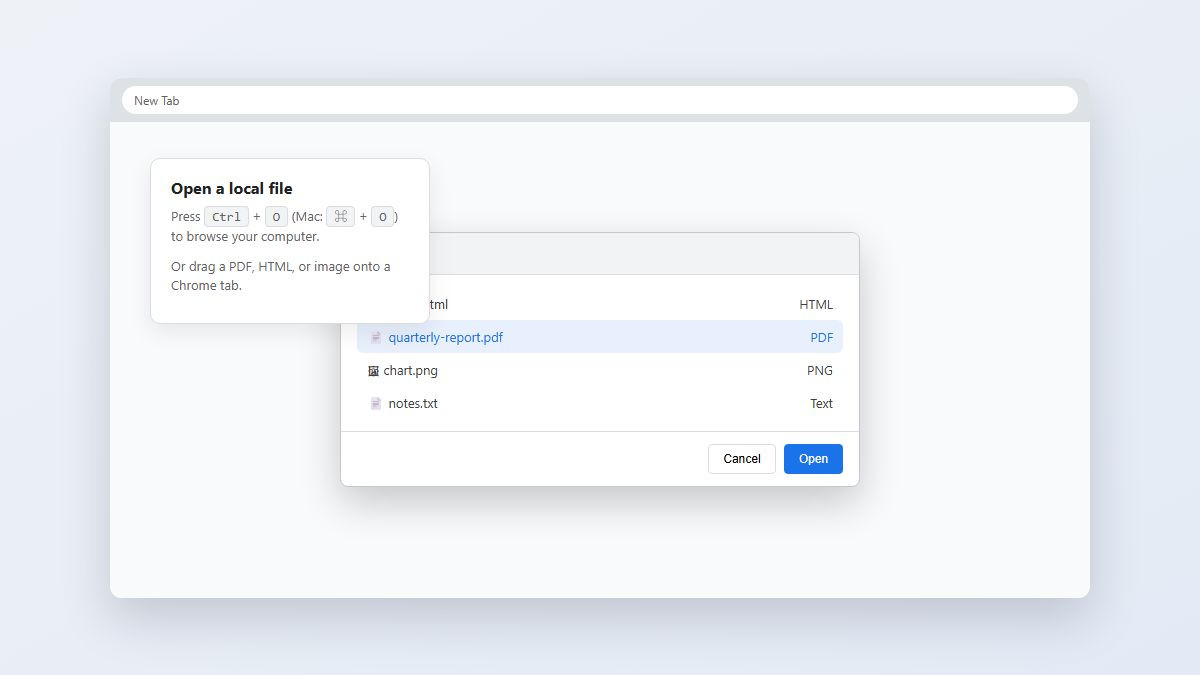
Drag and drop: Drag a PDF, HTML, image, or text file onto a Chrome tab.
Address bar: Type a path such as
file:///C:/Users/You/Documents/report.pdf(use forward slashes) and press Enter.Open with: In File Explorer / Finder, right-click → Open with → Google Chrome (ideal for PDFs and HTML previews).
Downloads: After a download finishes, open it from the download shelf or chrome://downloads. For PDFs, Settings → Privacy and security → Site settings → Additional content settings → PDF documents → Open PDFs in Chrome.
Chrome previews web-friendly types well. Word/Excel/PowerPoint files usually hand off to a desktop app rather than becoming editable inside the browser.
Workarounds when you need file:// behavior (extensions & flags)
Enterprise wikis and older intranet tools still publish file:// hyperlinks. If you must keep that workflow, use an explicit, user-controlled workaround—not a silent bypass.
Install a reputable extension designed for local file links (search the Chrome Web Store for names like Open Local Files / Enable local file links).
Open chrome://extensions, click Details on that extension.
Turn on Allow access to file URLs (and set site access as required).
Retry the link with a real click—extensions generally react to user gestures, not background page scripts.
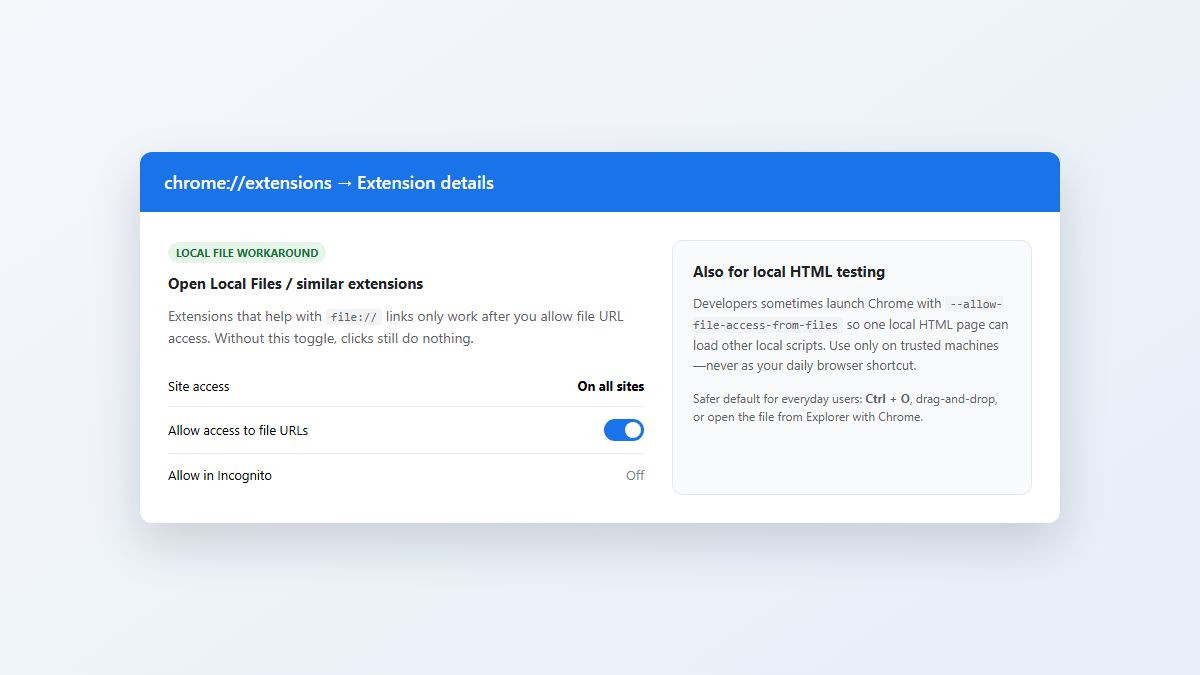
Developer-only flag: Launching Chrome with --allow-file-access-from-files can let one local HTML page load other local files/scripts while you test offline pages. Treat it as a temporary lab shortcut on a trusted machine—do not make it your everyday Chrome profile. Prefer a local static server (http://localhost) for ongoing front-end work.
Plain-text paths: when the “link” is just text
A common efficiency trap: the note says D:\Reports\2026\summary.xlsx as plain text—not an . Chrome has nothing to click.
Copy the path.
Paste it into File Explorer’s address bar and press Enter, or
Convert it to a file URL in Chrome’s omnibox, for example
file:///D:/Reports/2026/summary.xlsx(swap backslashes for/).For Office formats, let the OS open Excel/WPS after Chrome/Explorer resolves the path—or open the folder and double-click the file.
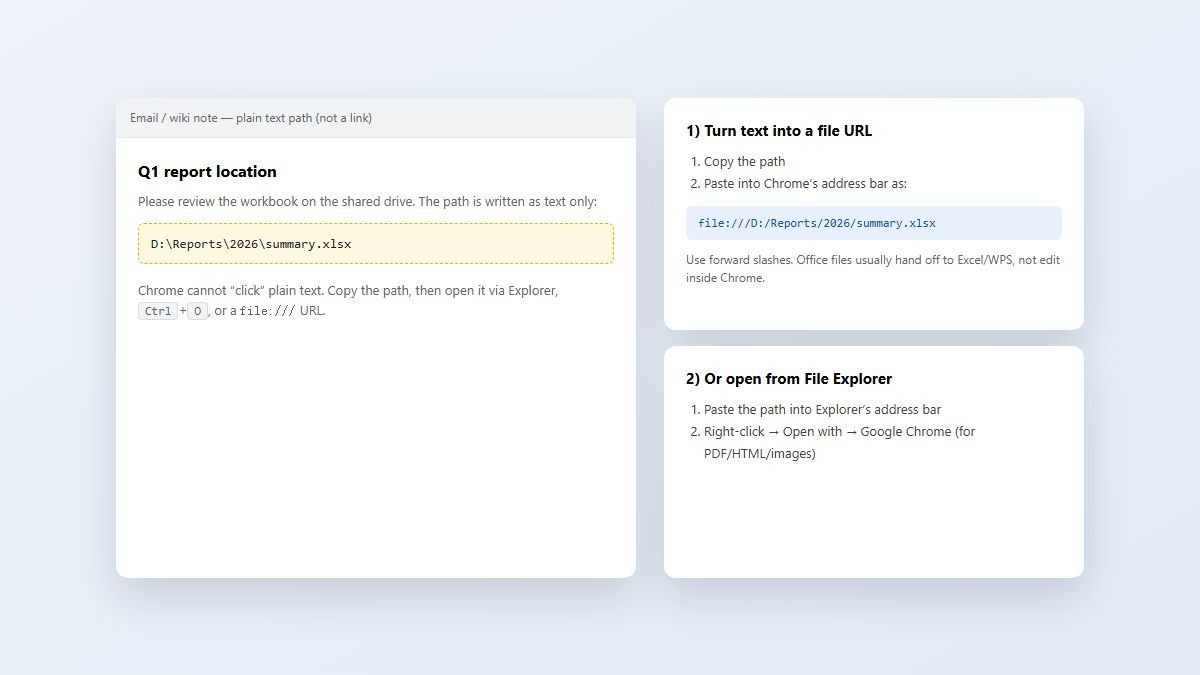
There is no built-in Chrome “right-click this random text and open as a file” command. Selection + copy + Explorer / file:/// is the reliable path; some extensions add convenience, but verify they only act on your click.
For developers: open and save local files the compliant way
If you are building a web app that needs to read or write user files, do not teach users to disable Chrome’s file:// protections. Use the modern File System Access API (supported in Chromium browsers with progressive enhancement).
Open: call a file picker (for example
showOpenFilePicker()) after a user gesture such as a button click.Read: work with the returned file handles in memory; show clear UI for what will be uploaded or processed.
Save: request a writable handle / save dialog so the user confirms where changes go.
Permissions: expect Chrome prompts such as allowing the site to view or edit files the user selected—not blanket disk access.
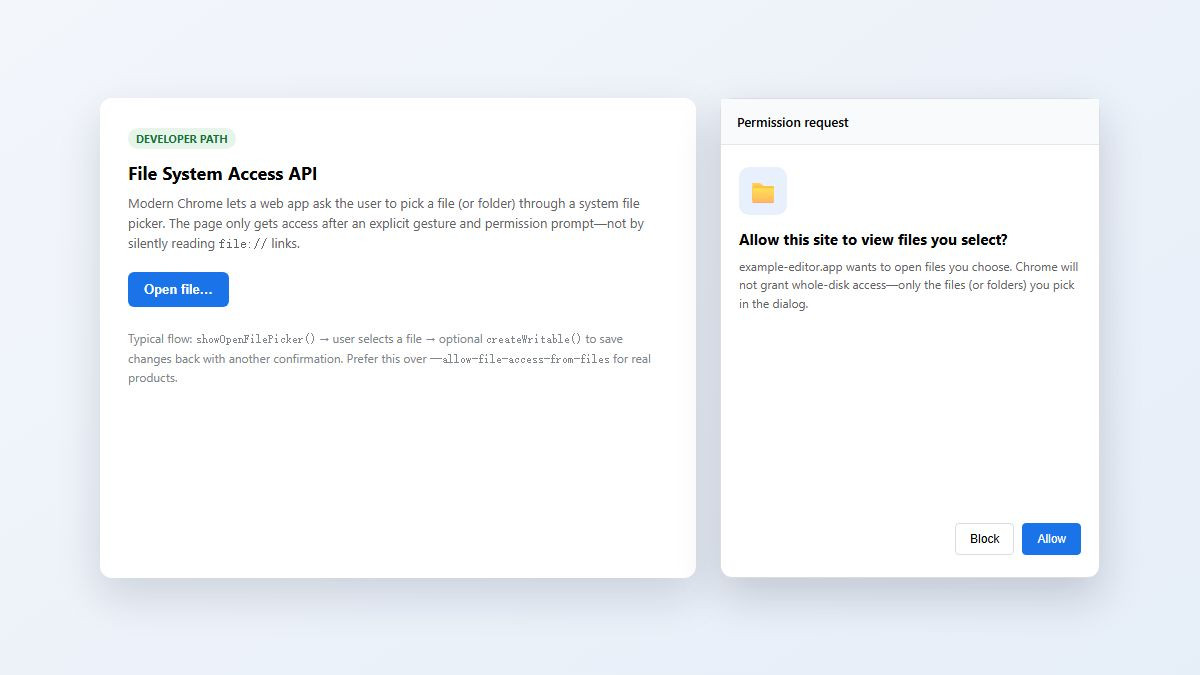
This matches what security-conscious users want: the site only touches files they pick. Fallback for older browsers: classic upload, then download a new copy for “save.”
Another option: open Office paths in WPS after Chrome gets you there
Chrome is a strong viewer for PDFs, HTML, and images, but it is not a full Word/Excel editor. When the “file” in your note is .docx, .xlsx, or .pptx, the practical finish line is a spreadsheet/writer app—especially if you bounce between Windows and Mac and do not want every handoff stuck inside Microsoft 365.
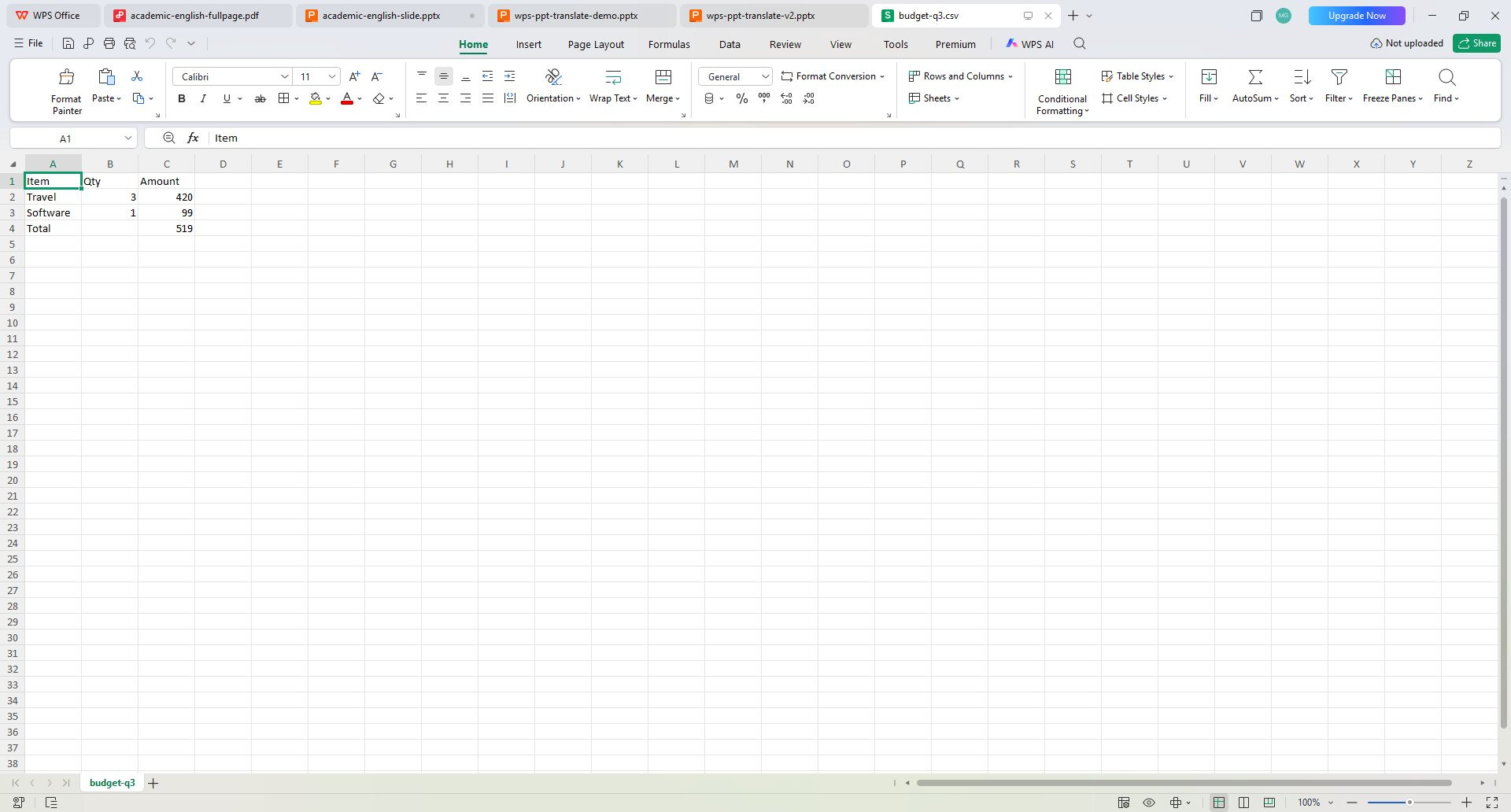
WPS Office lets you open everyday Excel-compatible workbooks in Spreadsheets (and related Office files in Writer/Presentation) across desktop and mobile, with a free tier for everyday editing. Use Chrome to locate or download the file, then open the real workbook/document in WPS when you need to edit, not just preview.
FAQ
How do I open a local file in Google Chrome?
Press Ctrl + O (Mac: ⌘ + O), pick the file, or drag it onto a tab. You can also type a file:/// path in the address bar.
Why don’t file:// links work when I click them on a website?
Chrome blocks web pages from opening local filesystem URLs to stop sites from reaching your disk without an explicit open action from you.
Do I need --allow-file-access-from-files to open local files?
No for normal PDF/HTML preview. That flag is a developer testing option for local HTML loading other local files. Prefer Ctrl+O or a localhost server for daily work.
How do I enable Allow access to file URLs for a Chrome extension?
Go to chrome://extensions → Details on the extension → enable Allow access to file URLs.
How can I open a plain text path like D:\folder\file.xlsx?
Copy the path into File Explorer, or convert it to file:///D:/folder/file.xlsx in Chrome. Office files will usually open in your spreadsheet/word app.
What is the File System Access API in Chrome?
It is a browser API that lets web apps open and save user-selected files through system pickers and permission prompts, instead of using blocked file:// hyperlinks.
Summary
Chrome can open local files when you start the action: Ctrl + O, drag-and-drop, Open with, or a typed file:/// URL. It blocks webpage file:// links to protect your filesystem. For intranet workflows, enable a trusted extension’s Allow access to file URLs toggle; for local HTML testing, use a temporary flag or localhost—not a permanent insecure profile. Plain-text paths need copy/paste into Explorer or a file URL. Developers should use the File System Access API with explicit pickers. When the target is an Office document, finish in WPS Spreadsheets after Chrome helps you find the file.



'%3e%3cpath%20d='M19.9911%204.11386V6.471H18.5894C18.0775%206.471%2017.7322%206.57814%2017.5536%206.79243C17.3751%207.00671%2017.2858%207.32814%2017.2858%207.75671V9.44421H19.9019L19.5536%2012.0871H17.2858V18.8639H14.5536V12.0871H12.2769V9.44421H14.5536V7.49779C14.5536%206.39064%2014.8632%205.53201%2015.4822%204.92189C16.1013%204.31177%2016.9257%204.00671%2017.9554%204.00671C18.8304%204.00671%2019.509%204.04243%2019.9911%204.11386Z'%20fill='%23333333'/%3e%3c/g%3e%3cdefs%3e%3cclipPath%20id='clip0_2938_8199'%3e%3crect%20width='16'%20height='16'%20fill='white'%20transform='translate(8%204.00671)'/%3e%3c/clipPath%3e%3c/defs%3e%3c/svg%3e)
'%3e%3cpath%20d='M17.5237%2010.7813L23.4811%204H22.0699L16.8949%209.88693L12.7648%204H8L14.2469%2012.9029L8%2020.0133H9.4112L14.8725%2013.7952L19.2352%2020.0133H24M9.92053%205.04213H12.0885L22.0688%2019.0224H19.9003'%20fill='%23333333'/%3e%3c/g%3e%3cdefs%3e%3cclipPath%20id='clip0_2938_8200'%3e%3crect%20width='16'%20height='16.0134'%20fill='white'%20transform='translate(8%204)'/%3e%3c/clipPath%3e%3c/defs%3e%3c/svg%3e)


