

'%3e%3cpath%20d='M8%200C12.4183%200%2016%203.58172%2016%208C16%2012.4183%2012.4183%2016%208%2016C3.58172%2016%200%2012.4183%200%208C0%203.58172%203.58172%200%208%200ZM11.6162%204.38379C11.2257%203.99337%2010.5927%203.99338%2010.2021%204.38379L8%206.58594L5.79785%204.38379C5.40732%203.99334%204.77429%203.99329%204.38379%204.38379C3.99331%204.77429%203.99335%205.40733%204.38379%205.79785L6.58594%208L4.38379%2010.2021C3.99348%2010.5927%203.99341%2011.2257%204.38379%2011.6162C4.77426%2012.0066%205.40734%2012.0065%205.79785%2011.6162L8%209.41406L10.2021%2011.6162C10.5927%2012.0066%2011.2257%2012.0067%2011.6162%2011.6162C12.0067%2011.2257%2012.0066%2010.5927%2011.6162%2010.2021L9.41406%208L11.6162%205.79785C12.0066%205.40735%2012.0066%204.77429%2011.6162%204.38379Z'%20fill='%23080E17'%20fill-opacity='0.46'/%3e%3c/g%3e%3cdefs%3e%3cclipPath%20id='clip0_3761_713'%3e%3crect%20width='16'%20height='16'%20fill='white'/%3e%3c/clipPath%3e%3c/defs%3e%3c/svg%3e)




'%3e%3cpath%20fill-rule='evenodd'%20clip-rule='evenodd'%20d='M21.4999%2010.9993C21.4999%205.20009%2016.7986%200.498901%2010.9993%200.498901C5.19994%200.498901%200.498657%205.20009%200.498657%2010.9993C0.498657%2016.2404%204.33858%2020.5844%209.35855%2021.3722V14.0346H6.69238V10.9993H9.35855V8.68594C9.35855%206.05427%2010.9262%204.60062%2013.3248%204.60062C14.4736%204.60062%2015.6753%204.80571%2015.6753%204.80571V7.38979H14.3512C13.0468%207.38979%2012.64%208.19921%2012.64%209.0296V10.9993H15.5523L15.0867%2014.0346H12.64V21.3722C17.66%2020.5844%2021.4999%2016.2404%2021.4999%2010.9993Z'%20fill='%231568EA'/%3e%3c/g%3e%3c/svg%3e)


'%3e%3cpath%20d='M2.42045%2022.1876H6.31818V12.7217L0.75%208.54553V20.5171C0.75%2021.4414%201.49892%2022.1876%202.42045%2022.1876Z'%20fill='%234285F4'/%3e%3cpath%20d='M19.682%2022.1876H23.5797C24.5041%2022.1876%2025.2502%2021.4387%2025.2502%2020.5171V8.54553L19.682%2012.7217'%20fill='%2334A853'/%3e%3cpath%20d='M19.682%205.48293V12.7216L25.2502%208.54543V6.31816C25.2502%204.25236%2022.8921%203.07469%2021.2411%204.31361'%20fill='%23FBBC04'/%3e%3cpath%20d='M6.31824%2012.7217V5.48303L13.0001%2010.4944L19.6819%205.48303V12.7217L13.0001%2017.733'%20fill='%23EA4335'/%3e%3cpath%20d='M0.75%206.31816V8.54543L6.31818%2012.7216V5.48293L4.75909%204.31361C3.10534%203.07469%200.75%204.25236%200.75%206.31816Z'%20fill='%23C5221F'/%3e%3c/g%3e%3cdefs%3e%3cclipPath%20id='clip0_2954_7305'%3e%3crect%20width='24.5'%20height='18.375'%20fill='white'%20transform='translate(0.75%203.8125)'/%3e%3c/clipPath%3e%3c/defs%3e%3c/svg%3e)


When I first started as a manager, I realized how unorganized my staff was, which was likely one of the reasons many team members were leaving. To fix this, I decided to plan a proper staff schedule. But then came the next challenge which was how to actually make one. If you’re in the same boat and wondering how to create a staff schedule, this guide is for you. After a lot of research, I found the perfect solution which is staff schedule templates. In this guide I’ll recommend the best templates and show you how to customize them using WPS Office.
How to Create a Staff Schedule
Before getting into all the details of how to create a staff schedule, let’s first understand what a staff schedule is, why it is so important, and how many typesof staff schedules there are.
What is a Staff Schedule
A staff schedule is basically a document that shows when an employee is expected to start and finish work, along with all the tasks they need to complete in that time. It helps managers keep employees on track, avoid unnecessary overtime, and calculate overtime pay when needed. It also gives employees peace of mind by letting them know their work hours and tasks in advance.
Benefits of a Staff Schedule
Having a staff schedule is beneficial not just for managers and businesses but also for employees. Below are some of the main benefits of a staff schedule.
It helps to avoid last minute chaos.
It makes it easier to track overtime and calculate extra pay.
It allows managers to keep everything organized and assign tasks fairly.
It helps employees plan their personal life since they already know their shifts in advance.
It keeps everyone on the same page so work gets done without any confusion.
It makes employees happier by giving them a clear idea of their work hours and responsibilities.
Different types of a Staff Schedule
There isn’t just one type of staff schedule. There are multiple types you can choose from. You can go for the one that fits your needs best.
Full-time schedule: This is when employees are expected to work full time. The exact hours for full-time work may vary in different countries, but it’s generally around 40 hours a week.
Part-time schedule: This is when employees work less than the full-time requirement.
Standard schedule: This is the most common one where a fixed set of days and hours is planned for each employee. It’s usually Monday to Friday, 9 to 5.
Fixed schedule: This is when the working hours and days are always the same. Employees are expected to show up on those specific days and work those fixed hours.
Flexible schedule: This one gives employees a bit of freedom. They are required to work a certain number of hours per week, but it’s up to them when and how they complete them.
Top 10 Editable Staff Schedule Templates [Free Download]
Now that we know what a staff schedule is, let’s move on to the main part, the staff schedule templates. There are plenty of templatesavailable online, but I’ve gone through most of them and picked out the 10 best free staff schedule templates. I’ll walk you through each one so you can find the one that works best for you.
1. Sales Staff Next Week Schedule
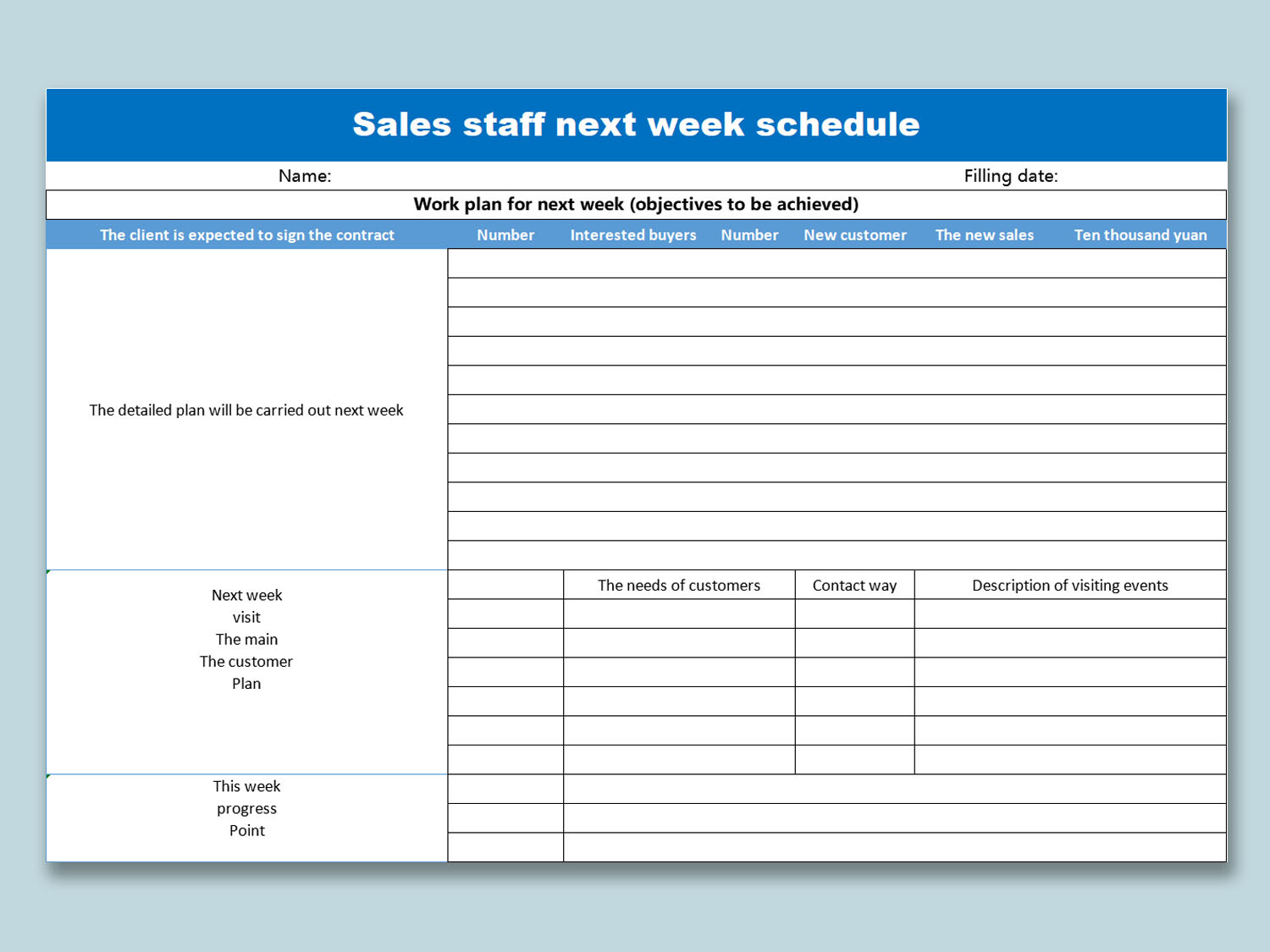
Sales Staff Next Week Schedule is a great template if you want to assign tasks weekly to your staff. It has tasks listed on the left side and all the technical business details like potential customers and other info on the right.
2. Employee Shift Schedule
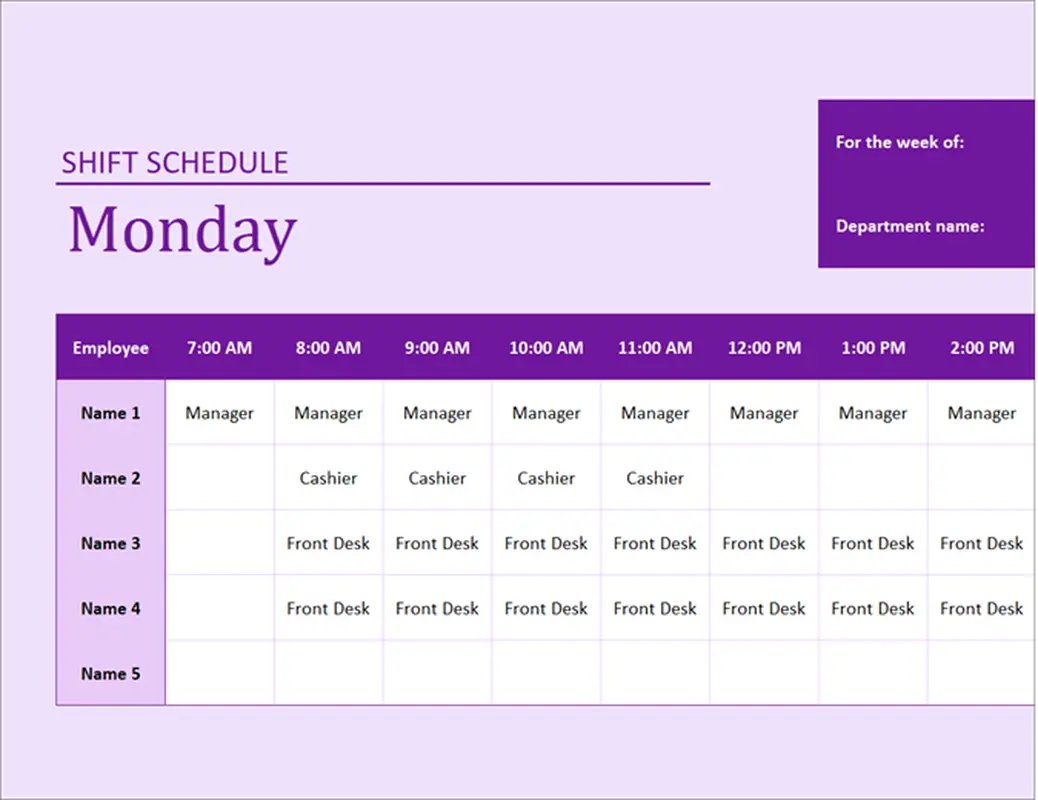
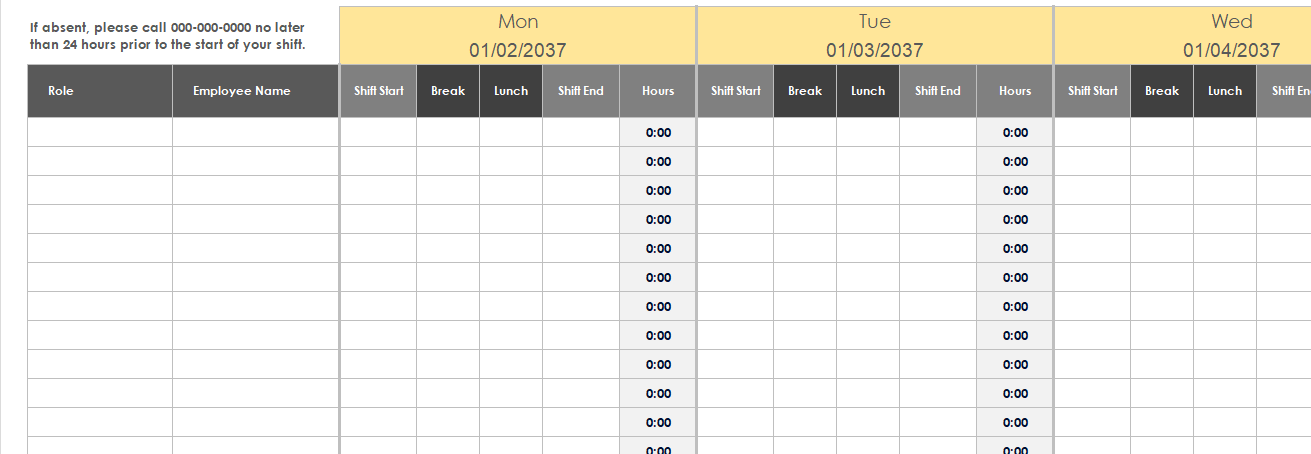
Employee Shift Schedule is perfect if you want to create a shift plan for employees, clearly telling them their working hours for the day.
3. Basic Employee Shift Schedule Template
Basic Employee Shift Schedule Template is one of the most practical staff schedule examples you can find. It’s very simple but really helpful. Employee names and roles are listed on the left, while shift timings are on the right. It even calculates total working hours and is designed to cover the whole week, making it convenient for both managers and employees.
4. 10-Hour Shift Schedule Template
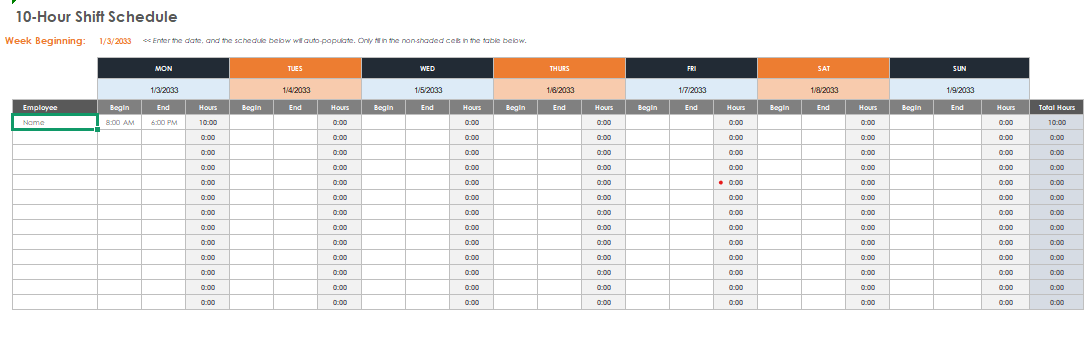
10-Hour Shift Schedule Template is very similar to the Basic Employee Shift Schedule Template with employees’ names on the left and working hours per week on the right. The only difference is that the working hours are fixed at 10 hours per shift.
5. 8-Hour 24/7 Shift Schedule Template
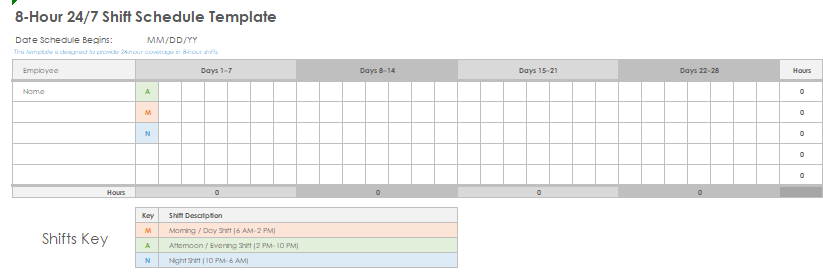
8-Hour 24/7 Shift Schedule Template is a monthly staff schedule that lists employee names on the left and shows which shift they’re working from the 1st to the 31st of the month. At the end, it totals the hours worked for the month.
6. 12-Hour Shift Schedule Template
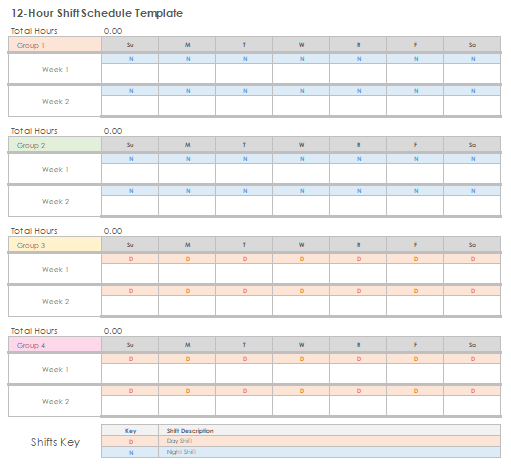
12-Hour Shift Schedule Template works well if you have different groups in your staff. It helps you segment them easily and makes it simple to calculate working hours for each employee, whether they’re on a morning, evening, or night shift.
7. Weekly Shift Schedule Template
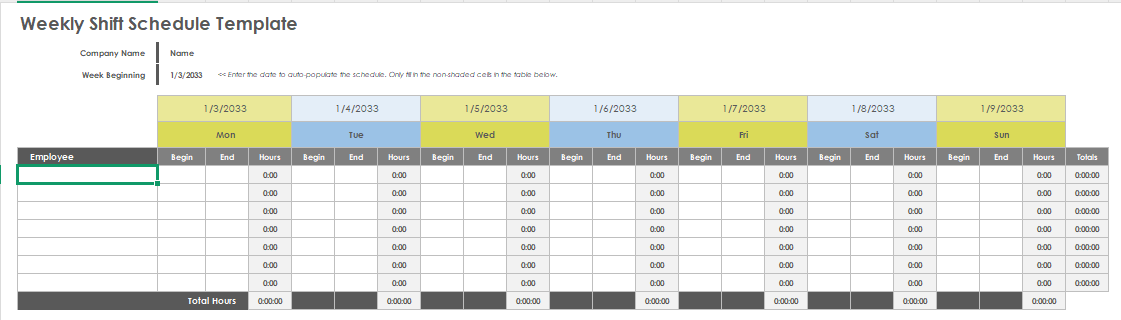
Weekly Shift Schedule Template is very similar to the Basic Employee Shift Schedule Template, with employee names on the left and daily hours on the right. It also adds up the total working hours at the end of the week.
8. Night Shift Schedule Template
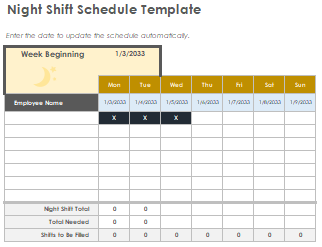
Night Shift Schedule Template is one of the best free staff schedule template options if you need to record night shifts. It tracks the total number of night shifts worked and calculates the weekly hours for each employee.
9. Monthly Employee Shift Schedule Template
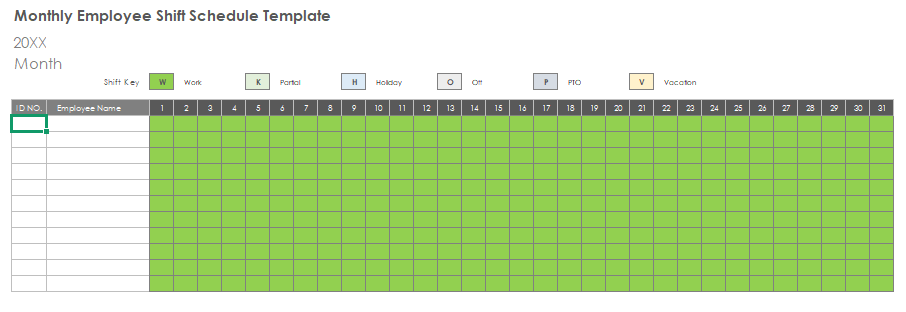
Monthly Employee Shift Schedule Template is perfect if you want to go into detail. It records whether an employee has taken a day off, worked part-time, or is on holiday. This makes it ideal for setting up a clear monthly plan.
10. Restaurant Shift Schedule Template
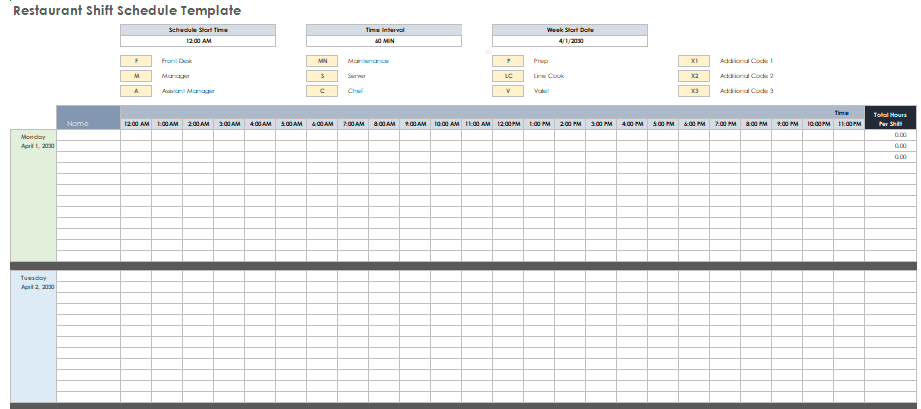
Restaurant Shift Schedule Template makes it easy to understand each employee’s role by assigning an alphabet code to every position. It lists names on the left and total hours worked per shift on the right, so you can manage restaurant staff more effectively.
How to Edit and Print Staff Schedule Template in Excel
After choosing the template you like, be it a weekly schedule or a monthly one, it’s time to edit it so you can add your employees’ names and details. Basically, this is where you personalize it, and for this part, I’ve found WPS Office to be the best option out there. It lets you easily edit the details in the template in just a few simple steps. You can follow the steps I’ve shared below to quickly customize your template.
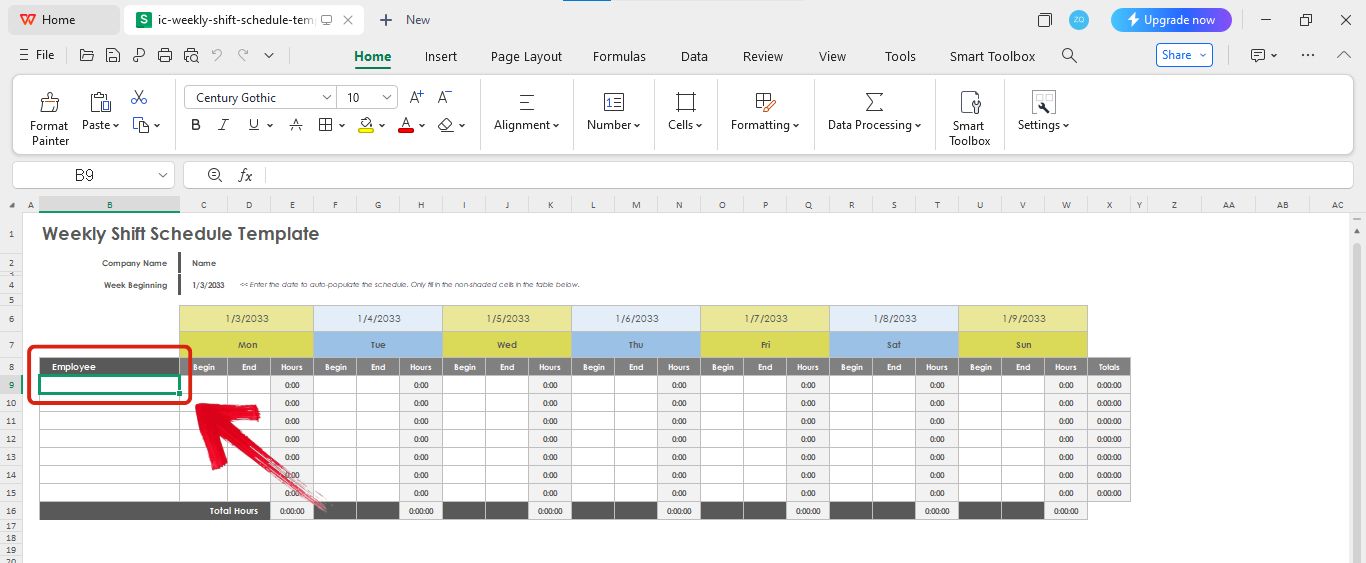
Step 1: Open your chosen templatein WPS Spreadsheet.
Step 2: Click on the cells and start adding information like employees’ names.
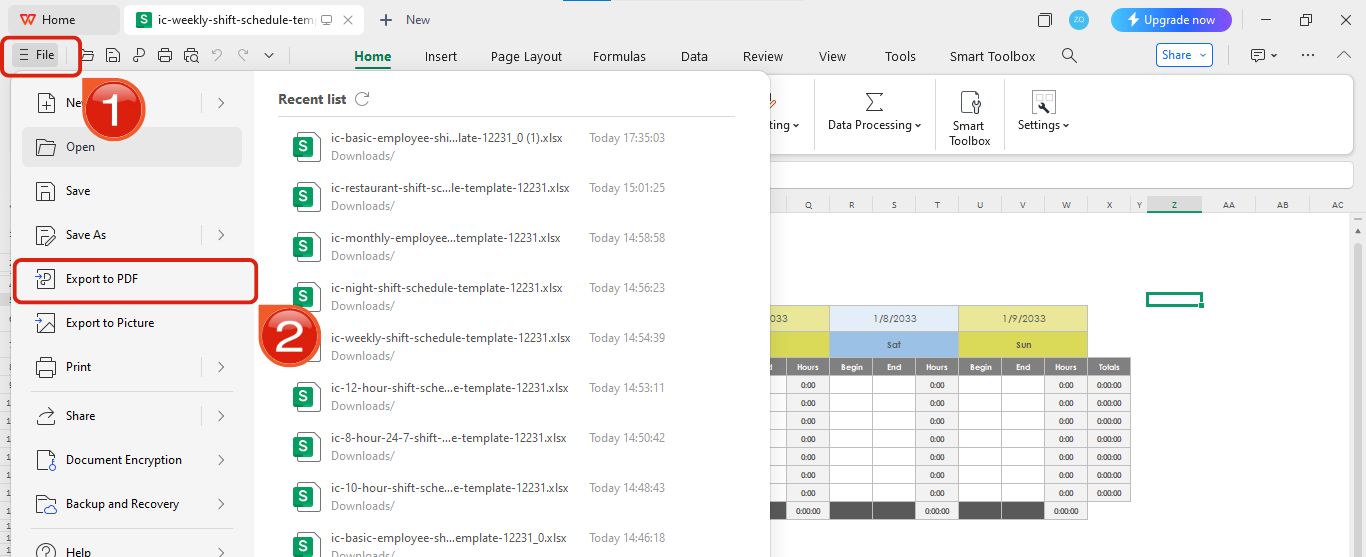
Step 3: Once you’re done filling it up, click on the three lines icon in the top left, then select Export to PDF.
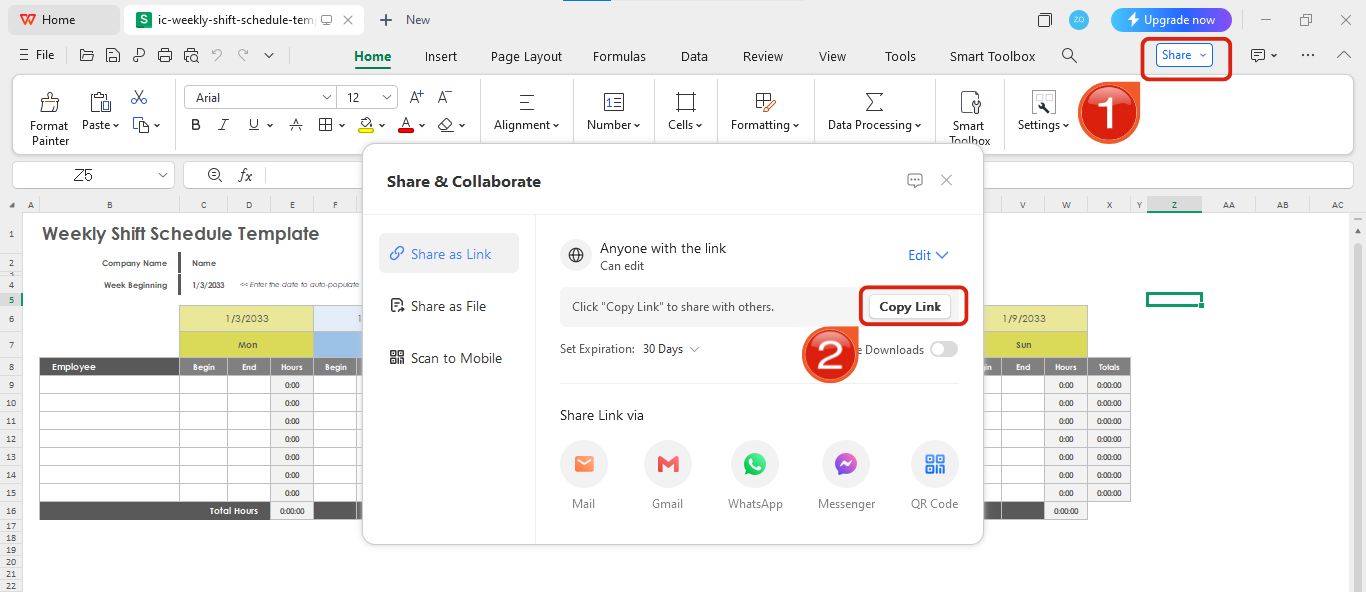
Step 4: If you want to share an online link of this template, simply click on Share and then Copy Link.
Tips for Using a Staff Schedule
Before making a staff schedule, there are a few things to keep in mind if you want it to be effective. I’ve shared five tips below that will help you create a schedule that works well for everyone.
Be Mindful: Instead of just assigning random shifts, take time to know your employees and understand their preferences. If you know one of your team members has a child, try to give them shifts that fit their situation. Also, make sure everyone gets enough rest between shifts so they can work at their best.
Schedule Smartly: Plan your staff schedule in a way that gets the best results. For example, if you have fresh hires, pair them with experienced employees. This way, they can learn on the job and your team can deliver better results overall.
Communicate the schedule: Make sure every employee knows about the schedule. You can paste it on a notice board or share an online link so everyone is clear on their shifts. This way, they can save time and only come to the office when it’s their shift.
Plan ahead: Try to create the schedule well before it starts. This gives employees enough time to check if they are comfortable with their shifts and suggest any changes if they find their allotted timings difficult.
Be open to suggestions: The schedule you make might not work perfectly for everyone, so be flexible. Give your employees the space to suggest changes if needed. This helps maintain their work-life balance and keeps things running smoothly.
Free Office Suite with Editable Templates & Smart AI
If you're looking for a free and reliable office suite then WPS Office is the way to go. It’s not just for opening or viewing documents. It actually lets you edit almost any kind of filewith ease. Compared to other options out there, WPS Office really stands out, especially because of its built-in AI tools that make everything tentimes easier and faster. Plus its simple interface makes it super easy to navigate things.
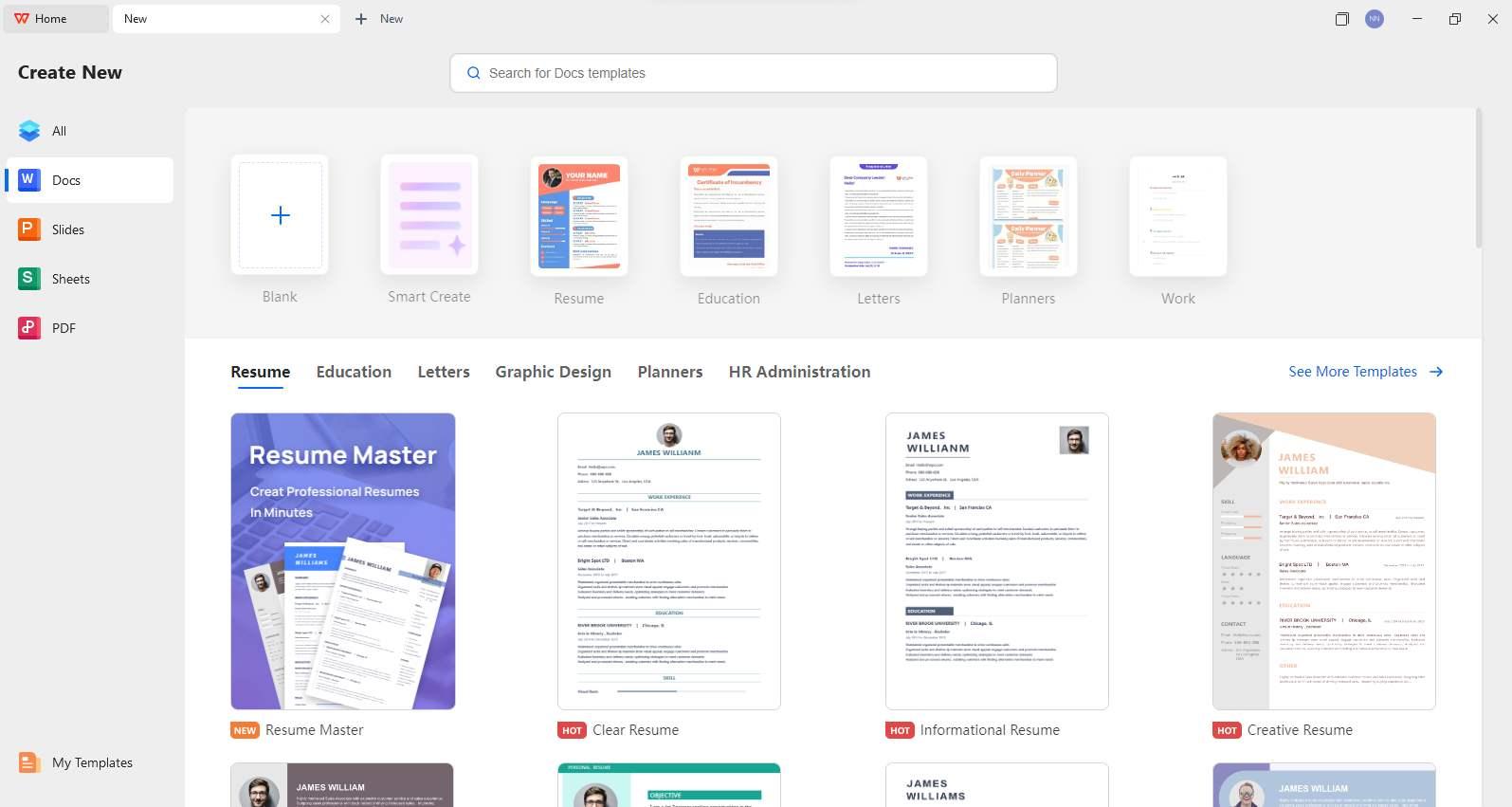
What sets WPS Office apart is that it doesn’t just let you edit any type of document. It also provides templates for almost any kind of document you want to create. This makes finding and editing templates super easy. Just search for the type of template you need, pick one, and start editing. It’s that simple with no extra steps.
Pros of Using WPS Office
Works on both desktop and mobile
Lets you open, edit, and create all kinds of documents easily
Comes with smart AI tools to help write, correct grammar, and summarize
Offers a huge library of free editable templates, including flyers and resumes
Super beginner-friendly with a simple interface
You don’t need to install separate apps for PDF, Word, or Excel.
Supports online collaboration and document sharing
Regular updates and stable performance
Most features are free to use without needing a premium plan
FAQs
1. How can I ensure fairness when using a scheduling template?
A staff schedule template makes this a lot easier because it gives you a clear visual of all the shifts. To keep things fair, try rotating shifts so everyone gets a turn at both the popular and less-popular times. Make sure weekend and holiday shifts are shared equally, and keep an eye on the total hours for each person so no one ends up feeling overworked or overlooked.
2. Can I track labor costs with a staff schedule template?
Yes, you can. Just add a column for each employee’s hourly wage, and the template can automatically calculate the cost for each shift and the total for the week. This is a simple way to keep your budget in check while still managing shifts effectively.
3. How often should I update the staff schedule?
It’s best to update the schedule regularly so it stays accurate. A good practice is to prepare it at least two weeks in advance and make changes as soon as something comes up, like an employee swapping shifts or taking a day off. This way, there are no last-minute surprises, and everyone knows what to expect.
The Simple Solution to Creating Staff Schedules
When I was trying to deal with the high employee turnover problem in our firm, I came across the idea of a staff schedule. It made so much sense and felt like the right answer. But then the next problem came up because I didn’t know how to create a staff schedule. I’m sure I’m not alone in this. Many people want to make a staff schedule but aren’t sure how to do it. To fix that, I found the best way to create a staff schedule, which is by using staff schedule templates. In this guide, I’ll share the 10 best staff schedule templates and show you how to edit them using WPS Office.

'%3e%3cpath%20d='M19.9911%204.11386V6.471H18.5894C18.0775%206.471%2017.7322%206.57814%2017.5536%206.79243C17.3751%207.00671%2017.2858%207.32814%2017.2858%207.75671V9.44421H19.9019L19.5536%2012.0871H17.2858V18.8639H14.5536V12.0871H12.2769V9.44421H14.5536V7.49779C14.5536%206.39064%2014.8632%205.53201%2015.4822%204.92189C16.1013%204.31177%2016.9257%204.00671%2017.9554%204.00671C18.8304%204.00671%2019.509%204.04243%2019.9911%204.11386Z'%20fill='%23333333'/%3e%3c/g%3e%3cdefs%3e%3cclipPath%20id='clip0_2938_8199'%3e%3crect%20width='16'%20height='16'%20fill='white'%20transform='translate(8%204.00671)'/%3e%3c/clipPath%3e%3c/defs%3e%3c/svg%3e)
'%3e%3cpath%20d='M17.5237%2010.7813L23.4811%204H22.0699L16.8949%209.88693L12.7648%204H8L14.2469%2012.9029L8%2020.0133H9.4112L14.8725%2013.7952L19.2352%2020.0133H24M9.92053%205.04213H12.0885L22.0688%2019.0224H19.9003'%20fill='%23333333'/%3e%3c/g%3e%3cdefs%3e%3cclipPath%20id='clip0_2938_8200'%3e%3crect%20width='16'%20height='16.0134'%20fill='white'%20transform='translate(8%204)'/%3e%3c/clipPath%3e%3c/defs%3e%3c/svg%3e)


