



'%3e%3cpath%20fill-rule='evenodd'%20clip-rule='evenodd'%20d='M21.4999%2010.9993C21.4999%205.20009%2016.7986%200.498901%2010.9993%200.498901C5.19994%200.498901%200.498657%205.20009%200.498657%2010.9993C0.498657%2016.2404%204.33858%2020.5844%209.35855%2021.3722V14.0346H6.69238V10.9993H9.35855V8.68594C9.35855%206.05427%2010.9262%204.60062%2013.3248%204.60062C14.4736%204.60062%2015.6753%204.80571%2015.6753%204.80571V7.38979H14.3512C13.0468%207.38979%2012.64%208.19921%2012.64%209.0296V10.9993H15.5523L15.0867%2014.0346H12.64V21.3722C17.66%2020.5844%2021.4999%2016.2404%2021.4999%2010.9993Z'%20fill='%231568EA'/%3e%3c/g%3e%3c/svg%3e)


'%3e%3cpath%20d='M2.42045%2022.1876H6.31818V12.7217L0.75%208.54553V20.5171C0.75%2021.4414%201.49892%2022.1876%202.42045%2022.1876Z'%20fill='%234285F4'/%3e%3cpath%20d='M19.682%2022.1876H23.5797C24.5041%2022.1876%2025.2502%2021.4387%2025.2502%2020.5171V8.54553L19.682%2012.7217'%20fill='%2334A853'/%3e%3cpath%20d='M19.682%205.48293V12.7216L25.2502%208.54543V6.31816C25.2502%204.25236%2022.8921%203.07469%2021.2411%204.31361'%20fill='%23FBBC04'/%3e%3cpath%20d='M6.31824%2012.7217V5.48303L13.0001%2010.4944L19.6819%205.48303V12.7217L13.0001%2017.733'%20fill='%23EA4335'/%3e%3cpath%20d='M0.75%206.31816V8.54543L6.31818%2012.7216V5.48293L4.75909%204.31361C3.10534%203.07469%200.75%204.25236%200.75%206.31816Z'%20fill='%23C5221F'/%3e%3c/g%3e%3cdefs%3e%3cclipPath%20id='clip0_2954_7305'%3e%3crect%20width='24.5'%20height='18.375'%20fill='white'%20transform='translate(0.75%203.8125)'/%3e%3c/clipPath%3e%3c/defs%3e%3c/svg%3e)


PNG files are ideal for screenshots, charts, receipts, and images with clean edges, but they are not always easy to submit or archive as a set. Turning those images into a single PDF gives the pages a consistent order, size, and sharing format.
This guide shows you how to convert PNG to PDF with WPS Office on desktop, with a browser-based method, and on mobile. You will also learn how to keep image quality high and avoid the transparency surprises that catch many users.
How to Convert PNG to PDF: 4 Easy Methods
What You Need to Convert PNG to PDF
Before you start, decide whether the PDF should preserve the image dimensions, match a standard paper size, or group several PNGs into one document. A short preparation step prevents awkward margins and reordering later.
Your PNG image or images in the correct order.
WPS Office for desktop conversion, or a reputable online converter for browser-based work.
A target page size and orientation, such as A4 portrait or Letter landscape.
A quality choice: original resolution for print, or compressed output for email and forms.
A note about transparency: transparent PNG areas usually become white in a PDF unless you add a background first.
Insert PNG picture in WPS Writer


How to Convert PNG to PDF in WPS Office
The desktop method keeps the image and the PDF on your computer. WPS Writer can insert PNG files, arrange them in one document, and export the result as a PDF.
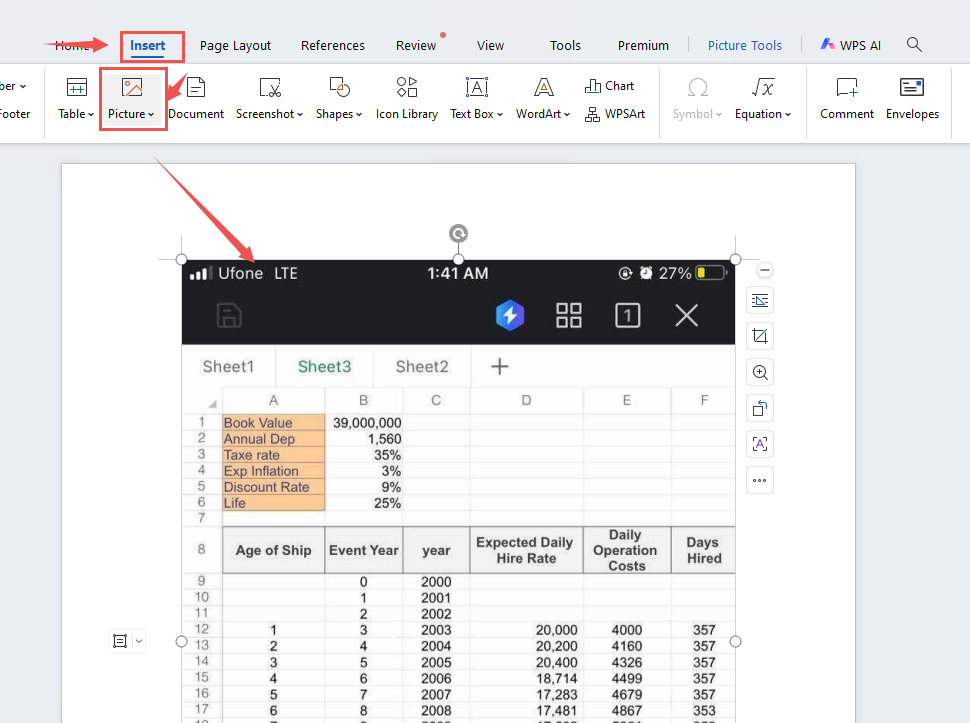
Insert the PNG: open WPS Writer, go to Insert → Picture, and choose your PNG file.
Insert PNG into WPS document
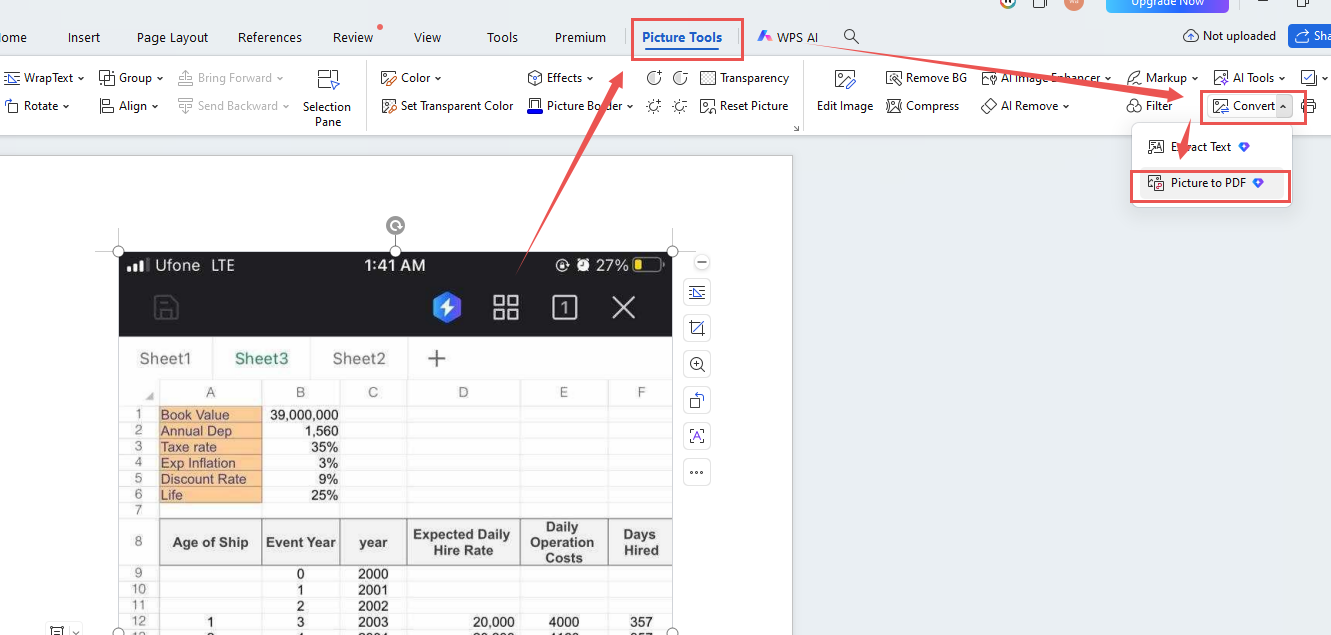
Open the conversion tool: select the image, go to Picture Tools, and click Convert.
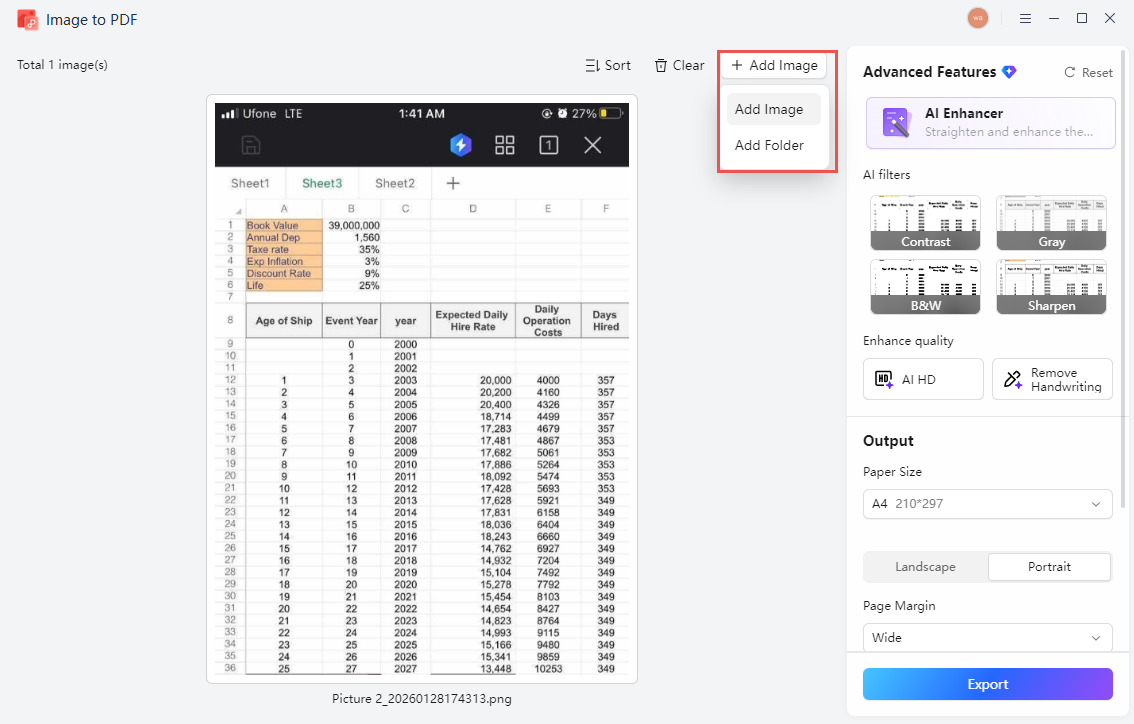
Add more images: in the Image to PDF panel, use Add Image to combine several PNG files or change their order.
WPS image to PDF panel
Adjust the output: choose page size, orientation, margin, and quality for the final document.
Export the PDF: click Export, choose a destination, and confirm the conversion.
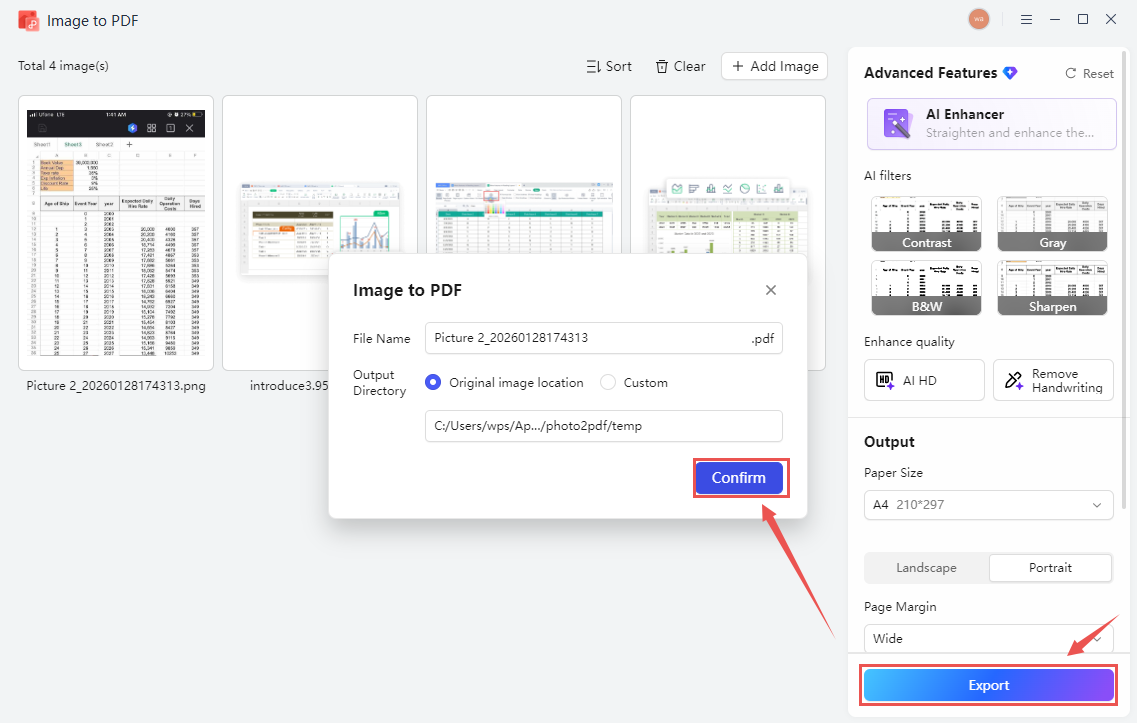
Export PNG as PDF in WPS
For the complete illustrated walkthrough, see the WPS Academy guide to image-to-PDF conversion using WPS Office.
How to Convert PNG to PDF Online
An online converter is useful when you are on a shared computer, a tablet, or a device where you cannot install desktop software. Choose a service with a clear privacy policy, and delete the uploaded files when the download is complete.
Open the image-to-PDF converter and select your PNG file.
Arrange multiple images in the order you want them to appear.
Choose the page size, orientation, and compression level.
Start the conversion and download the PDF.
Check that every page is present and that transparency has rendered as expected.
Delete the uploaded file from the service if that option is available.
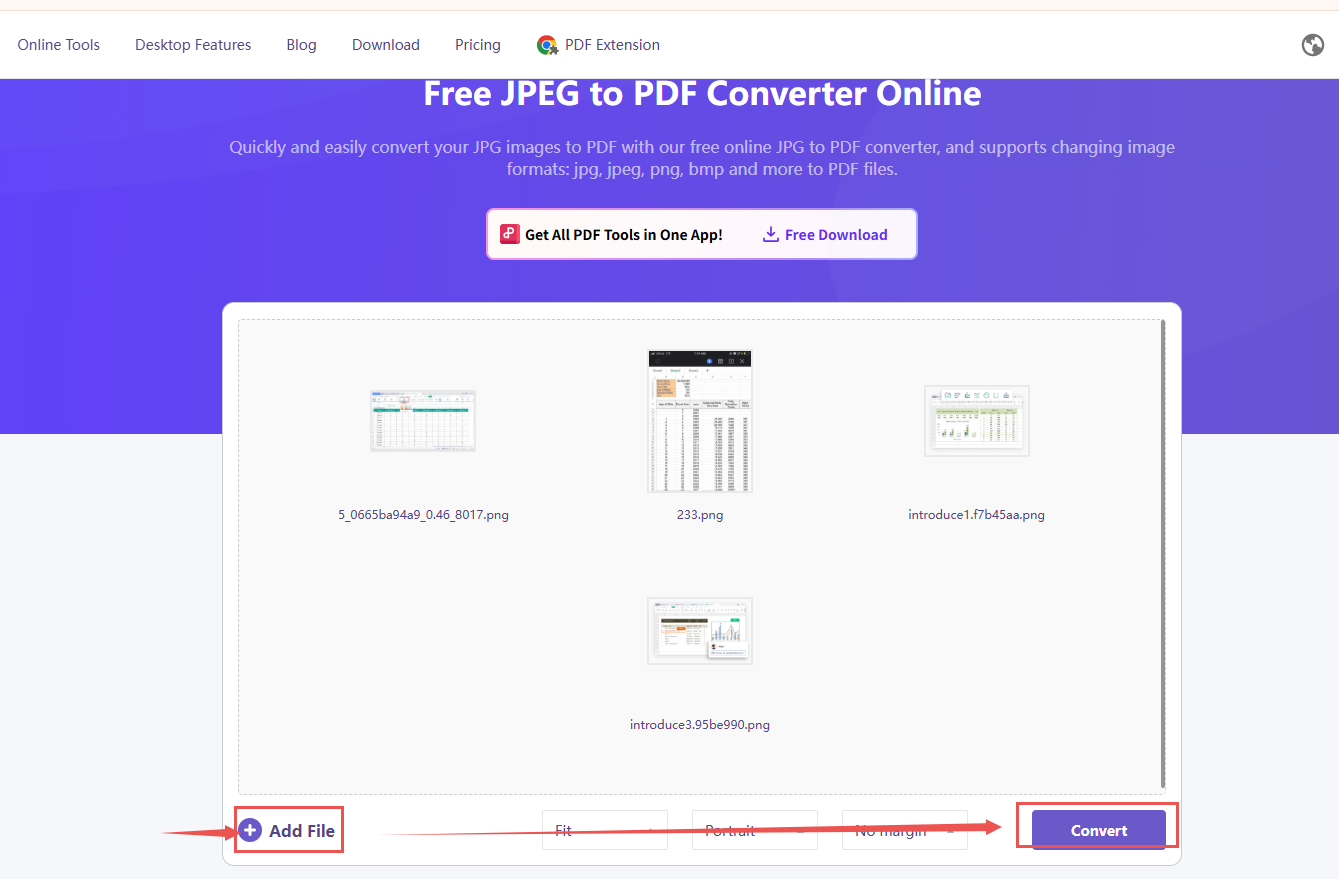
Online image to PDF converter
How to Convert PNG to PDF on Mobile
On a phone or tablet, you can create a PDF from a PNG in two common ways. The first is to insert the image into a WPS Writer document and share or export it as a PDF. The second is to use a browser-based converter. Menu names can vary slightly by app version and operating system, so look for Insert Image, Export, or Share as PDF rather than relying on exact screen positions.
For multi-page submissions, add the images in order and check the preview before you export. Avoid editing the same PNG repeatedly, because repeated saves can soften text and lines.
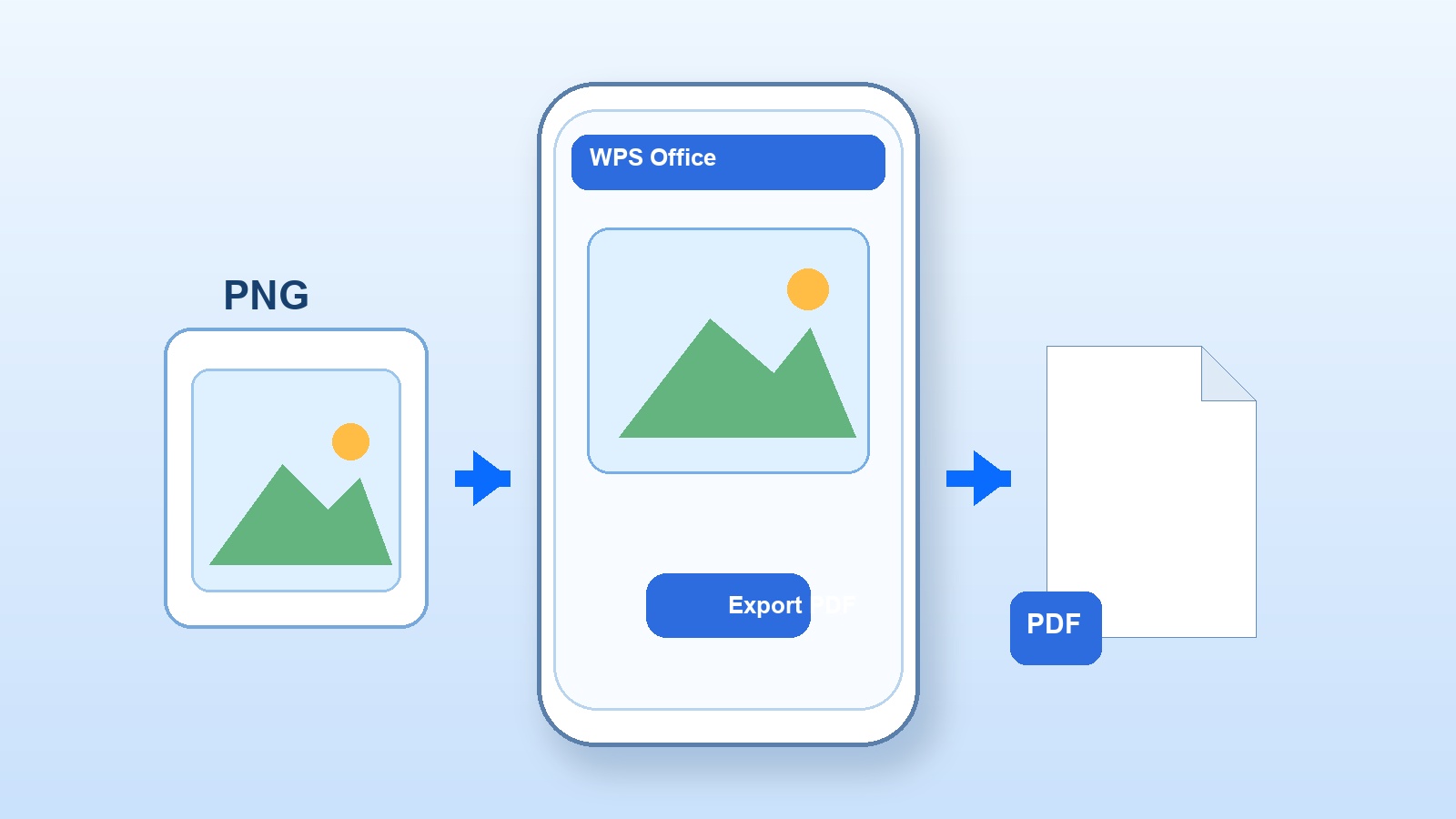
Convert PNG to PDF on mobile
The Best Free Alternative: WPS Office
WPS Office is more than a single-purpose PNG converter. It lets you place images in a document, add text or page numbers, combine files, and export a clean PDF without switching between several tools. That is useful when an image-only PDF needs a cover page, captions, or a consistent layout.
| What matters | WPS Office | Basic online converter |
|---|---|---|
| Workflow efficiency | Insert, arrange, caption, and export in one document | Upload, download, and reopen another tool for edits |
| Layout control | Page size, margins, order, text, and multiple images | Usually limited to a simple image stack |
| All-in-one capability | Writer, PDF tools, OCR, conversion, and templates | Focused on one conversion task |
| Quality options | Original resolution or compressed output for email | Presets vary by service |
| Privacy control | Desktop workflow keeps the working file on your device | The file is uploaded to a third-party server |
| Pricing and access | Free core tools on desktop and mobile | Free limits, ads, or file-size caps are common |
Better control: arrange multiple PNGs and add context before you export the PDF.
One toolkit: convert, edit, sign, and compress documents without switching apps.
Start free: use the core document and PDF tools before deciding whether you need premium options.
WPS Office free PDF toolkit
FAQs
Can I convert a PNG with transparency to PDF?
Yes, but transparent areas commonly appear white in the finished PDF. Add a solid background in WPS Writer if the PDF needs a different color.
How do I combine several PNG files into one PDF?
Insert the images into one WPS Writer document or use the Add Image option in the Image to PDF panel, then arrange them before export.
Does converting PNG to PDF reduce image quality?
Not automatically. Quality depends on the export settings and any compression you apply. Keep the original PNGs if you may need to print later.
Can I convert PNG to PDF for free?
Yes. WPS Office includes a free workflow for inserting images and exporting a PDF, and many online converters offer a free tier.
Can I convert PNG to PDF on my phone?
Yes. Use WPS Office mobile or a browser-based converter, then check the preview and page order before sharing the file.


'%3e%3cpath%20d='M19.9911%204.11386V6.471H18.5894C18.0775%206.471%2017.7322%206.57814%2017.5536%206.79243C17.3751%207.00671%2017.2858%207.32814%2017.2858%207.75671V9.44421H19.9019L19.5536%2012.0871H17.2858V18.8639H14.5536V12.0871H12.2769V9.44421H14.5536V7.49779C14.5536%206.39064%2014.8632%205.53201%2015.4822%204.92189C16.1013%204.31177%2016.9257%204.00671%2017.9554%204.00671C18.8304%204.00671%2019.509%204.04243%2019.9911%204.11386Z'%20fill='%23333333'/%3e%3c/g%3e%3cdefs%3e%3cclipPath%20id='clip0_2938_8199'%3e%3crect%20width='16'%20height='16'%20fill='white'%20transform='translate(8%204.00671)'/%3e%3c/clipPath%3e%3c/defs%3e%3c/svg%3e)
'%3e%3cpath%20d='M17.5237%2010.7813L23.4811%204H22.0699L16.8949%209.88693L12.7648%204H8L14.2469%2012.9029L8%2020.0133H9.4112L14.8725%2013.7952L19.2352%2020.0133H24M9.92053%205.04213H12.0885L22.0688%2019.0224H19.9003'%20fill='%23333333'/%3e%3c/g%3e%3cdefs%3e%3cclipPath%20id='clip0_2938_8200'%3e%3crect%20width='16'%20height='16.0134'%20fill='white'%20transform='translate(8%204)'/%3e%3c/clipPath%3e%3c/defs%3e%3c/svg%3e)


