



'%3e%3cpath%20fill-rule='evenodd'%20clip-rule='evenodd'%20d='M21.4999%2010.9993C21.4999%205.20009%2016.7986%200.498901%2010.9993%200.498901C5.19994%200.498901%200.498657%205.20009%200.498657%2010.9993C0.498657%2016.2404%204.33858%2020.5844%209.35855%2021.3722V14.0346H6.69238V10.9993H9.35855V8.68594C9.35855%206.05427%2010.9262%204.60062%2013.3248%204.60062C14.4736%204.60062%2015.6753%204.80571%2015.6753%204.80571V7.38979H14.3512C13.0468%207.38979%2012.64%208.19921%2012.64%209.0296V10.9993H15.5523L15.0867%2014.0346H12.64V21.3722C17.66%2020.5844%2021.4999%2016.2404%2021.4999%2010.9993Z'%20fill='%231568EA'/%3e%3c/g%3e%3c/svg%3e)


'%3e%3cpath%20d='M2.42045%2022.1876H6.31818V12.7217L0.75%208.54553V20.5171C0.75%2021.4414%201.49892%2022.1876%202.42045%2022.1876Z'%20fill='%234285F4'/%3e%3cpath%20d='M19.682%2022.1876H23.5797C24.5041%2022.1876%2025.2502%2021.4387%2025.2502%2020.5171V8.54553L19.682%2012.7217'%20fill='%2334A853'/%3e%3cpath%20d='M19.682%205.48293V12.7216L25.2502%208.54543V6.31816C25.2502%204.25236%2022.8921%203.07469%2021.2411%204.31361'%20fill='%23FBBC04'/%3e%3cpath%20d='M6.31824%2012.7217V5.48303L13.0001%2010.4944L19.6819%205.48303V12.7217L13.0001%2017.733'%20fill='%23EA4335'/%3e%3cpath%20d='M0.75%206.31816V8.54543L6.31818%2012.7216V5.48293L4.75909%204.31361C3.10534%203.07469%200.75%204.25236%200.75%206.31816Z'%20fill='%23C5221F'/%3e%3c/g%3e%3cdefs%3e%3cclipPath%20id='clip0_2954_7305'%3e%3crect%20width='24.5'%20height='18.375'%20fill='white'%20transform='translate(0.75%203.8125)'/%3e%3c/clipPath%3e%3c/defs%3e%3c/svg%3e)


Endnotes place citations and explanatory notes at the end of a document instead of at the bottom of each page. This guide shows how to insert, convert, and format endnotes in Microsoft Word on Windows and Mac—plus a free, Word-compatible option in WPS Writer if you want a simpler workflow.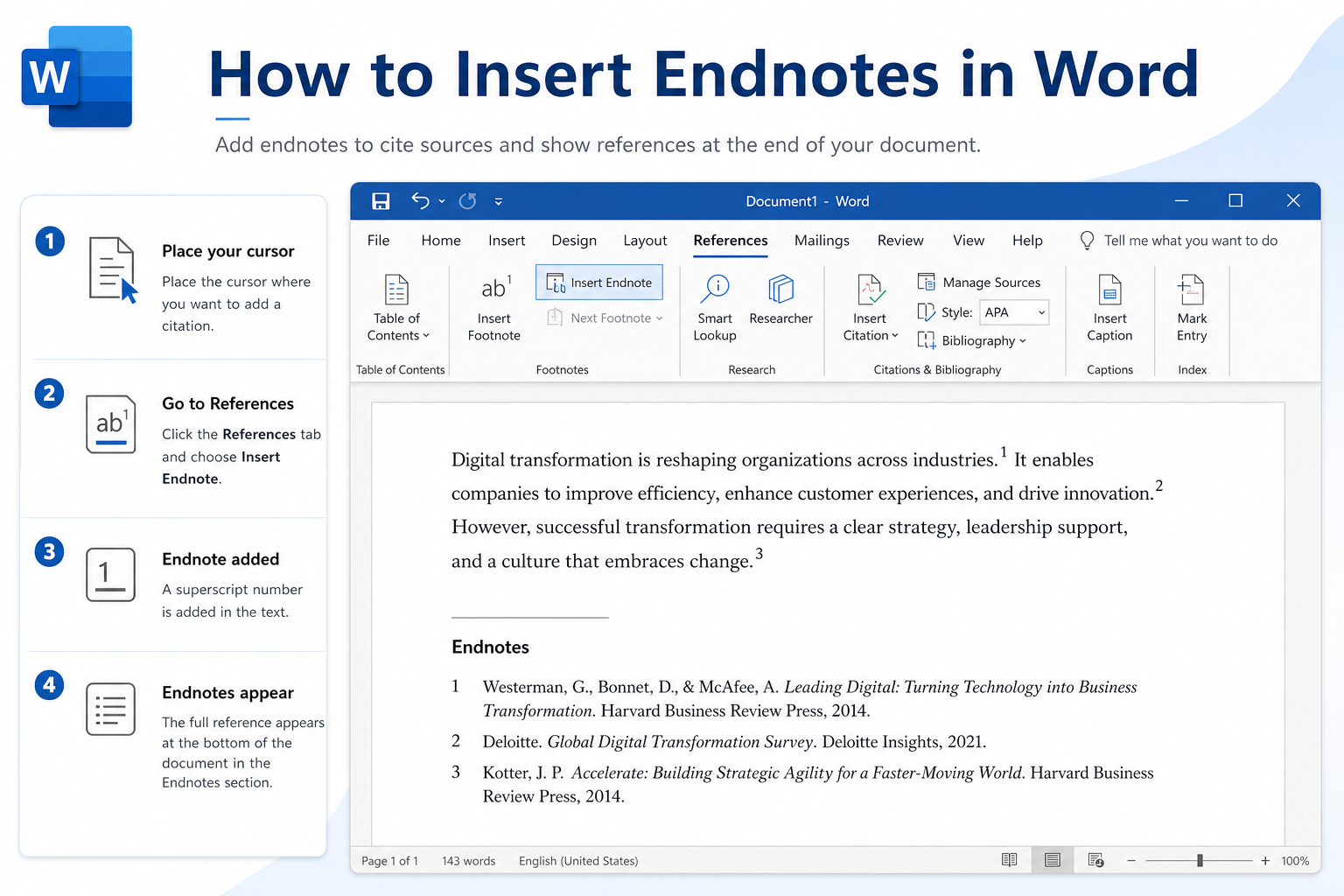
Quick answer: Place your cursor after the text → go to References → Insert Endnote (or open the Footnotes dialog and set location to End of document). To convert footnotes, open the Footnotes dialog → Convert → Convert all footnotes to endnotes.


Endnotes vs. Footnotes (Quick Comparison)
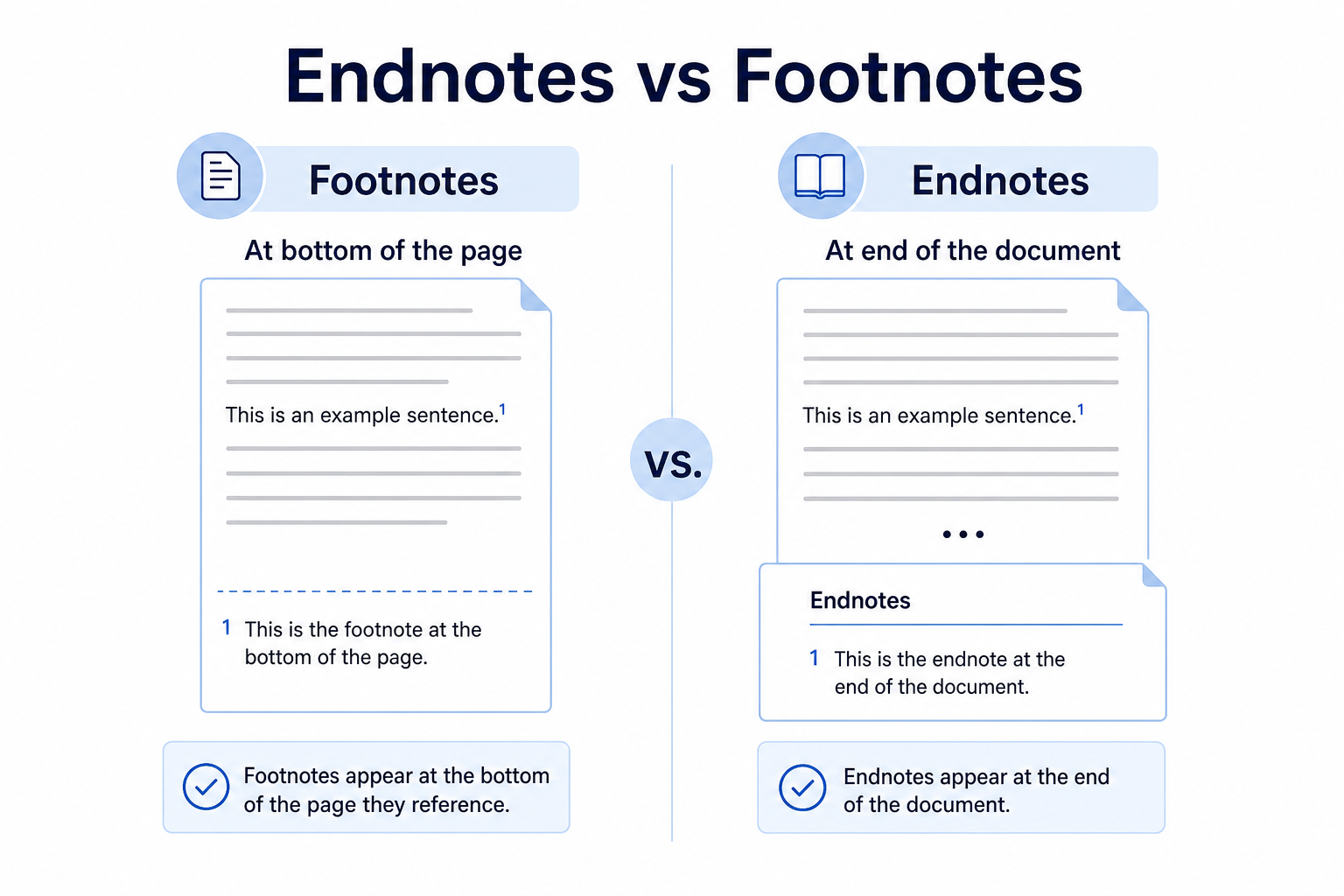
| Feature | Endnotes | Footnotes |
|---|---|---|
| Location | End of the document (or section) | Bottom of the current page |
| Best for | Long papers, clean page layout | Quick references readers see while reading |
| Word path | References → Insert Endnote | References → Insert Footnote |
How to Insert Endnotes in Microsoft Word
These steps work in Word 2016, 2019, 2021, and Microsoft 365.
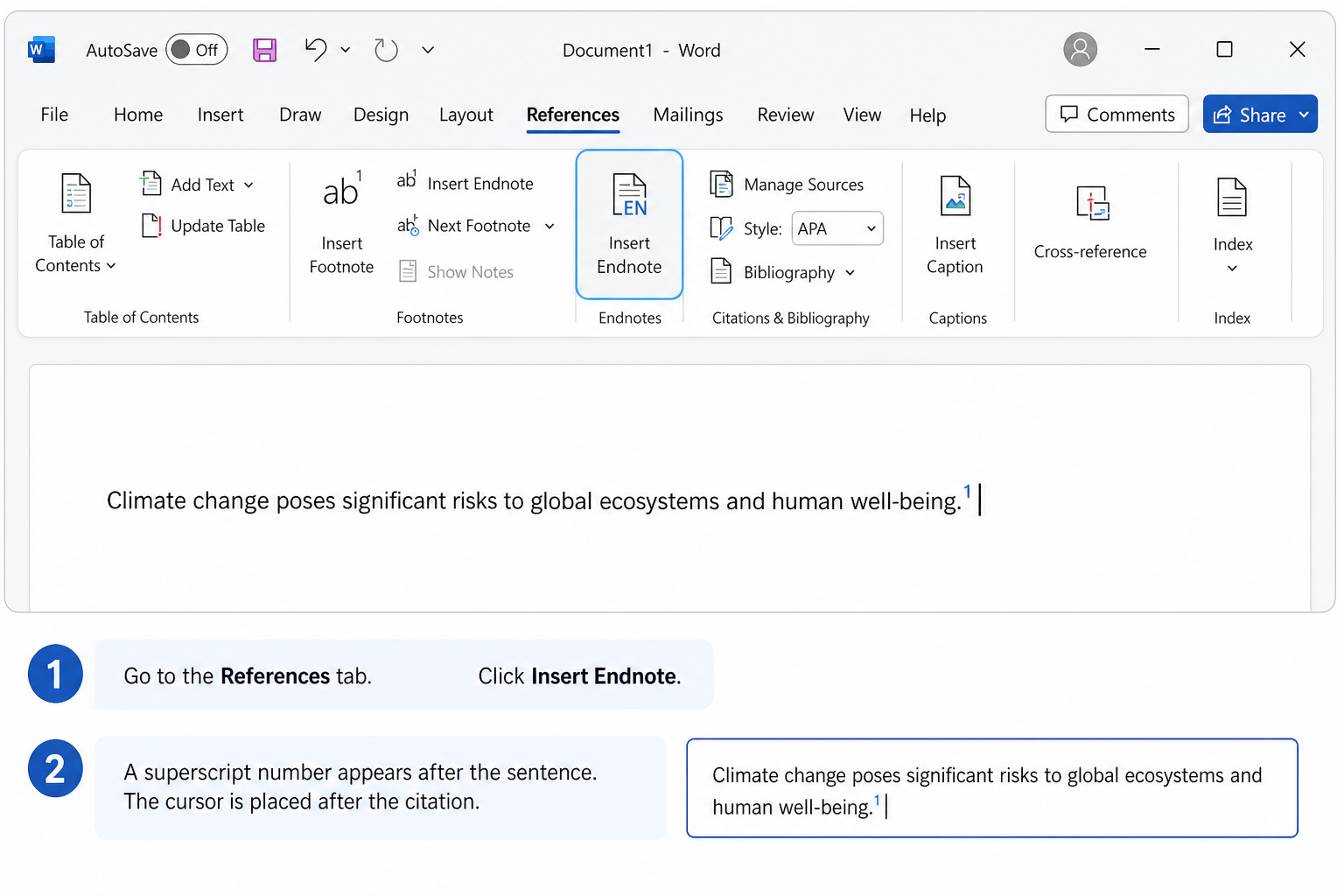
Place your cursor right after the word or sentence that needs a citation.
Go to the References tab.
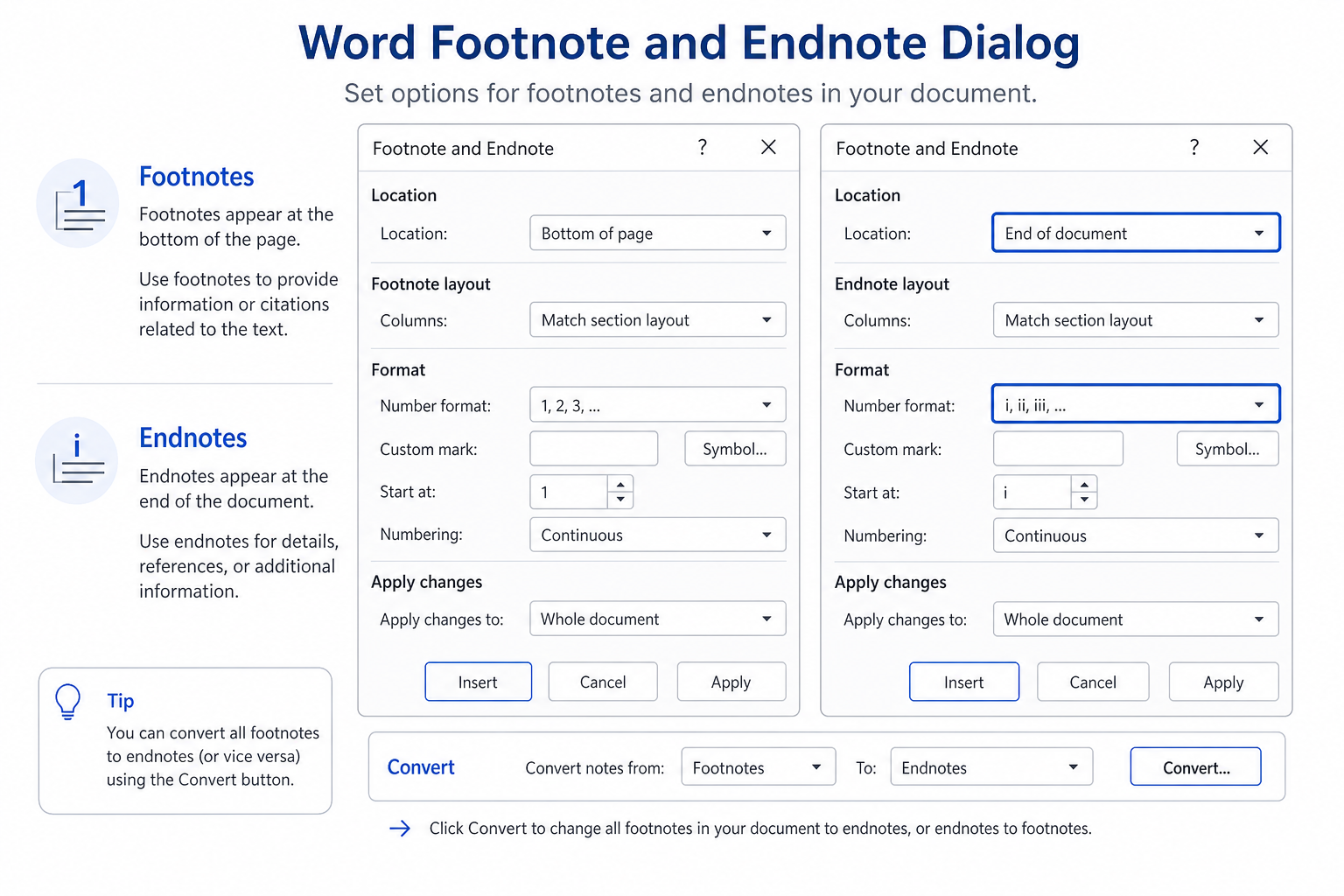
Click Insert Endnote for a one-click insert.Or click the small dialog launcher in the Footnotes group to open full settings.
In the dialog, set Location to End of document (not End of section, unless you want section-based notes).
Optional: choose number format, starting number, and continuous vs. restart numbering.
Click Insert. Word adds a superscript mark in the text and moves you to the endnote area so you can type the note.
Tip: Double-click a superscript endnote mark to jump between the main text and the endnote list.
Citations stay on the References ribbon; tables, symbols, and pictures live on the Insert Tab in Word when you need those everyday add-ons in the same paper.
Convert Footnotes to Endnotes in Word
If you added footnotes by mistake, you can convert them in bulk without retyping.
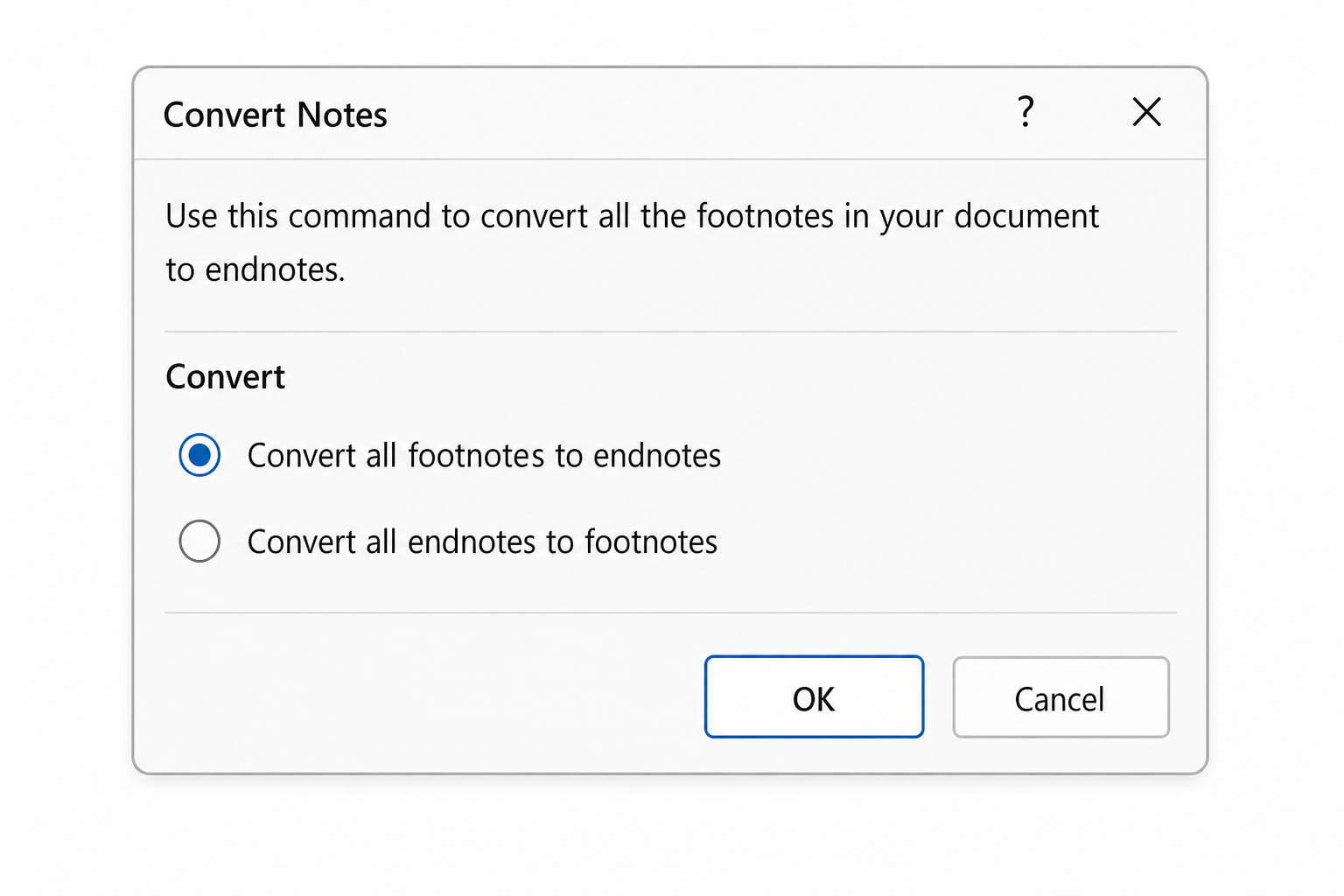
Go to References and open the Footnotes dialog launcher (small arrow in the Footnotes group).
Click Convert…
Choose Convert all footnotes to endnotes.
Confirm. Word moves the notes to the end of the document and renumbers them automatically.
You can also convert endnotes back to footnotes from the same dialog if your style guide changes.
Customize Endnote Format
Match academic or publisher requirements by adjusting both the superscript mark and the endnote text:
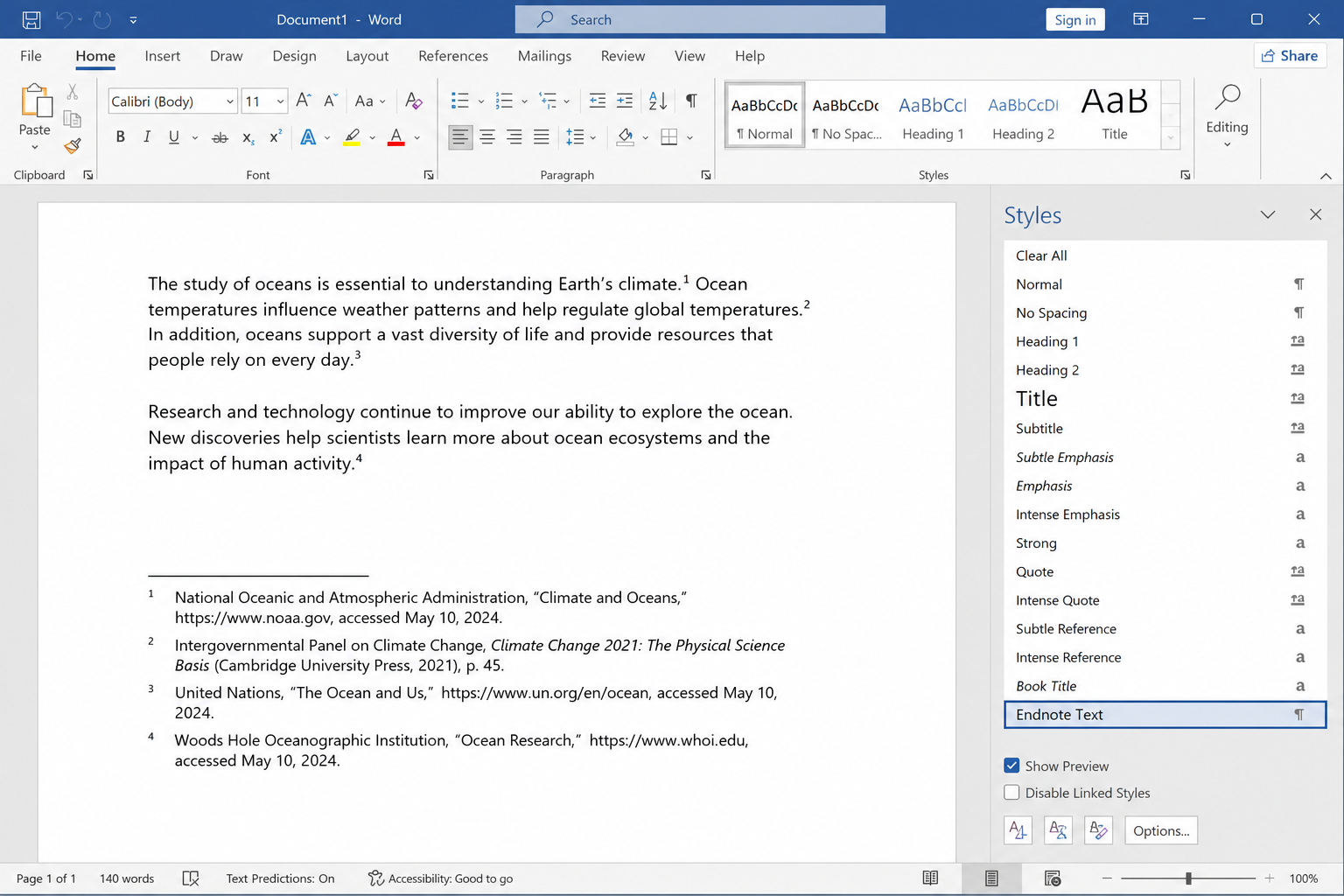
Select an endnote number or note text, then change font size, bold, or color on the Home tab.
Modify the Endnote Text or Endnote Reference style (Home → Styles) for consistent formatting across the file.
Open the Footnotes dialog again to reset numbering to continuous or restart per section.
Adjust indentation, line spacing, and alignment for the endnote paragraph text.
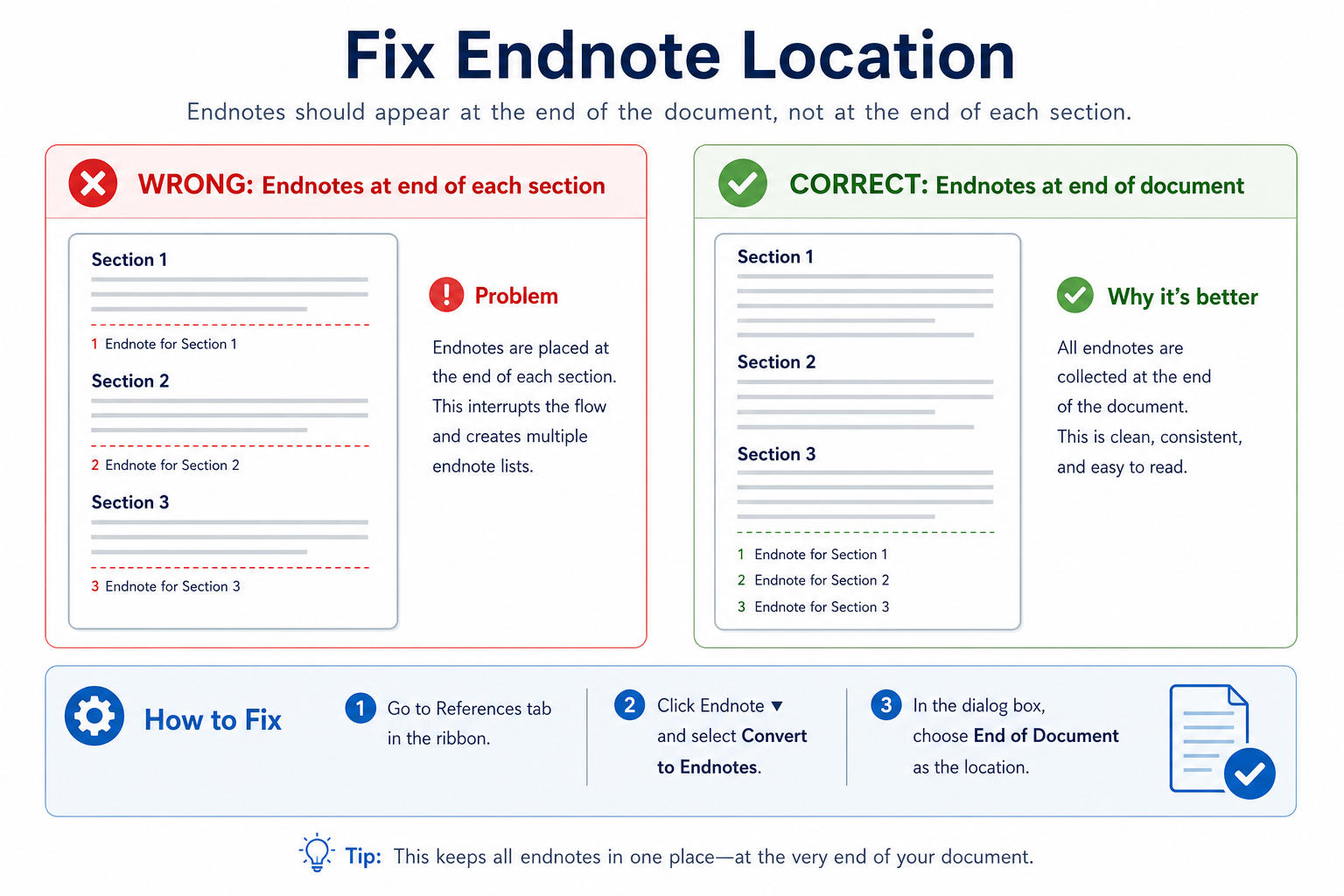
| Problem | What to try |
|---|---|
| Endnotes appear at the end of each section | Open Footnotes settings → set location to End of document |
| Numbering restarts unexpectedly | Set numbering to Continuous in the Footnotes dialog |
| Format looks inconsistent | Update the Endnote Text style instead of formatting one note only |
How to Insert Endnotes on Mac
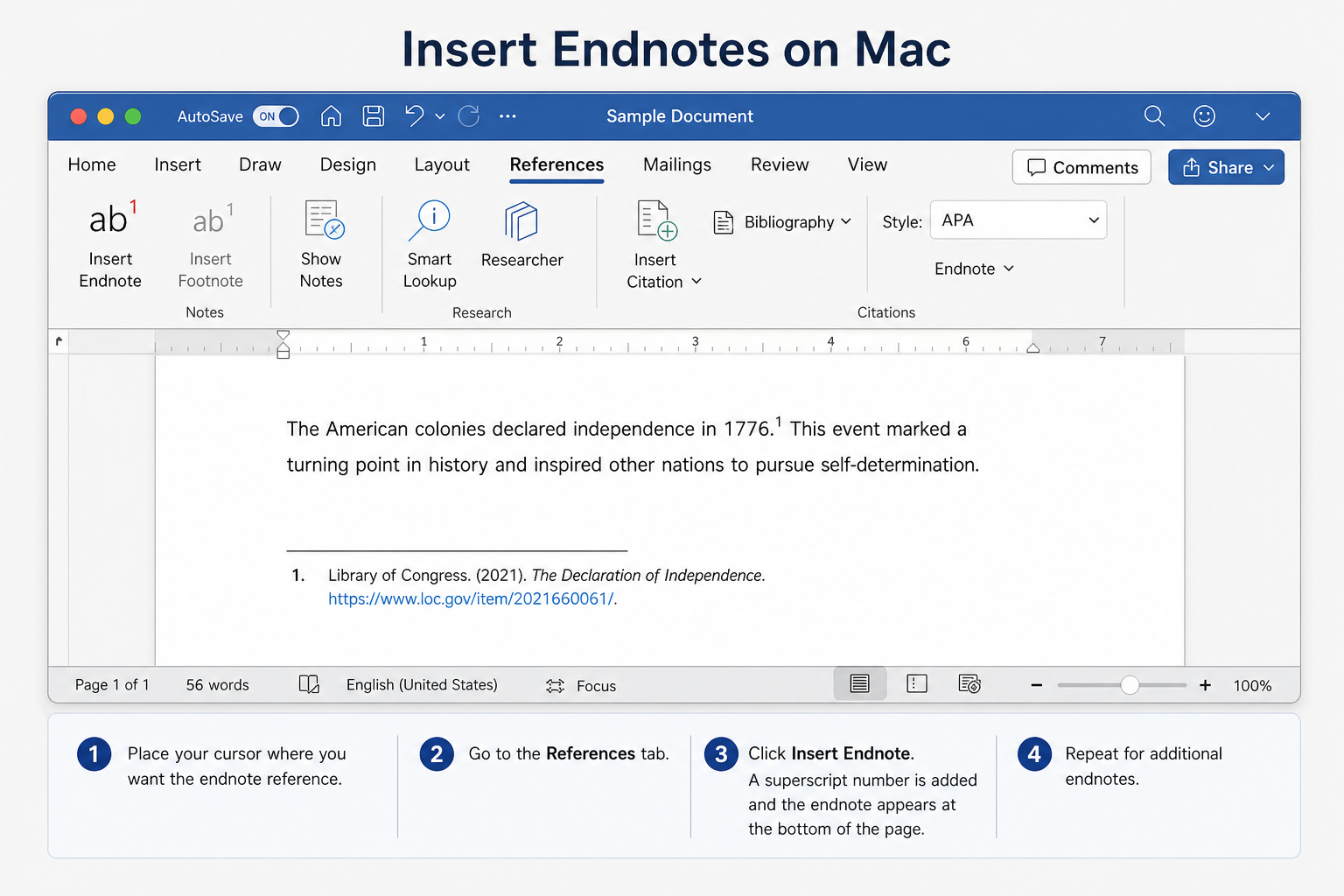
Place the cursor after the citation point.
Go to References → Insert Endnote.
Type the note at the end of the document.
Use the Footnotes preferences/dialog if you need location or numbering changes (menu labels may vary slightly by Mac Word version).
Free Method: Insert Endnotes in WPS Writer
Word’s Footnotes dialog offers deep controls, but everyday endnote work is often just “insert and type.” WPS Writer is a free, Word-compatible option with a direct Insert Endnote action on the References tab.
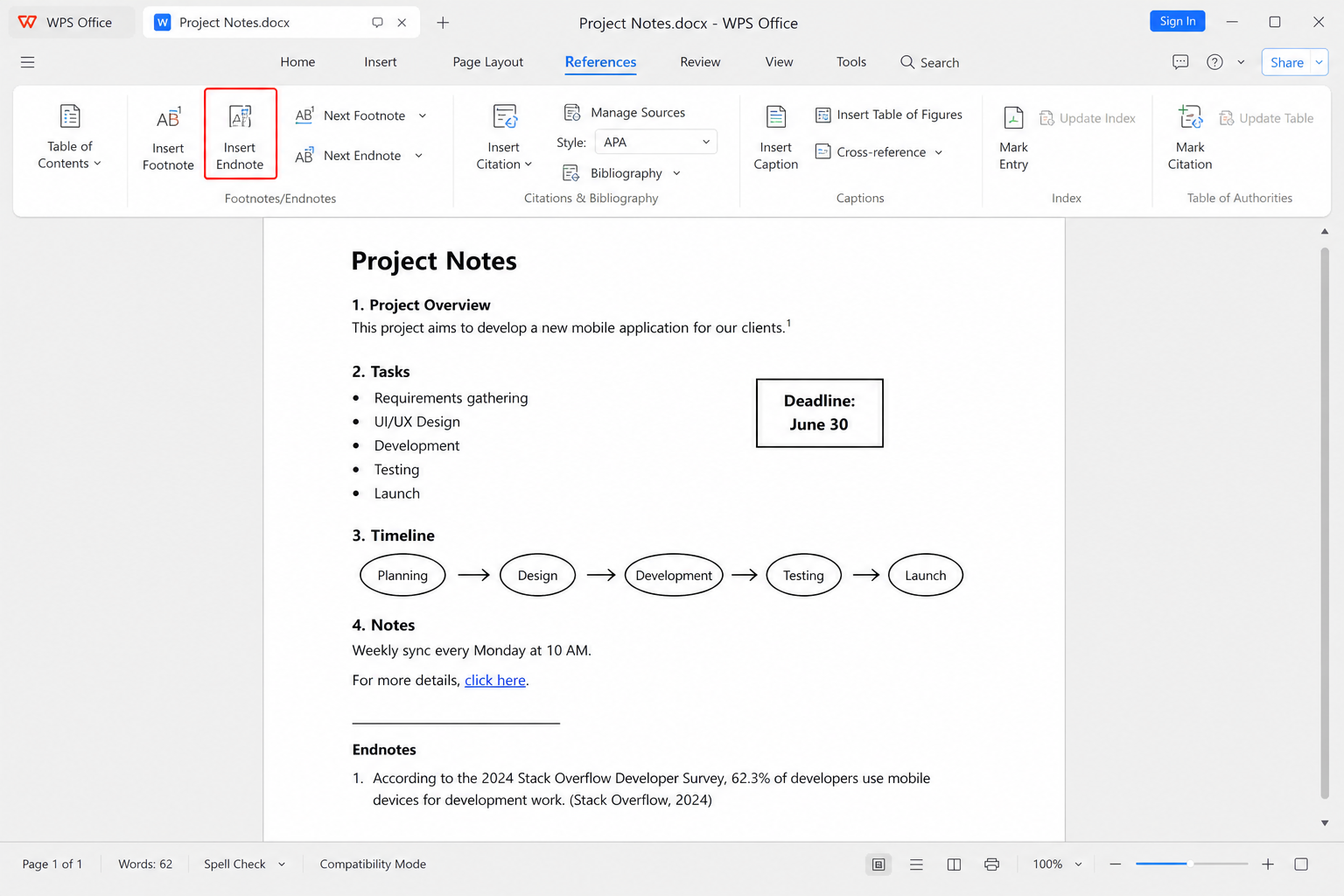
Open your document in WPS Writer.
Place the cursor at the target text position.
Go to References → Insert Endnote.
Type your citation or explanation in the endnote area.
Adjust font, spacing, and layout as needed, then save as .docx for Microsoft Word.
Straightforward insert — Add endnotes from References without digging through extra panels for basic use
Strong Word compatibility — Share common .doc / .docx files with Word users
No paid subscription required — Core writing and reference tools for daily documents
Works well for long papers — Practical for documents with many notes when you keep formatting simple
FAQ
Why do my endnotes appear at the end of each section?
The location is set to End of section. Open the Footnotes dialog under References and change it to End of document.
How do I delete an endnote?
Delete the superscript endnote mark in the main text. Word removes the matching endnote entry automatically. Do not delete only the note text if you also want the number gone.
Will endnotes look correct after I export to PDF?
Usually yes if you export from Word or WPS with standard PDF settings. Preview the PDF once to confirm numbering and layout, especially in long academic files.
Do WPS endnotes work in Microsoft Word?
Yes—when you save as a standard Word format, endnotes usually open and renumber normally in Microsoft Word.
Conclusion
To insert endnotes in Word, use References → Insert Endnote, then set the location to End of document when needed. Convert footnotes in bulk from the Footnotes dialog, and update endnote styles for consistent academic formatting. If you want a simpler free workflow with Word-compatible files, WPS Writer’s Insert Endnote tool is a practical alternative for everyday papers and reports.

'%3e%3cpath%20d='M19.9911%204.11386V6.471H18.5894C18.0775%206.471%2017.7322%206.57814%2017.5536%206.79243C17.3751%207.00671%2017.2858%207.32814%2017.2858%207.75671V9.44421H19.9019L19.5536%2012.0871H17.2858V18.8639H14.5536V12.0871H12.2769V9.44421H14.5536V7.49779C14.5536%206.39064%2014.8632%205.53201%2015.4822%204.92189C16.1013%204.31177%2016.9257%204.00671%2017.9554%204.00671C18.8304%204.00671%2019.509%204.04243%2019.9911%204.11386Z'%20fill='%23333333'/%3e%3c/g%3e%3cdefs%3e%3cclipPath%20id='clip0_2938_8199'%3e%3crect%20width='16'%20height='16'%20fill='white'%20transform='translate(8%204.00671)'/%3e%3c/clipPath%3e%3c/defs%3e%3c/svg%3e)
'%3e%3cpath%20d='M17.5237%2010.7813L23.4811%204H22.0699L16.8949%209.88693L12.7648%204H8L14.2469%2012.9029L8%2020.0133H9.4112L14.8725%2013.7952L19.2352%2020.0133H24M9.92053%205.04213H12.0885L22.0688%2019.0224H19.9003'%20fill='%23333333'/%3e%3c/g%3e%3cdefs%3e%3cclipPath%20id='clip0_2938_8200'%3e%3crect%20width='16'%20height='16.0134'%20fill='white'%20transform='translate(8%204)'/%3e%3c/clipPath%3e%3c/defs%3e%3c/svg%3e)


