

'%3e%3cpath%20d='M8%200C12.4183%200%2016%203.58172%2016%208C16%2012.4183%2012.4183%2016%208%2016C3.58172%2016%200%2012.4183%200%208C0%203.58172%203.58172%200%208%200ZM11.6162%204.38379C11.2257%203.99337%2010.5927%203.99338%2010.2021%204.38379L8%206.58594L5.79785%204.38379C5.40732%203.99334%204.77429%203.99329%204.38379%204.38379C3.99331%204.77429%203.99335%205.40733%204.38379%205.79785L6.58594%208L4.38379%2010.2021C3.99348%2010.5927%203.99341%2011.2257%204.38379%2011.6162C4.77426%2012.0066%205.40734%2012.0065%205.79785%2011.6162L8%209.41406L10.2021%2011.6162C10.5927%2012.0066%2011.2257%2012.0067%2011.6162%2011.6162C12.0067%2011.2257%2012.0066%2010.5927%2011.6162%2010.2021L9.41406%208L11.6162%205.79785C12.0066%205.40735%2012.0066%204.77429%2011.6162%204.38379Z'%20fill='%23080E17'%20fill-opacity='0.46'/%3e%3c/g%3e%3cdefs%3e%3cclipPath%20id='clip0_3761_713'%3e%3crect%20width='16'%20height='16'%20fill='white'/%3e%3c/clipPath%3e%3c/defs%3e%3c/svg%3e)




'%3e%3cpath%20fill-rule='evenodd'%20clip-rule='evenodd'%20d='M21.4999%2010.9993C21.4999%205.20009%2016.7986%200.498901%2010.9993%200.498901C5.19994%200.498901%200.498657%205.20009%200.498657%2010.9993C0.498657%2016.2404%204.33858%2020.5844%209.35855%2021.3722V14.0346H6.69238V10.9993H9.35855V8.68594C9.35855%206.05427%2010.9262%204.60062%2013.3248%204.60062C14.4736%204.60062%2015.6753%204.80571%2015.6753%204.80571V7.38979H14.3512C13.0468%207.38979%2012.64%208.19921%2012.64%209.0296V10.9993H15.5523L15.0867%2014.0346H12.64V21.3722C17.66%2020.5844%2021.4999%2016.2404%2021.4999%2010.9993Z'%20fill='%231568EA'/%3e%3c/g%3e%3c/svg%3e)


'%3e%3cpath%20d='M2.42045%2022.1876H6.31818V12.7217L0.75%208.54553V20.5171C0.75%2021.4414%201.49892%2022.1876%202.42045%2022.1876Z'%20fill='%234285F4'/%3e%3cpath%20d='M19.682%2022.1876H23.5797C24.5041%2022.1876%2025.2502%2021.4387%2025.2502%2020.5171V8.54553L19.682%2012.7217'%20fill='%2334A853'/%3e%3cpath%20d='M19.682%205.48293V12.7216L25.2502%208.54543V6.31816C25.2502%204.25236%2022.8921%203.07469%2021.2411%204.31361'%20fill='%23FBBC04'/%3e%3cpath%20d='M6.31824%2012.7217V5.48303L13.0001%2010.4944L19.6819%205.48303V12.7217L13.0001%2017.733'%20fill='%23EA4335'/%3e%3cpath%20d='M0.75%206.31816V8.54543L6.31818%2012.7216V5.48293L4.75909%204.31361C3.10534%203.07469%200.75%204.25236%200.75%206.31816Z'%20fill='%23C5221F'/%3e%3c/g%3e%3cdefs%3e%3cclipPath%20id='clip0_2954_7305'%3e%3crect%20width='24.5'%20height='18.375'%20fill='white'%20transform='translate(0.75%203.8125)'/%3e%3c/clipPath%3e%3c/defs%3e%3c/svg%3e)


A Microsoft Excel macro-enabled worksheet is an .xlsm workbook: the same Open XML grid as .xlsx, plus VBA macros that can format, refresh, or rebuild a report. You can read the cells without running that code. Enable macros only if you trust the sender and you actually need the automation.
What a Microsoft Excel macro-enabled worksheet actually stores
The extra “M” is storage, not a different grid. .xlsx cannot keep VBA. .xlsm can. That is why a Microsoft Excel macro-enabled worksheet is not the same job as opening a plain workbook. Formulas, charts, and formatting usually load. The automation stays off until you allow it.
Treat an unexpected .xlsm like executable mail, not like a CSV. Unsolicited files that push Enable Content are a common malware path. You do not need macros to check totals, copy a table, or export a PDF.
Keep these points in mind before you start:
Sheet data can be read with macros disabled
Buttons, custom forms, and refresh macros will not run until you enable content
Downloads and email attachments may also open in Protected View
Saving as .xlsx drops VBA, so do that only when you no longer need the code
If someone sent the file for a one-click report, ask what the macro is supposed to do. Then decide whether you need the code, or only the numbers.


How to open a Microsoft Excel macro-enabled worksheet without running code
Desktop Excel is the native app for this format. Open from File > Open. Double-clicking works when Excel owns the .xlsm extension. If nothing happens, launch Excel first, then browse to the folder.
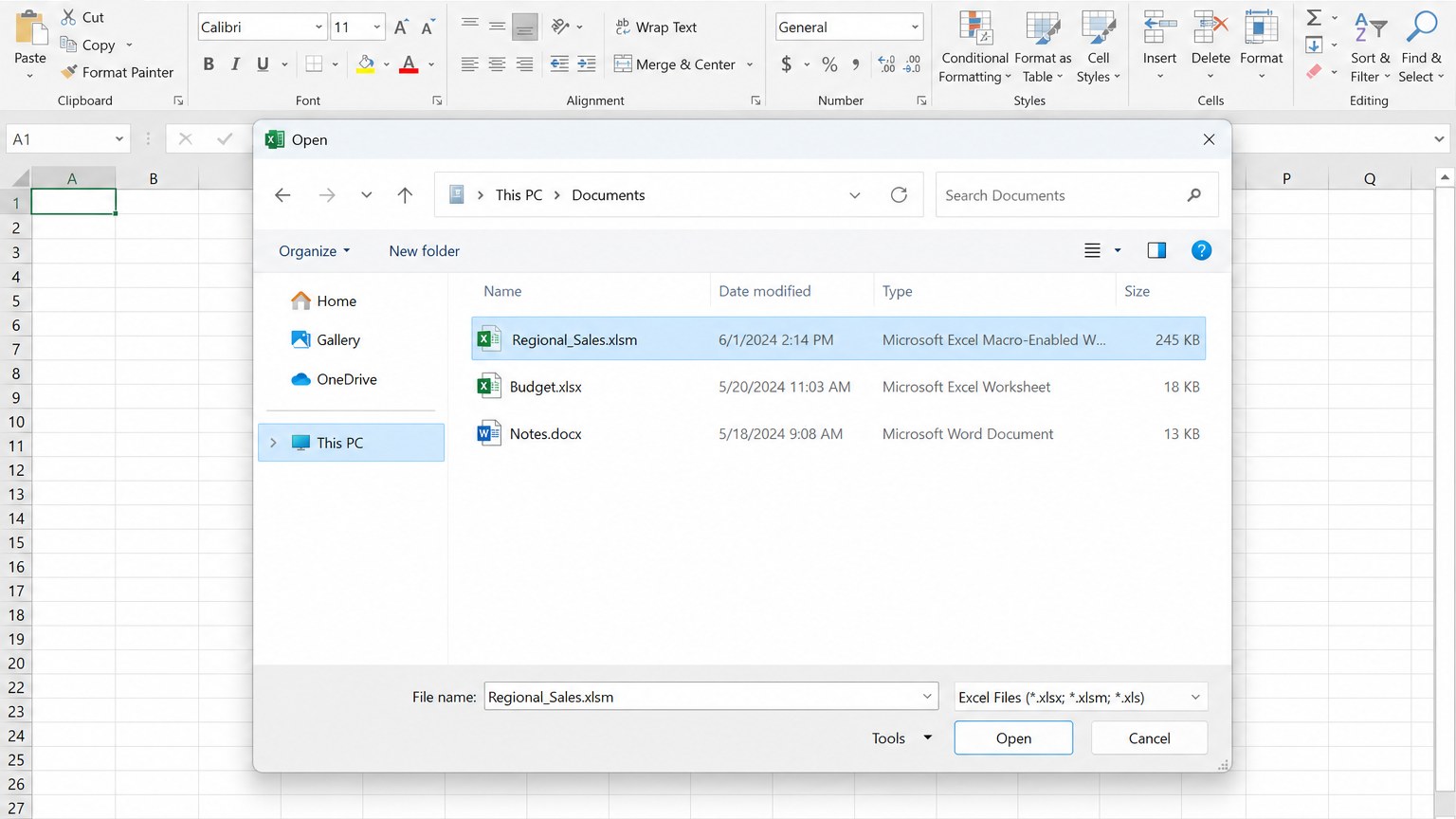
Step 1: Open the workbook from File
In Excel, go to File > Open and select the .xlsm file. If the dialog hides it, set the type filter to Excel files or All files. Confirm the name matches what you expected before you load it.
Step 2: Leave Protected View until you trust the file
Downloads often open in Protected View. You can scroll in a limited window. Click Enable Editing only after you recognize the sender and the filename. That click exits the sandbox. It does not, by itself, run VBA.
After this step, a Microsoft Excel macro-enabled worksheet is usable as a spreadsheet. Totals, filters, and print still work. The yellow bar can wait.
Enable a Microsoft Excel macro-enabled worksheet only from a trusted source
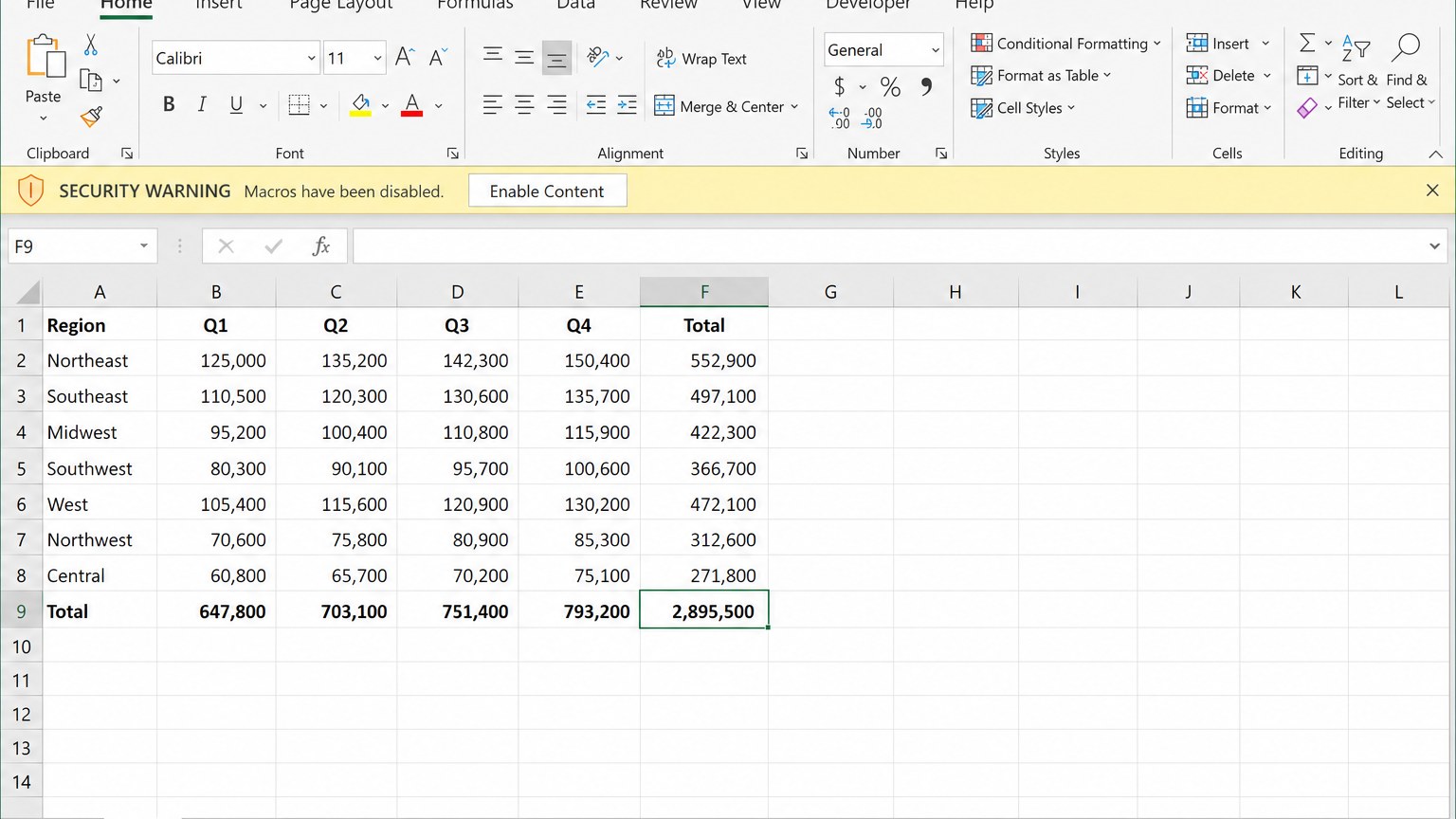
A yellow Security Warning bar is normal. For a trusted internal template, click Enable Content so the macros can run. For a file you do not know, leave macros disabled. You can still copy values, check formulas, and print.
Microsoft’s guidance is blunt: do not enable macros unless you know what they do and you want that behavior. After you open a Microsoft Excel macro-enabled worksheet, the sheets stay useful even if the code stays blocked.
A downloaded workbook can also carry a Mark of the Web. Excel then blocks macros more aggressively. Close the file first. In File Explorer, right-click the .xlsm, open Properties, and check Unblock if it appears. Only do this for a file you already trust. Unblocking does not make unknown code safe.
Do not turn on “enable all macros” globally to silence one prompt. That setting lets any later workbook run code without asking. For ribbon settings in WPS, see how to enable macros in WPS Office.
Open a Microsoft Excel macro-enabled worksheet in WPS Spreadsheets
WPS Office for Windows lists compatibility with Microsoft Excel formats including .xls, .xlsx, and .xlsm. That is why a Microsoft Excel macro-enabled worksheet can open locally in WPS Spreadsheets: the file stays on disk, and you can edit values, formulas, and layout without Excel installed.
Macros are a separate layer. WPS can open the workbook for data work even when VBA is not fully available. Running or editing macros typically needs a VBA support component, and complex Excel code is not guaranteed to match desktop Excel. For everyday viewing and editing, open the sheets first, then decide whether the automation is worth enabling.
Step 1: Start Spreadsheets from the WPS home screen
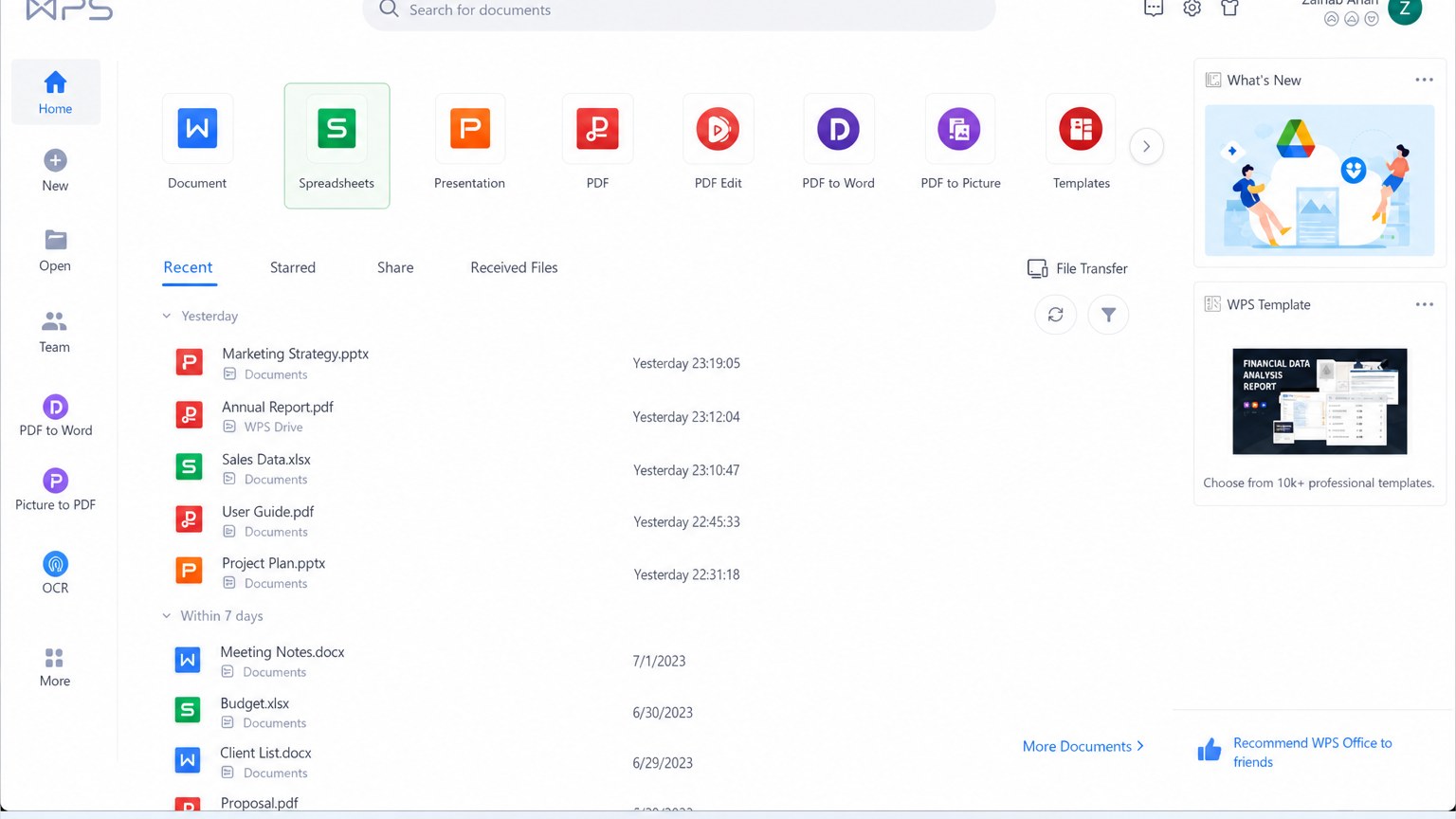
Launch WPS Office. On the home dashboard, choose Spreadsheets. That opens the spreadsheet workspace instead of Writer or Presentation.
Step 2: Use Menu, then Open
Click the Menu button in the upper-left corner and choose Open. This is the same pattern WPS uses in Writer and Presentation. It is the in-app path, rather than a file-manager double-click.
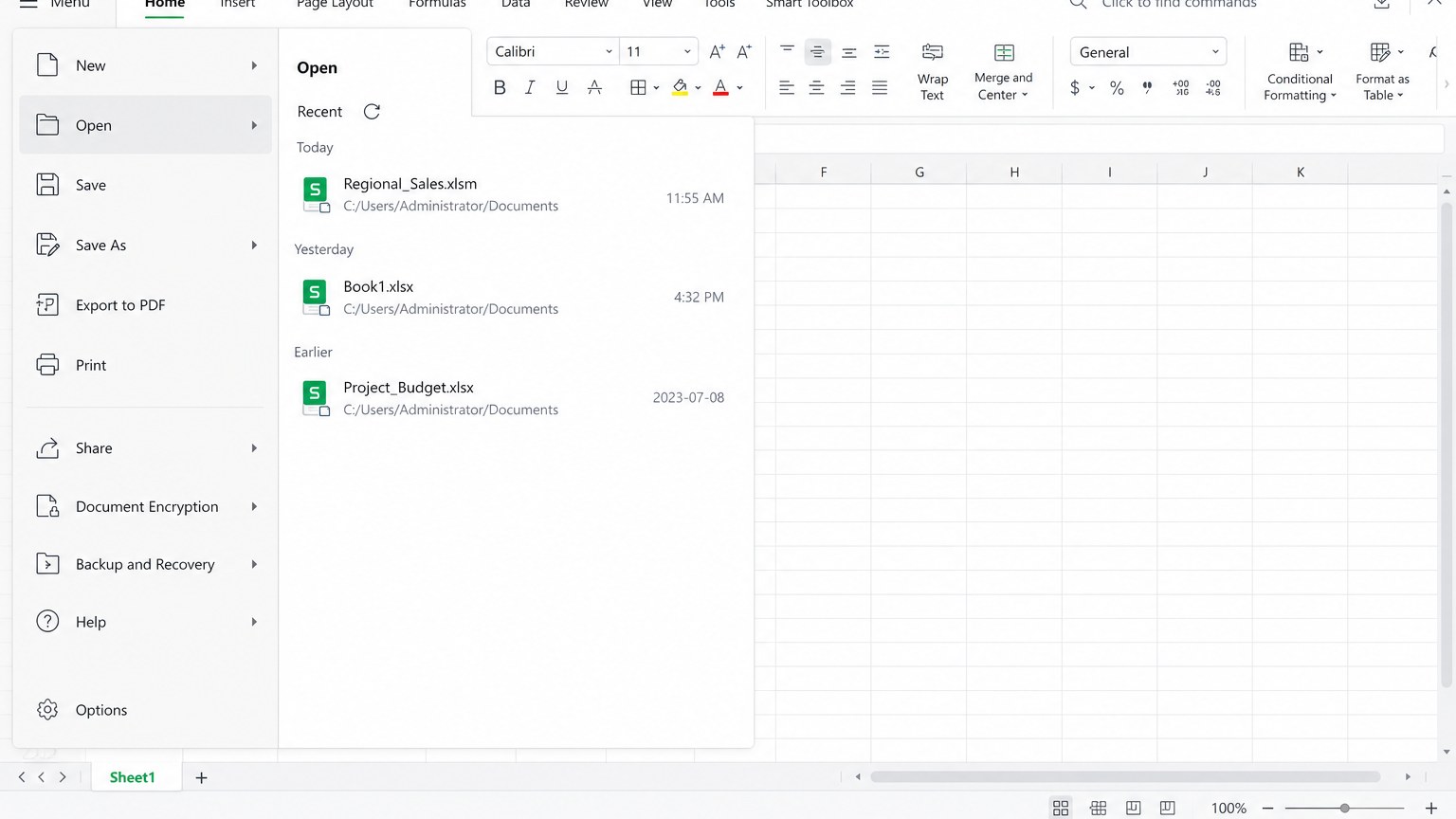
Step 3: Review the sheets before you enable any code
Select the .xlsm workbook and click Open. The file should load with sheet tabs, the formula bar, and the grid. Check totals and named sheets. If a yellow warning appears, treat it like Excel’s prompt: enable only for a trusted file. You can save a working copy, export PDF, or keep editing cells even if macros stay off.
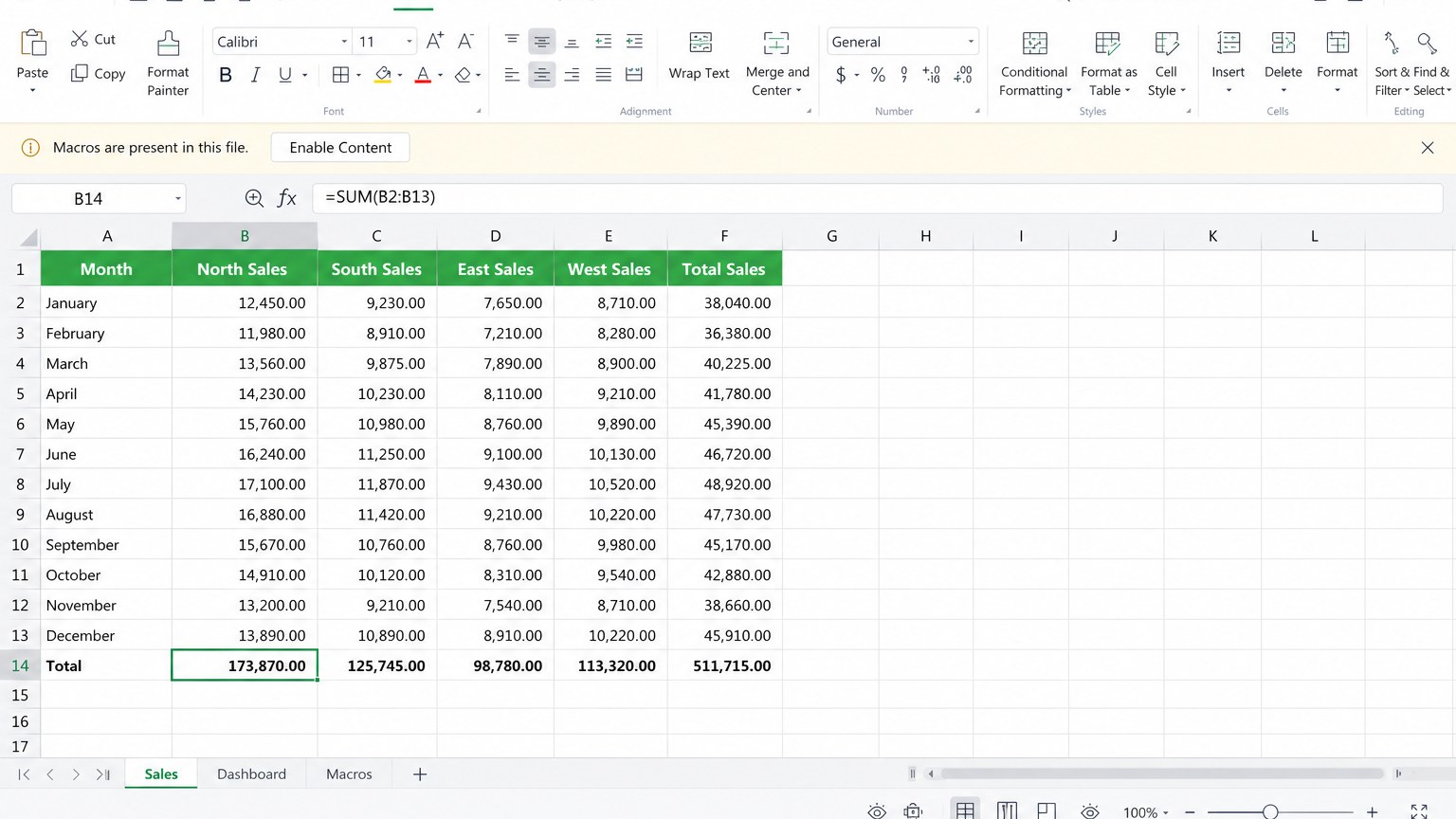
If you already use WPS for other Excel files, this flow matches opening Excel workbooks in WPS Office. The only extra caution with a Microsoft Excel macro-enabled worksheet is the macro prompt.
FAQ
Can I open a Microsoft Excel macro-enabled worksheet on a Mac?
Yes. Excel for Mac opens .xlsm. Enable macros only if you trust the file. WPS Office is also available on macOS for local spreadsheet work. Double-clicking still depends on which app owns the extension.
Does Google Sheets run the macros?
No. Google Sheets and Excel for the web can show the grid and many formulas. They do not execute Excel VBA. That is useful when you distrust the attachment, and a limitation when a button is supposed to rebuild a report.
Can LibreOffice Calc replace Excel for this file?
LibreOffice Calc can open the sheets and charts. VBA compatibility is partial. Simple recorded macros may work. Complex Excel automation often does not, or it needs rewriting in LibreOffice Basic. Calc is not the same as LibreOffice Draw edit PDF free: Calc is for the workbook, Draw is for the PDF export.
Should I convert the Microsoft Excel macro-enabled worksheet to .xlsx?
Only when you are sure you do not need the macros. Saving as .xlsx is a good way to share a static table. It is a bad way to archive a tool that depends on VBA. Keep the original .xlsm if the sender still uses the automation.
When should I skip Draw and use WPS PDF?
Skip Draw when the PDF is a scan, a long report, or a file that needs merge, split, compress, or convert to Word. LibreOffice Draw edit PDF free is enough for a logo or a one-line date. WPS PDF is faster when the page has to look finished after a real rewrite.



'%3e%3cpath%20d='M19.9911%204.11386V6.471H18.5894C18.0775%206.471%2017.7322%206.57814%2017.5536%206.79243C17.3751%207.00671%2017.2858%207.32814%2017.2858%207.75671V9.44421H19.9019L19.5536%2012.0871H17.2858V18.8639H14.5536V12.0871H12.2769V9.44421H14.5536V7.49779C14.5536%206.39064%2014.8632%205.53201%2015.4822%204.92189C16.1013%204.31177%2016.9257%204.00671%2017.9554%204.00671C18.8304%204.00671%2019.509%204.04243%2019.9911%204.11386Z'%20fill='%23333333'/%3e%3c/g%3e%3cdefs%3e%3cclipPath%20id='clip0_2938_8199'%3e%3crect%20width='16'%20height='16'%20fill='white'%20transform='translate(8%204.00671)'/%3e%3c/clipPath%3e%3c/defs%3e%3c/svg%3e)
'%3e%3cpath%20d='M17.5237%2010.7813L23.4811%204H22.0699L16.8949%209.88693L12.7648%204H8L14.2469%2012.9029L8%2020.0133H9.4112L14.8725%2013.7952L19.2352%2020.0133H24M9.92053%205.04213H12.0885L22.0688%2019.0224H19.9003'%20fill='%23333333'/%3e%3c/g%3e%3cdefs%3e%3cclipPath%20id='clip0_2938_8200'%3e%3crect%20width='16'%20height='16.0134'%20fill='white'%20transform='translate(8%204)'/%3e%3c/clipPath%3e%3c/defs%3e%3c/svg%3e)


