The demand for efficient, high-quality visual communication has never
been higher, yet many professionals still find themselves bogged down by
the manual labor of slide creation. While AI-powered tools promise to
automate the writing and formatting process, the reality is often a
mixed bag of generic content and rigid layouts. Finding a tool that
balances speed with professional quality is essential for anyone looking
to reclaim their time. This SlidesGPT AI presentation maker explores SlidesGPT, evaluating its capabilities as a rapid
drafting tool.
Use Word, Excel, and PPT for FREE
SlidesGPT
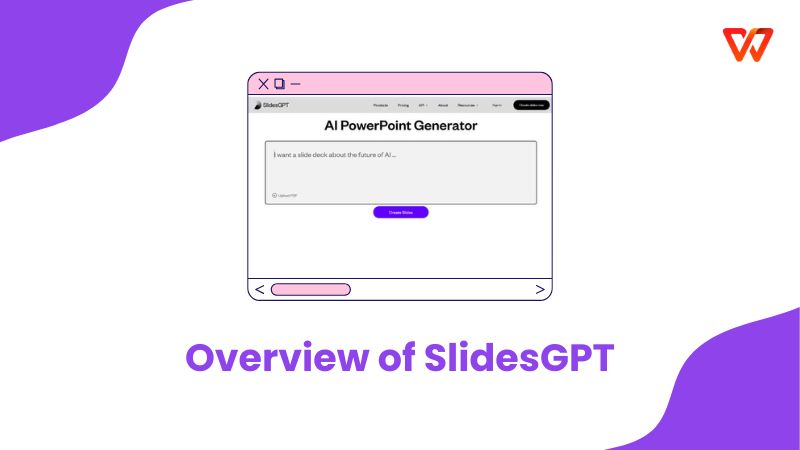
Overview of SlidesGPT
SlidesGPT is
an AI ppt generator SlidesGPT designed to streamline the initial stages
of deck creation. Leveraging large language models (LLMs), it acts as an
automated drafter that converts simple text prompts into structured
slides with content and basic layouts. It is particularly targeted at
users who need to brainstorm ideas or generate a skeleton deck quickly without starting from a blank
canvas.
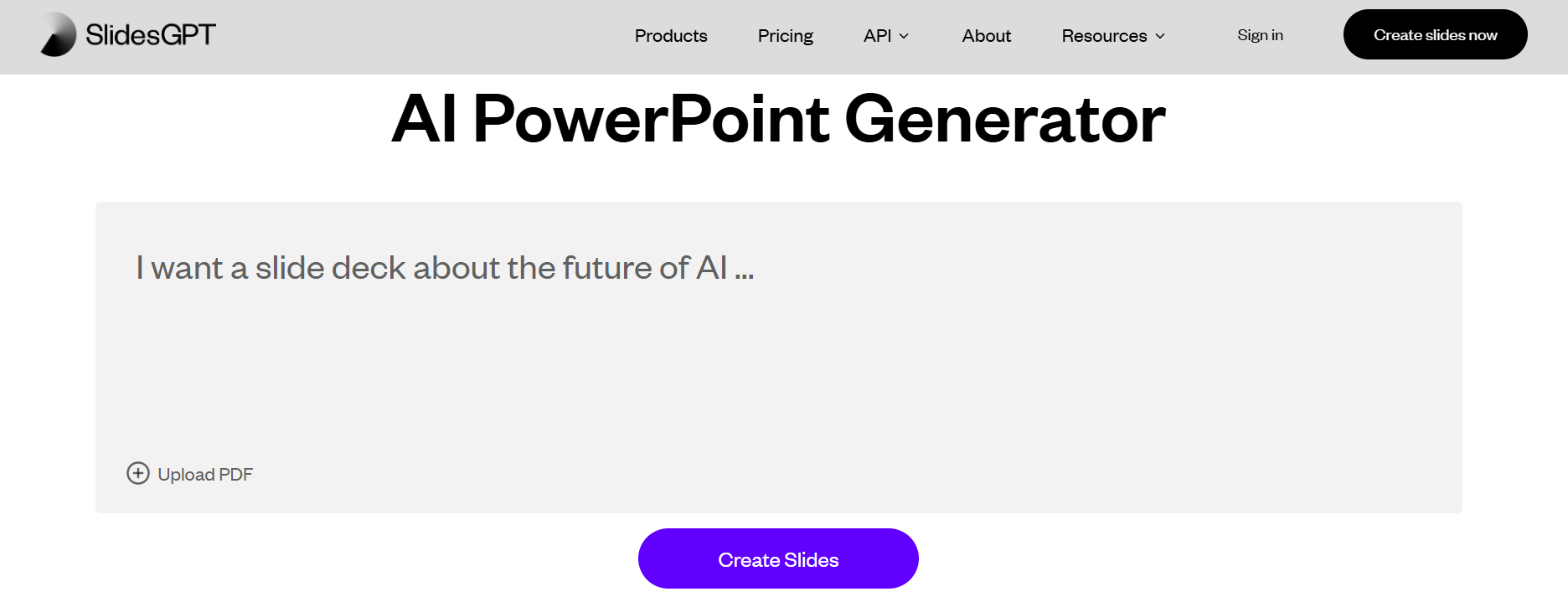
SlideGPT Interface
How It Works:
Rather than building slides manually, the process begins with a
topic, outline, or script, which the AI transforms into a complete draft
presentation. By understanding context and intent, Slide GPT organizes
ideas into a clear narrative and automatically generates slide titles,
structured bullet points, and appropriate layouts. The result is a
presentation that is immediately usable, ready for refinement, review,
or direct presentation.
Core Functionality:
Prompt-to-Slide: Generates entire decks from a single sentence or paragraph.
Automated Content: Fills slides with relevant text, headings, and talking points.
Theme Selection: Applies basic visual themes to the generated content.
Cloud Accessibility: Works entirely in the browser with no software installation required.
Key Pros and Cons of
SlidesGPT
Slide GPT offers a convenient entry point into AI-assisted
presentation making, but it is important to understand where it fits in
a professional workflow. It excels at speed and ideation but often faces
challenges when deeper customization or intricate design is required.
Below is a breakdown of the SlidesGPT pros and cons to help you decide
if it meets your needs.
Pros:
Rapidly produces slide drafts from simple text prompts.
Significantly reduces time spent on initial brainstorming and outlining.
Accessible directly through a web browser with no installation needed.
Helpful for generating structure and talking points for unfamiliar topics.
Cons:
Slide layouts and design aesthetics often require manual adjustment.
Content quality can be generic, especially for complex or technical subjects.
Limited control over specific styling, fonts, and branding elements.
Heavily dependent on the quality of the input prompt for good results.
SlidesGPT Alternatives
Comparison Table
To give you a clearer picture of the market, we have compared
SlidesGPT against other leading AI presentation tools. This table highlights differences between SlidesGPT alternatives in content
quality, export flexibility, and overall integration.
Feature / Tool
Slides GPT
WPS AI Slides
Gamma
Beautiful.ai
Canva AI
AI Content Generation
Yes
Yes
Yes
Yes
Yes
Content Quality
Medium
Advanced
High
High
Medium
Design Flexibility
Low
High
High
High
High
Slide Customization
Basic
Full
Moderate
Moderate
High
PPT / PPTX Export
Limited
Full
Partial
Partial
Yes
Offline Editing
No
Yes
No
No
No
Integration
Cloud Only
WPS Office Suite
Cloud
Cloud
Cloud
Best Use Case
Quick Drafts
Professional Decks
Modern Interactive
Design-First
Design + Visuals
Why WPS
AI Slides Is a Smarter Alternative to SlidesGPT
SlidesGPT provides a quick way to generate draft slides from prompts,
but many professionals often hit a wall when they need to refine those
drafts into a final product. It lacks deeper content quality, stronger
design control, and full editing workflows that go beyond simple
web-based automation. WPS AI Slides fills these gaps by
offering a comprehensive solution that integrates powerful AI directly
into a professional presentation editor.
Key Advantages of WPS AI Slides:
Richer AI Content Generation: Produces deeper, context-aware slide narratives and talking points based on topics, documents, or uploaded outlines.
Design and Customization Control: Offers professional templates and layout adjustments with significantly more design flexibility than draft generators.
Full Export & Compatibility: Exports native .pptx files fully compatible with Microsoft PowerPoint and Google Slides.
Offline and Suite Integration: Works within WPS Presentation for both online and offline workflows, connecting seamlessly with Docs and PDFs.
User-Friendly Editing: Allows users to refine content, visuals, and aesthetic details with precision after the initial AI generation.
How to Create
Presentations with WPS AI Slides:
Getting started is easy. Instead of struggling with manual
formatting, you can let the AI handle the heavy lifting in just a few
clicks.
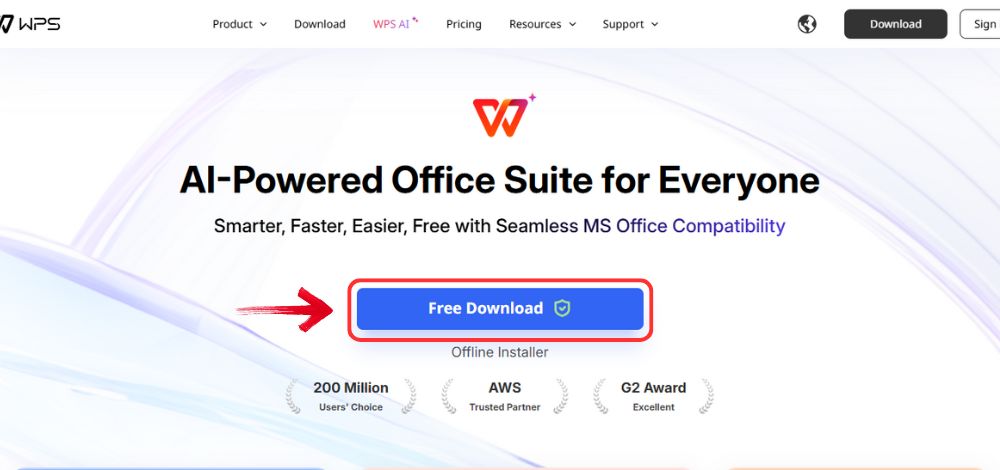
Step 1: Open your browser to visit WPS Office and click the "Free Download" button to start the download.
Download WPS Office
Step 2: The download will finish in a few seconds.
Once done, run the installation file like you would for any other app or
software.
Step 3: WPS Office will show you a few simple terms
and conditions. Accept them, then click the "Install
Now" button to begin the installation.
Install WPS Office
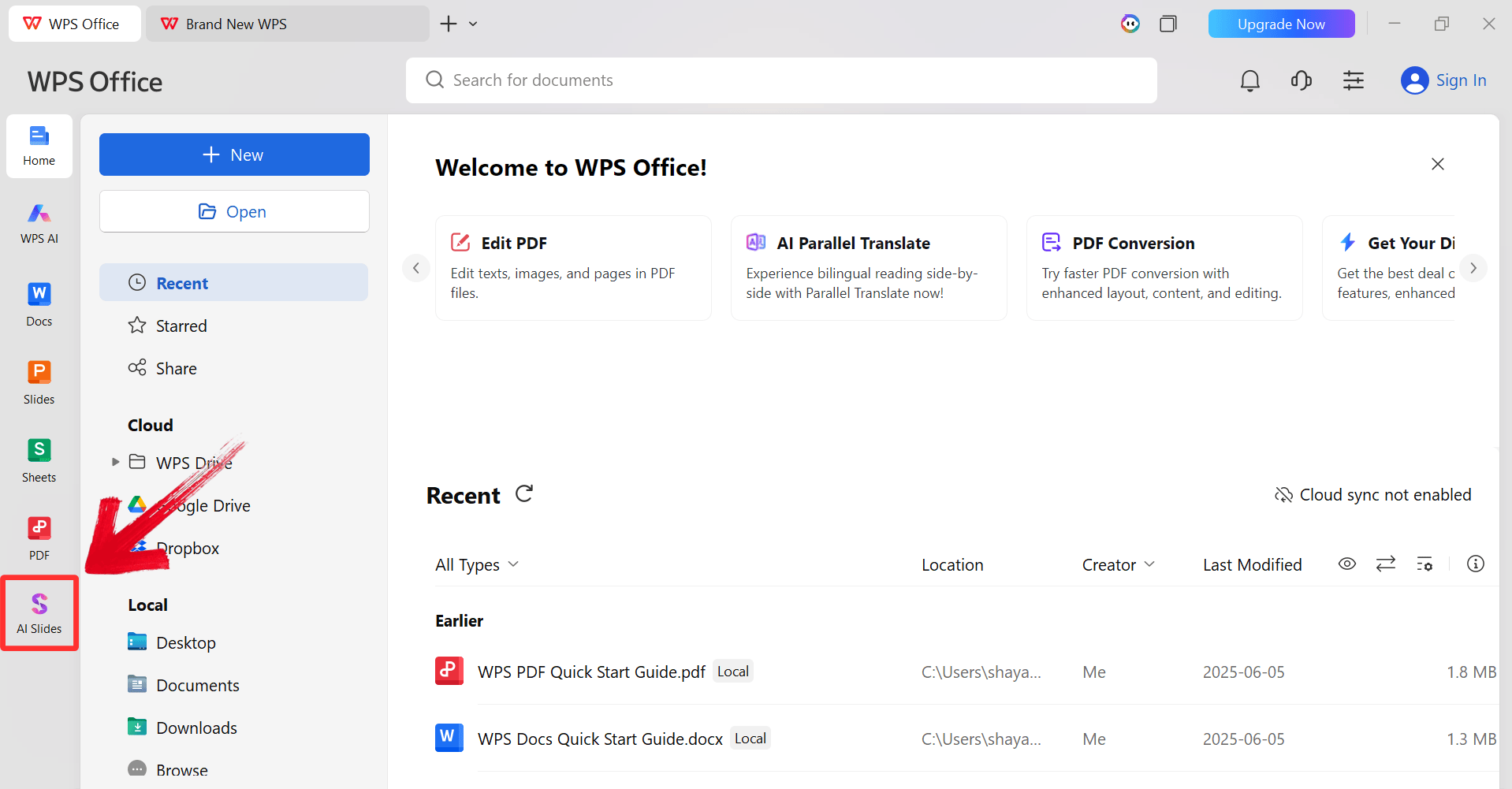
Step 4: After installation, in WPS Office, click “Slides” from the left sidebar.
WPS Slides Dashboard
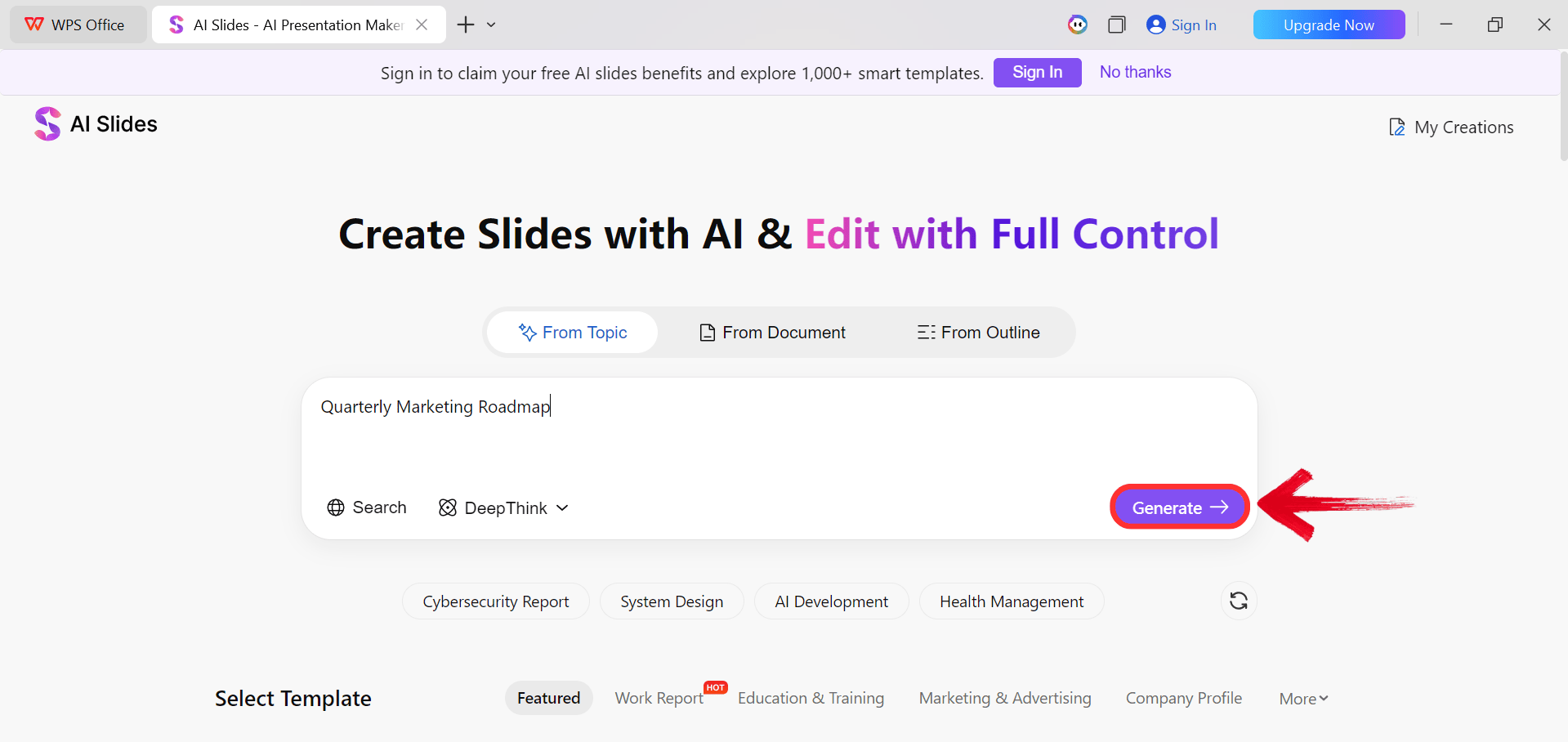
Step 5: Enter your presentation topic (e.g.,
"Quarterly Marketing Roadmap") into the dialogue box and click “Generate” to create the outline.
Click Generate
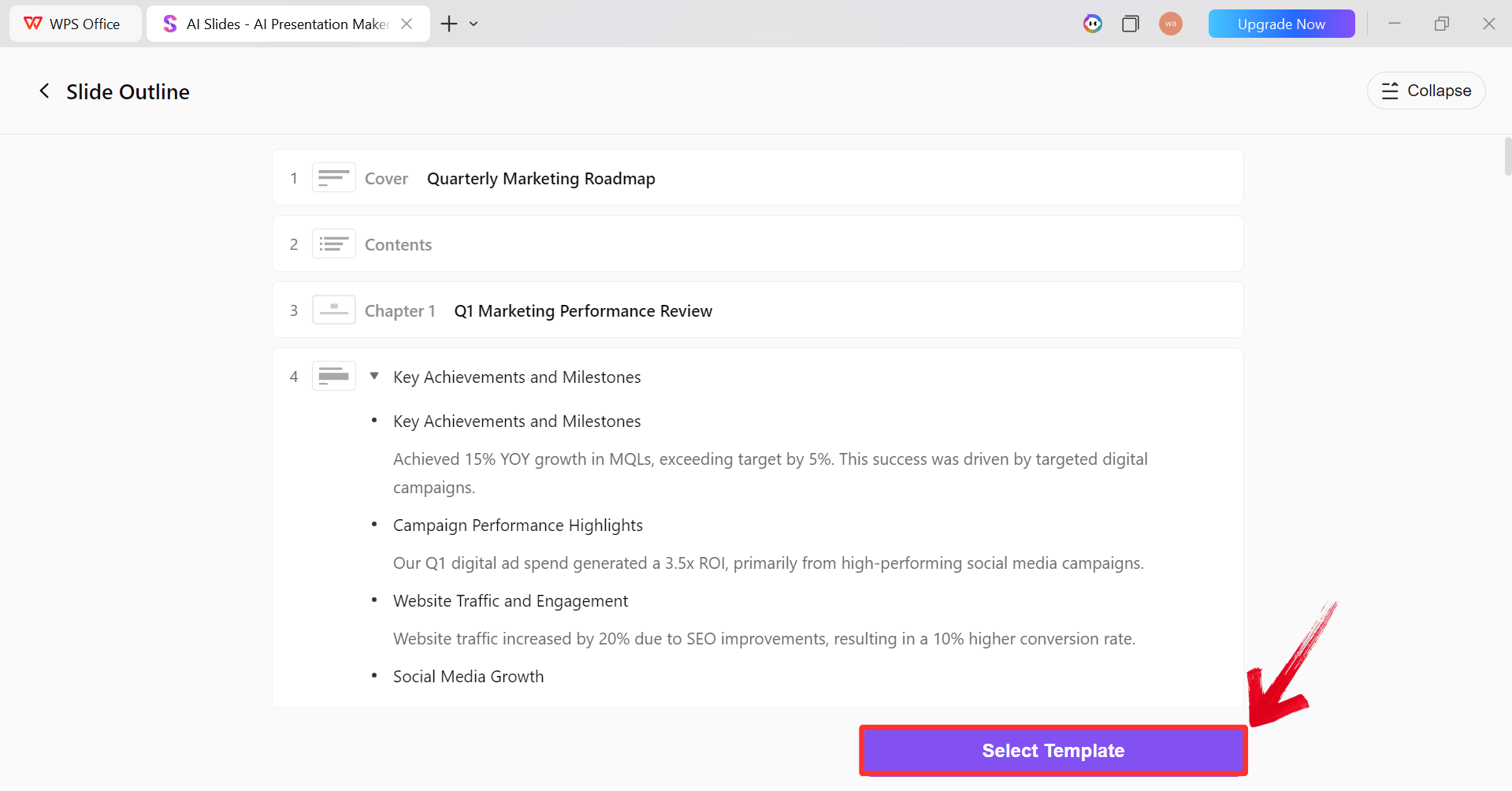
Step 6: After the AI creates the outline,
click “Select Template” to pick a template from the
already available ones.
AI Generated Outline
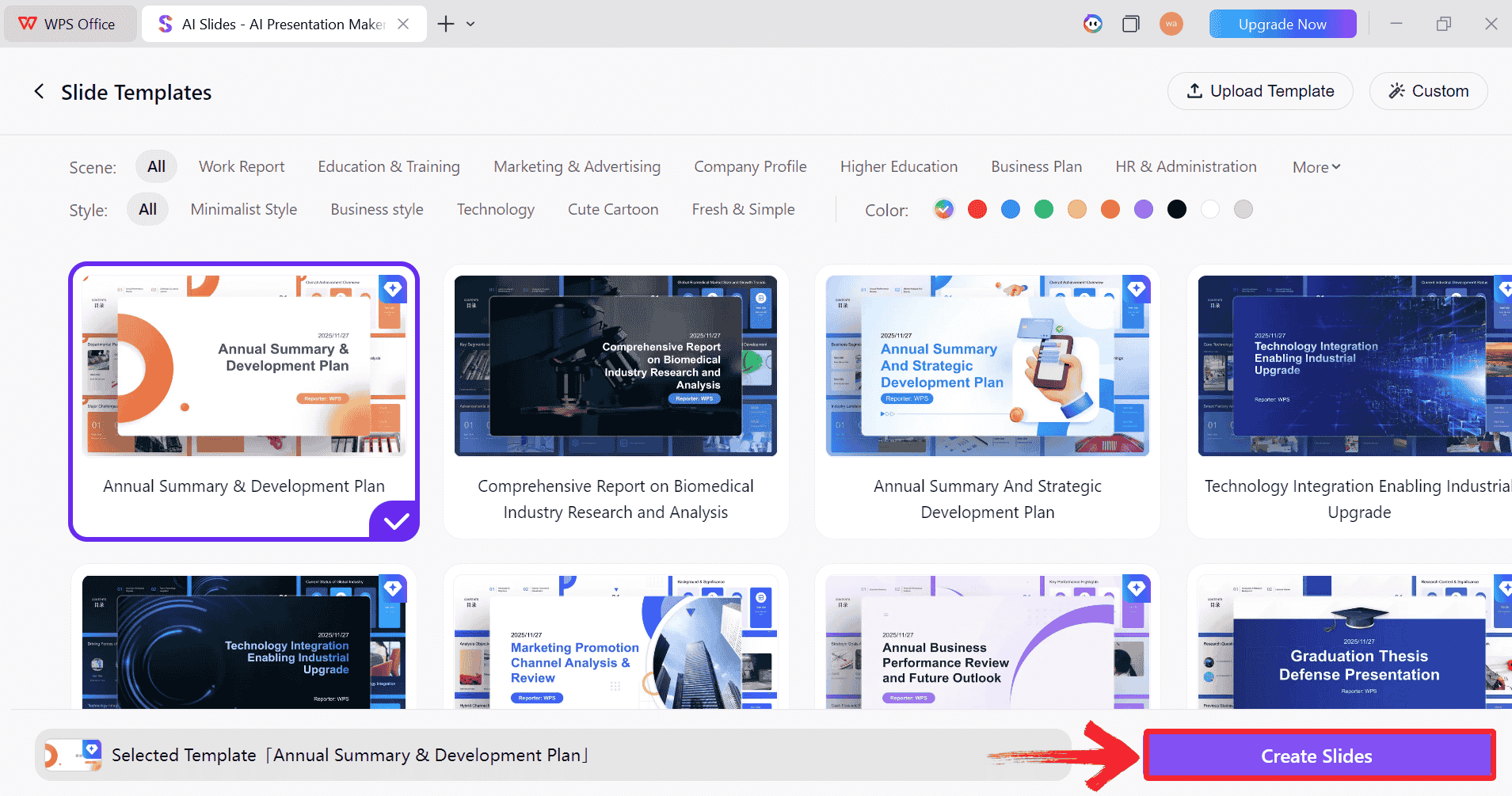
Step 7: Choose from the Wide template library and
click “Create Slides” to generate your
presentation.
Pick a Template
Step 8: Finally, your Slide deck will be generated
with the accurate content.
AI-generated PPT
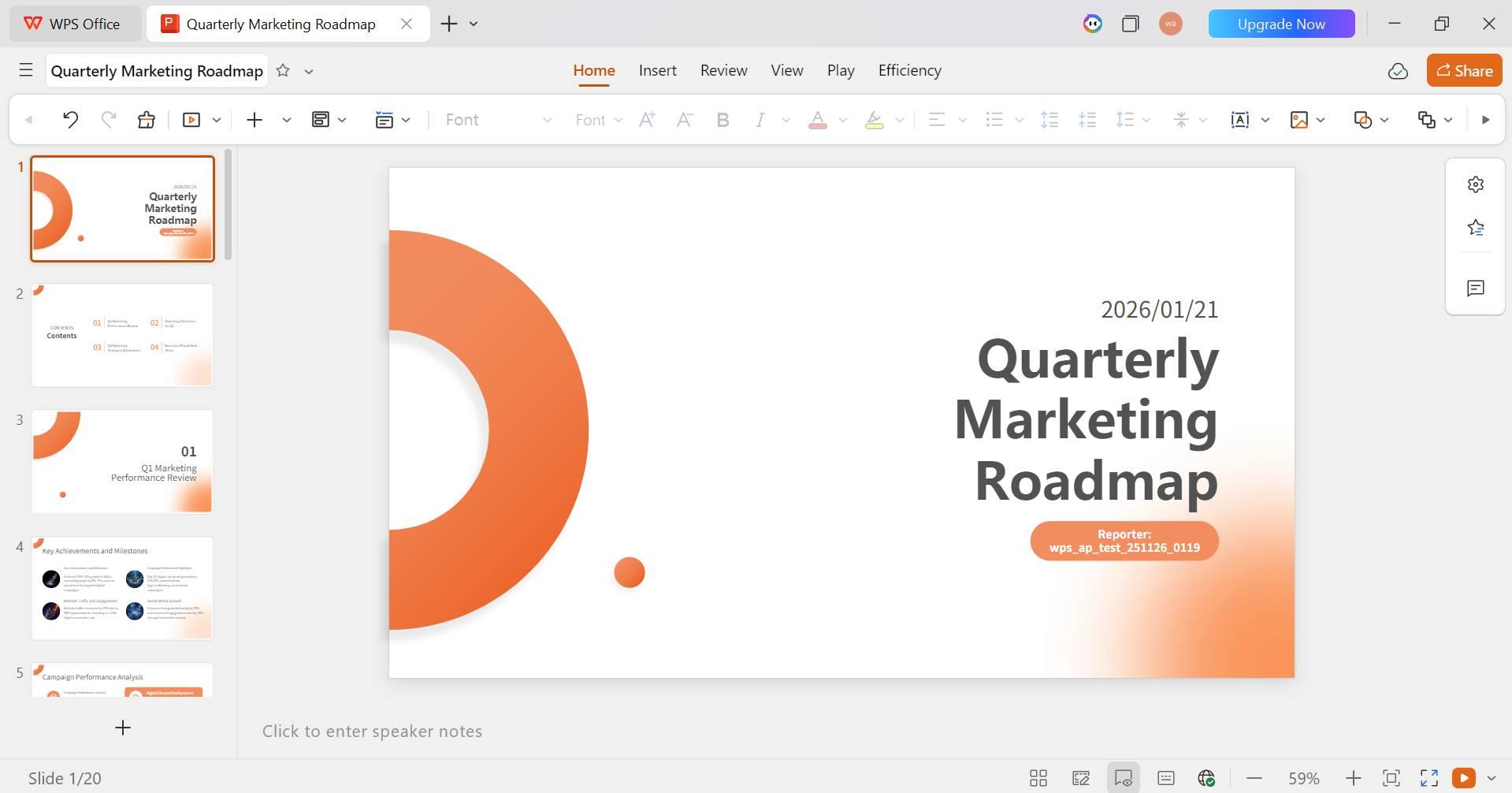
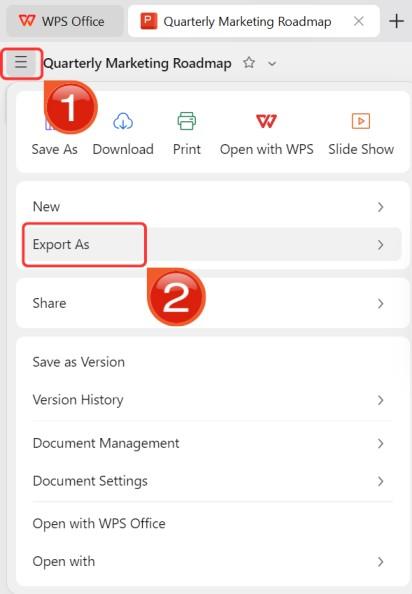
Step 9: Click on the File menu and then click “Export as” to download your PPT.
Export and Download
100% secure
FAQs
Q1: Is SlidesGPT free to use?
SlidesGPT typically allows users to generate previews for free, but
downloading or exporting the final editable presentation often requires
a one-time payment or a subscription plan.
Q2: Can
SlidesGPT export presentations to PowerPoint?
Yes, SlidesGPT usually offers an option to export to PowerPoint and
Google Slides. However, the editability of elements (like shapes and
text boxes) can sometimes be limited compared to decks created natively
in tools like WPS Office.
Q3: What
type of presentations is SlidesGPT best for?
SlidesGPT is best suited for quick drafts, brainstorming sessions,
and educational summaries. It is an excellent tool for getting ideas
onto the screen fast, but usually requires further polishing for
high-stakes business meetings.
When You Need More Than a Starting Point
In this Slides GPT summary review, we saw how SlidesGPT serves as a useful starting point for users who need to brainstorm and draft presentation content quickly using AI. It simplifies the initial hurdle of the blank page. However, for users who need richer content, granular design control, and a complete editing workflow that works offline, WPS AI Slides offers a smarter and more comprehensive alternative for delivering professional results.
Khadija Khan is a tech writer who explores office suites and creates content to simplify everyday tools. She teaches and inspires through clear, engaging writing.


'%3e%3cpath%20d='M8%200C12.4183%200%2016%203.58172%2016%208C16%2012.4183%2012.4183%2016%208%2016C3.58172%2016%200%2012.4183%200%208C0%203.58172%203.58172%200%208%200ZM11.6162%204.38379C11.2257%203.99337%2010.5927%203.99338%2010.2021%204.38379L8%206.58594L5.79785%204.38379C5.40732%203.99334%204.77429%203.99329%204.38379%204.38379C3.99331%204.77429%203.99335%205.40733%204.38379%205.79785L6.58594%208L4.38379%2010.2021C3.99348%2010.5927%203.99341%2011.2257%204.38379%2011.6162C4.77426%2012.0066%205.40734%2012.0065%205.79785%2011.6162L8%209.41406L10.2021%2011.6162C10.5927%2012.0066%2011.2257%2012.0067%2011.6162%2011.6162C12.0067%2011.2257%2012.0066%2010.5927%2011.6162%2010.2021L9.41406%208L11.6162%205.79785C12.0066%205.40735%2012.0066%204.77429%2011.6162%204.38379Z'%20fill='%23080E17'%20fill-opacity='0.46'/%3e%3c/g%3e%3cdefs%3e%3cclipPath%20id='clip0_3761_713'%3e%3crect%20width='16'%20height='16'%20fill='white'/%3e%3c/clipPath%3e%3c/defs%3e%3c/svg%3e)



'%3e%3cpath%20fill-rule='evenodd'%20clip-rule='evenodd'%20d='M21.4999%2010.9993C21.4999%205.20009%2016.7986%200.498901%2010.9993%200.498901C5.19994%200.498901%200.498657%205.20009%200.498657%2010.9993C0.498657%2016.2404%204.33858%2020.5844%209.35855%2021.3722V14.0346H6.69238V10.9993H9.35855V8.68594C9.35855%206.05427%2010.9262%204.60062%2013.3248%204.60062C14.4736%204.60062%2015.6753%204.80571%2015.6753%204.80571V7.38979H14.3512C13.0468%207.38979%2012.64%208.19921%2012.64%209.0296V10.9993H15.5523L15.0867%2014.0346H12.64V21.3722C17.66%2020.5844%2021.4999%2016.2404%2021.4999%2010.9993Z'%20fill='%231568EA'/%3e%3c/g%3e%3c/svg%3e)


'%3e%3cpath%20d='M2.42045%2022.1876H6.31818V12.7217L0.75%208.54553V20.5171C0.75%2021.4414%201.49892%2022.1876%202.42045%2022.1876Z'%20fill='%234285F4'/%3e%3cpath%20d='M19.682%2022.1876H23.5797C24.5041%2022.1876%2025.2502%2021.4387%2025.2502%2020.5171V8.54553L19.682%2012.7217'%20fill='%2334A853'/%3e%3cpath%20d='M19.682%205.48293V12.7216L25.2502%208.54543V6.31816C25.2502%204.25236%2022.8921%203.07469%2021.2411%204.31361'%20fill='%23FBBC04'/%3e%3cpath%20d='M6.31824%2012.7217V5.48303L13.0001%2010.4944L19.6819%205.48303V12.7217L13.0001%2017.733'%20fill='%23EA4335'/%3e%3cpath%20d='M0.75%206.31816V8.54543L6.31818%2012.7216V5.48293L4.75909%204.31361C3.10534%203.07469%200.75%204.25236%200.75%206.31816Z'%20fill='%23C5221F'/%3e%3c/g%3e%3cdefs%3e%3cclipPath%20id='clip0_2954_7305'%3e%3crect%20width='24.5'%20height='18.375'%20fill='white'%20transform='translate(0.75%203.8125)'/%3e%3c/clipPath%3e%3c/defs%3e%3c/svg%3e)




'%3e%3cpath%20d='M19.9911%204.11386V6.471H18.5894C18.0775%206.471%2017.7322%206.57814%2017.5536%206.79243C17.3751%207.00671%2017.2858%207.32814%2017.2858%207.75671V9.44421H19.9019L19.5536%2012.0871H17.2858V18.8639H14.5536V12.0871H12.2769V9.44421H14.5536V7.49779C14.5536%206.39064%2014.8632%205.53201%2015.4822%204.92189C16.1013%204.31177%2016.9257%204.00671%2017.9554%204.00671C18.8304%204.00671%2019.509%204.04243%2019.9911%204.11386Z'%20fill='%23333333'/%3e%3c/g%3e%3cdefs%3e%3cclipPath%20id='clip0_2938_8199'%3e%3crect%20width='16'%20height='16'%20fill='white'%20transform='translate(8%204.00671)'/%3e%3c/clipPath%3e%3c/defs%3e%3c/svg%3e)
'%3e%3cpath%20d='M17.5237%2010.7813L23.4811%204H22.0699L16.8949%209.88693L12.7648%204H8L14.2469%2012.9029L8%2020.0133H9.4112L14.8725%2013.7952L19.2352%2020.0133H24M9.92053%205.04213H12.0885L22.0688%2019.0224H19.9003'%20fill='%23333333'/%3e%3c/g%3e%3cdefs%3e%3cclipPath%20id='clip0_2938_8200'%3e%3crect%20width='16'%20height='16.0134'%20fill='white'%20transform='translate(8%204)'/%3e%3c/clipPath%3e%3c/defs%3e%3c/svg%3e)


