

'%3e%3cpath%20d='M8%200C12.4183%200%2016%203.58172%2016%208C16%2012.4183%2012.4183%2016%208%2016C3.58172%2016%200%2012.4183%200%208C0%203.58172%203.58172%200%208%200ZM11.6162%204.38379C11.2257%203.99337%2010.5927%203.99338%2010.2021%204.38379L8%206.58594L5.79785%204.38379C5.40732%203.99334%204.77429%203.99329%204.38379%204.38379C3.99331%204.77429%203.99335%205.40733%204.38379%205.79785L6.58594%208L4.38379%2010.2021C3.99348%2010.5927%203.99341%2011.2257%204.38379%2011.6162C4.77426%2012.0066%205.40734%2012.0065%205.79785%2011.6162L8%209.41406L10.2021%2011.6162C10.5927%2012.0066%2011.2257%2012.0067%2011.6162%2011.6162C12.0067%2011.2257%2012.0066%2010.5927%2011.6162%2010.2021L9.41406%208L11.6162%205.79785C12.0066%205.40735%2012.0066%204.77429%2011.6162%204.38379Z'%20fill='%23080E17'%20fill-opacity='0.46'/%3e%3c/g%3e%3cdefs%3e%3cclipPath%20id='clip0_3761_713'%3e%3crect%20width='16'%20height='16'%20fill='white'/%3e%3c/clipPath%3e%3c/defs%3e%3c/svg%3e)




'%3e%3cpath%20fill-rule='evenodd'%20clip-rule='evenodd'%20d='M21.4999%2010.9993C21.4999%205.20009%2016.7986%200.498901%2010.9993%200.498901C5.19994%200.498901%200.498657%205.20009%200.498657%2010.9993C0.498657%2016.2404%204.33858%2020.5844%209.35855%2021.3722V14.0346H6.69238V10.9993H9.35855V8.68594C9.35855%206.05427%2010.9262%204.60062%2013.3248%204.60062C14.4736%204.60062%2015.6753%204.80571%2015.6753%204.80571V7.38979H14.3512C13.0468%207.38979%2012.64%208.19921%2012.64%209.0296V10.9993H15.5523L15.0867%2014.0346H12.64V21.3722C17.66%2020.5844%2021.4999%2016.2404%2021.4999%2010.9993Z'%20fill='%231568EA'/%3e%3c/g%3e%3c/svg%3e)


'%3e%3cpath%20d='M2.42045%2022.1876H6.31818V12.7217L0.75%208.54553V20.5171C0.75%2021.4414%201.49892%2022.1876%202.42045%2022.1876Z'%20fill='%234285F4'/%3e%3cpath%20d='M19.682%2022.1876H23.5797C24.5041%2022.1876%2025.2502%2021.4387%2025.2502%2020.5171V8.54553L19.682%2012.7217'%20fill='%2334A853'/%3e%3cpath%20d='M19.682%205.48293V12.7216L25.2502%208.54543V6.31816C25.2502%204.25236%2022.8921%203.07469%2021.2411%204.31361'%20fill='%23FBBC04'/%3e%3cpath%20d='M6.31824%2012.7217V5.48303L13.0001%2010.4944L19.6819%205.48303V12.7217L13.0001%2017.733'%20fill='%23EA4335'/%3e%3cpath%20d='M0.75%206.31816V8.54543L6.31818%2012.7216V5.48293L4.75909%204.31361C3.10534%203.07469%200.75%204.25236%200.75%206.31816Z'%20fill='%23C5221F'/%3e%3c/g%3e%3cdefs%3e%3cclipPath%20id='clip0_2954_7305'%3e%3crect%20width='24.5'%20height='18.375'%20fill='white'%20transform='translate(0.75%203.8125)'/%3e%3c/clipPath%3e%3c/defs%3e%3c/svg%3e)


Fundraising in 2026 moves fast, and there’s little room for second chances. Founders are expected to communicate vision, traction, and credibility in minutes, not weeks. That pressure is exactly why Pitch AI has become a go-to solution for building investor-ready decks at speed. Still, many teams struggle with high costs, fragmented tools, and confusing workflows. This guide breaks down what Pitch AI offers, explains how to use Pitch AI effectively, and introduces a more seamless alternative designed to fit naturally into your existing workflow.
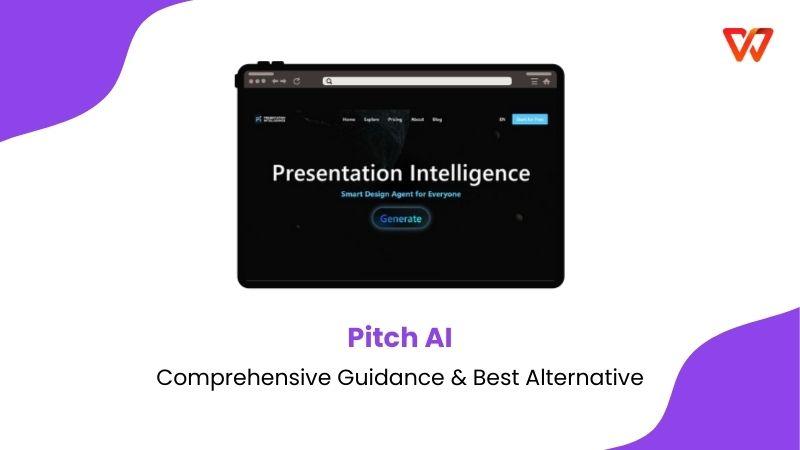
What Is Pitch AI?
Before diving into comparisons, I want to ground you in what Pitch AI actually is and why it gained traction so quickly. Pitch AI is an AI-powered presentation assistant built into Pitch.com. I’ve used it primarily for investor decks and internal strategy presentations. The platform focuses on speed, collaboration, and visual clarity. Instead of starting from a blank slide, you describe your idea and Pitch AI generates structured slides aligned with modern startup storytelling. What stands out to me is how it feels purpose-built for pitching. You’re not adapting a generic slide tool; you’re stepping into an environment designed around persuasion, clarity, and engagement.

Pitch AI exists to reduce friction. You explain your startup, target audience, and goals, and the AI suggests layouts, content blocks, and design themes. This makes it especially useful when time is tight and expectations are high. Pitch AI operates on a subscription model through Pitch.com. There is a limited free Pitch AI tier, but advanced AI features, analytics, and collaboration require paid plans. For early-stage founders, this cost can feel heavy when fundraising is not yet guaranteed.
Pitch AI impressed me with speed and aesthetics, but I felt boxed in by pricing once I needed flexibility beyond pitching.
Pitch AI: Pros and Cons
To help you decide quickly, this breakdown follows the same criteria used to evaluate tools in real project environments. The focus stays on practicality under tight deadlines and high investor expectations. Special attention is given to how intuitive the workflow is for users searching for how to use Pitch AI, along with the overall value offered by a free Pitch AI option before upgrading. Additionally, a Pitch AI recommendation is provided to highlight which features deliver the most impact for startup founders and teams.
Pros:
Excellent real-time collaboration:
When you’re working with co-founders or advisors, changes appear instantly. I’ve found this especially useful during live feedback sessions.
Powerful engagement analytics:
You can trackslide views and engagement, which helps refine your pitch before key meetings.
Modern UI and beautiful templates:
Pitch AI nails visual balance. Even rushed decks look investor-ready.
Cons:
Limited AI prompt length:
The 400-character limit often forces you to oversimplify complex business models.
Fewer deep design customizations:
Advanced designersmay feel constrained when pushing brand-specific visuals.
Standalone platform:
You still jump between Pitch AI and your main office tools, which breaks workflow momentum.
Pitch AI shines for fast collaboration, but I often wished it lived inside my main document ecosystem.
Six Best Practices for AI-Enhanced Pitch Decks
These practices come from repeated real-world use, not theory. When you apply them consistently, AI becomes a strategic assistantinstead of a shortcut that weakens your story.
Start With Story Structure
Before generating slides, I outline the narrative in plain words. You should guide the AI with a clear beginning, middle, and outcome. This keeps the deck persuasive rather than random and helps investors follow your logic effortlessly.
Design That Drives Decisions
AI provides layouts, but you decide emphasis. I intentionally highlight traction, revenue logic, or risk mitigation instead of decorative visuals that add no strategic value.
Data Visualization Strategy
I always review charts manually. AI-generatedvisuals save time, but accuracy and clarity still sit with you. Clean graphs build credibility instantly.
Smart Customization
Treat AI output as a working draft. I refine tone, adjust phrasing, and align branding so the deck sounds human and intentional, not automated.
Quality Control Process
ABefore sharing, I review flow, grammar, and slide balance. AI accelerates creation, but trust is earned through polish.
Audience-Specific Narratives
Different investors care about different risks. I slightly adapt the same AI-generated deck depending on the audience to keep relevance high.
Once you guide AI with structure and intent, pitch quality improves dramatically.
The Best Alternative: WPS AI Slides
While Pitch AI delivers speed and collaboration for presentation-focused workflows, many teams eventually look for a solution that supports more than just slide creation. As pitching becomes one component of a larger business process, spanning financial modeling, documentation, and revisions, the need for deeper integration becomes more apparent. This shift is where WPS AI Slides begins to differentiate itself.
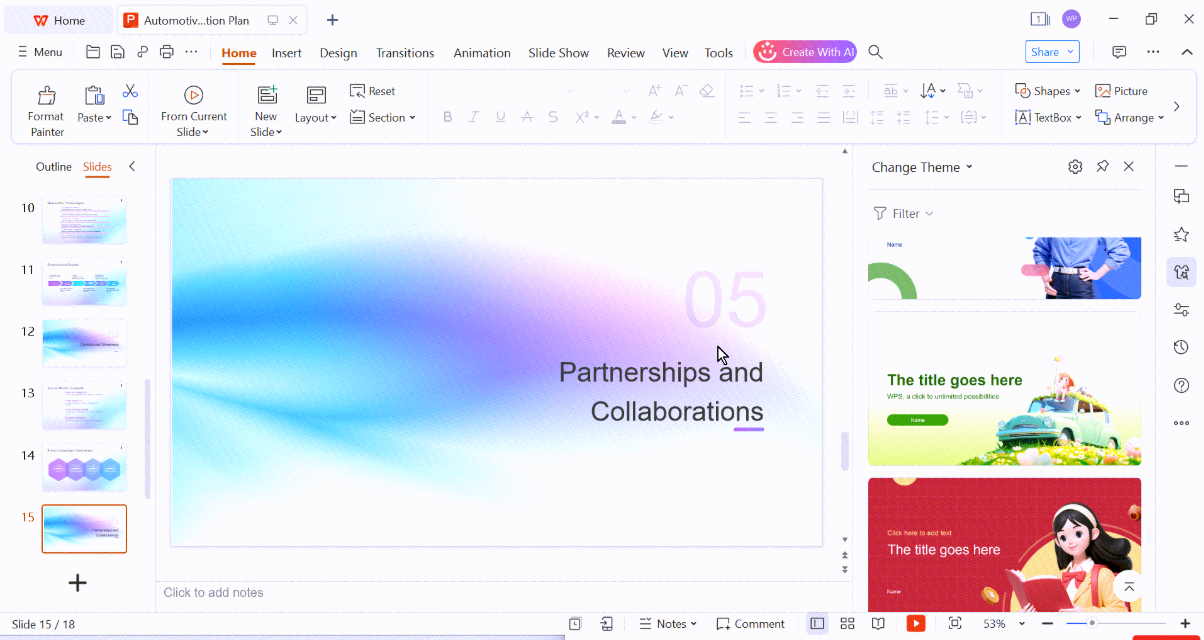
It supports not only presentations, but also documents, spreadsheets, PDFs, and file conversions, making it practical when pitching is just one part of a broader workflow. The software can be downloaded and used offline, offering stability and control during high-pressure preparation phases. Its core strength is integration, keeping pitch decks, financial models, and legal documents in one consistent environment without formatting disruptions.
Functions and Features:
AI-generated slide outlines
Investor-ready templates
PDF, JPG, and file conversion
Cross-platform support
Cloud and offline access
How to Use WPS AI Slides:
Before jumping into steps, let me explain how I approach it. I treat WPS as my central workspace.
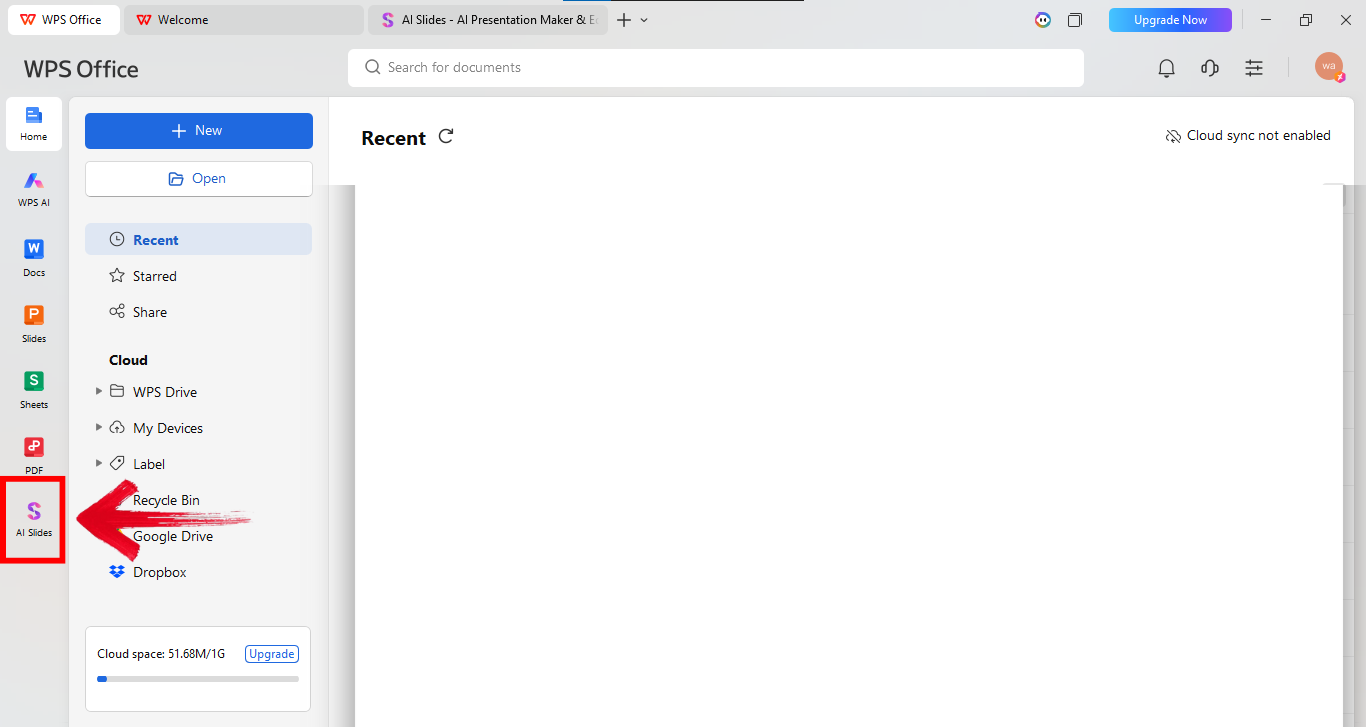
Step 1: First of all, open WPS office and click AI Slides from the panel on the left side of your screen.
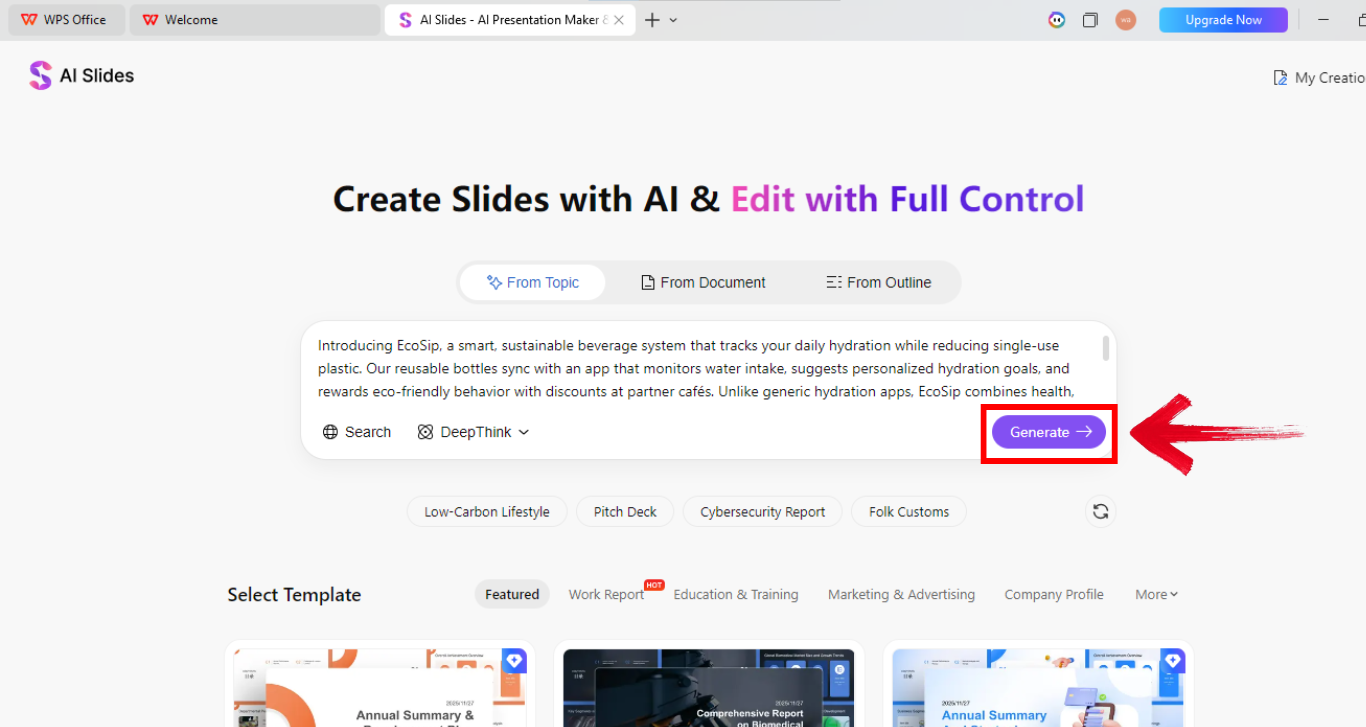
Step 2: Now explain your startup in the prompt box. Give details about the audience, and goal. Longer prompts work better here. Once done, click “Generate” to bring the presentation to life.
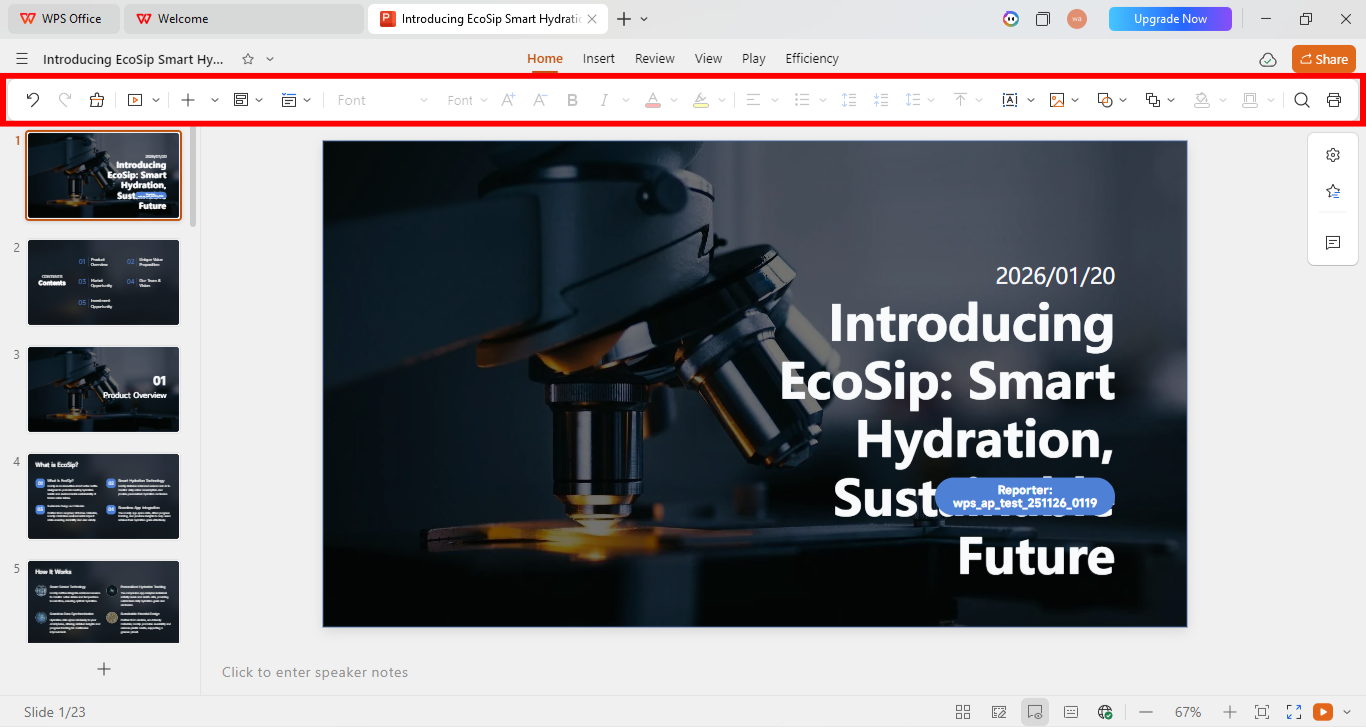
Step 3: Once the presentation is there, use the editing panel above your presentation to make relevant changes.
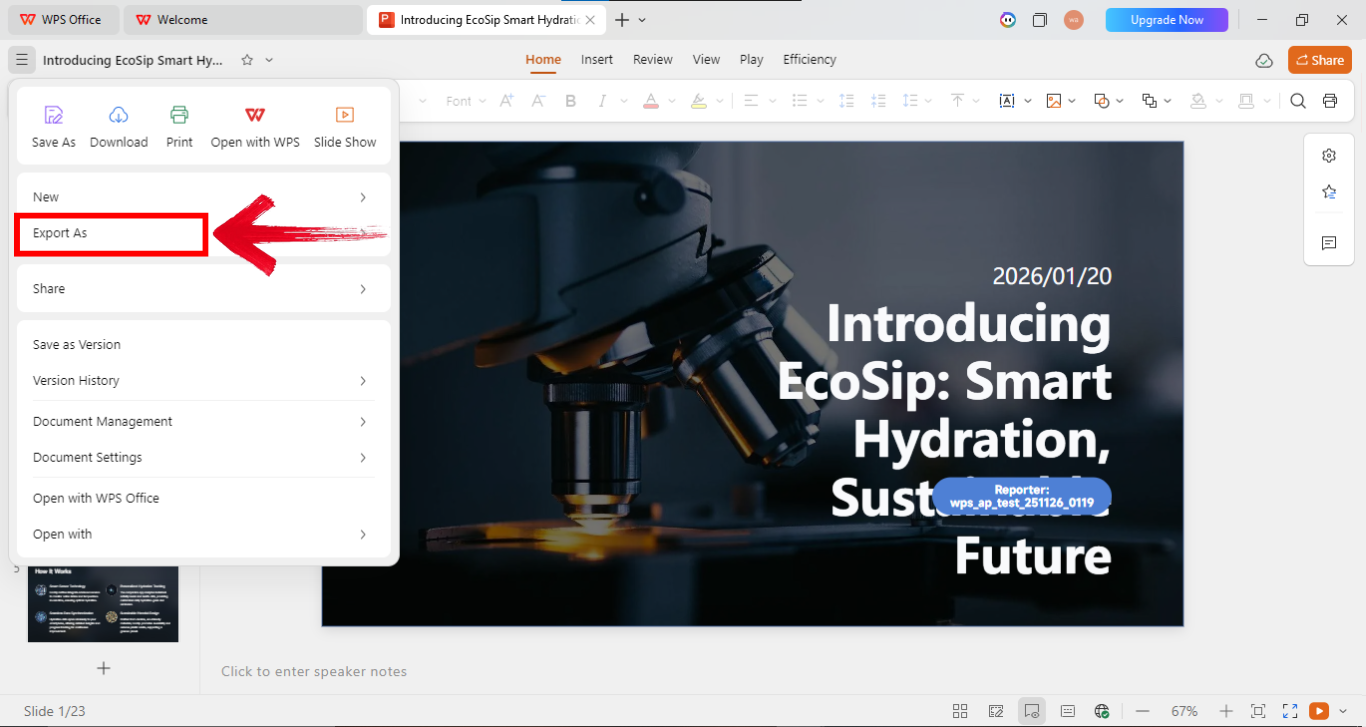
Step 4: Now go to the options on the top left of your screen and click “Export as” to export the file in your preferred file type.
Pros:
Integrated office ecosystem
Cost-effective for startups
Flexible AI input length
Cons:
Fewer niche pitch analytics
Less startup-specific branding out of the box
Requires initial setup familiarity
WPS AI Slides felt like a long-term tool, not just a fundraising shortcut.
Comparison: Pitch AI vs. WPS AI Slides
Before choosing between these tools, it helps to step back and look at how they fit into your broader workflow. Pitch AI focuses on pitching as a single activity, while WPS AI Slides treats pitching as one part of running a business. I compare them below based on real usage, not feature lists alone.
| Feature | Pitch AI | WPS AI Slides |
|---|---|---|
| Core Focus | Investor presentations | Full office productivity + AI slides |
| Platform Type | Web-based standalone tool | Downloadable desktop & cloud suite |
| AI Prompt Flexibility | Limited prompt length | Longer, more detailed prompts |
| Collaboration | Strong real-time collaboration | File-based and cloud collaboration |
| Analytics | Built-in engagement tracking | Basic presentation insights |
| Pricing Model | Subscription-focused | Cost-effective bundled suite |
| Workflow Integration | Requires switching tools | All documents in one ecosystem |
I use Pitch AI for fast, collaborative pitch reviews, but WPS AI Slides has become my go-to for serious, end-to-end preparation.
FAQs
Q1: How does WPS AI help me follow a professional investor pitch deck structure?
WPS AI organizes your content into investor-expected sections like Problem, Solution, and Market Size, ensuring narrative clarity.
Q2: Why is WPS AI a smarter Pitch AI alternative for startups on a budget?
You get AI slides plus documents and spreadsheets in one affordable suite, reducing tool sprawl.
Q3: Can beginners use Pitch AI effectively?
Yes. With a clear idea and structured prompts, beginners can create polished decks quickly.
Q4: Is free Pitch AI enough for fundraising?
Free tiers help you test ideas, but serious fundraising usually requires advanced features.
Q5: How do I switch from Pitch AI to WPS AI Slides smoothly?
Export your content, then rebuild structure inside WPS using AI-assisted outlines.
Pitch AI and WPS AI Slides Insights
In 2026, Pitch AI has become a go-to solution for fast, professional storytelling. It helps founders structure investor narratives and build polished decks quickly, but standalone pitching tools can feel limiting once supporting documents and revisions enter the picture. This is whereWPS AI Slides, integrated within WPS Office, stands out by keeping presentations, spreadsheets, and related files in one connected workspace.

'%3e%3cpath%20d='M19.9911%204.11386V6.471H18.5894C18.0775%206.471%2017.7322%206.57814%2017.5536%206.79243C17.3751%207.00671%2017.2858%207.32814%2017.2858%207.75671V9.44421H19.9019L19.5536%2012.0871H17.2858V18.8639H14.5536V12.0871H12.2769V9.44421H14.5536V7.49779C14.5536%206.39064%2014.8632%205.53201%2015.4822%204.92189C16.1013%204.31177%2016.9257%204.00671%2017.9554%204.00671C18.8304%204.00671%2019.509%204.04243%2019.9911%204.11386Z'%20fill='%23333333'/%3e%3c/g%3e%3cdefs%3e%3cclipPath%20id='clip0_2938_8199'%3e%3crect%20width='16'%20height='16'%20fill='white'%20transform='translate(8%204.00671)'/%3e%3c/clipPath%3e%3c/defs%3e%3c/svg%3e)
'%3e%3cpath%20d='M17.5237%2010.7813L23.4811%204H22.0699L16.8949%209.88693L12.7648%204H8L14.2469%2012.9029L8%2020.0133H9.4112L14.8725%2013.7952L19.2352%2020.0133H24M9.92053%205.04213H12.0885L22.0688%2019.0224H19.9003'%20fill='%23333333'/%3e%3c/g%3e%3cdefs%3e%3cclipPath%20id='clip0_2938_8200'%3e%3crect%20width='16'%20height='16.0134'%20fill='white'%20transform='translate(8%204)'/%3e%3c/clipPath%3e%3c/defs%3e%3c/svg%3e)


