



'%3e%3cpath%20fill-rule='evenodd'%20clip-rule='evenodd'%20d='M21.4999%2010.9993C21.4999%205.20009%2016.7986%200.498901%2010.9993%200.498901C5.19994%200.498901%200.498657%205.20009%200.498657%2010.9993C0.498657%2016.2404%204.33858%2020.5844%209.35855%2021.3722V14.0346H6.69238V10.9993H9.35855V8.68594C9.35855%206.05427%2010.9262%204.60062%2013.3248%204.60062C14.4736%204.60062%2015.6753%204.80571%2015.6753%204.80571V7.38979H14.3512C13.0468%207.38979%2012.64%208.19921%2012.64%209.0296V10.9993H15.5523L15.0867%2014.0346H12.64V21.3722C17.66%2020.5844%2021.4999%2016.2404%2021.4999%2010.9993Z'%20fill='%231568EA'/%3e%3c/g%3e%3c/svg%3e)


'%3e%3cpath%20d='M2.42045%2022.1876H6.31818V12.7217L0.75%208.54553V20.5171C0.75%2021.4414%201.49892%2022.1876%202.42045%2022.1876Z'%20fill='%234285F4'/%3e%3cpath%20d='M19.682%2022.1876H23.5797C24.5041%2022.1876%2025.2502%2021.4387%2025.2502%2020.5171V8.54553L19.682%2012.7217'%20fill='%2334A853'/%3e%3cpath%20d='M19.682%205.48293V12.7216L25.2502%208.54543V6.31816C25.2502%204.25236%2022.8921%203.07469%2021.2411%204.31361'%20fill='%23FBBC04'/%3e%3cpath%20d='M6.31824%2012.7217V5.48303L13.0001%2010.4944L19.6819%205.48303V12.7217L13.0001%2017.733'%20fill='%23EA4335'/%3e%3cpath%20d='M0.75%206.31816V8.54543L6.31818%2012.7216V5.48293L4.75909%204.31361C3.10534%203.07469%200.75%204.25236%200.75%206.31816Z'%20fill='%23C5221F'/%3e%3c/g%3e%3cdefs%3e%3cclipPath%20id='clip0_2954_7305'%3e%3crect%20width='24.5'%20height='18.375'%20fill='white'%20transform='translate(0.75%203.8125)'/%3e%3c/clipPath%3e%3c/defs%3e%3c/svg%3e)


Quick answer: For a production React Native PDF view, most teams start with react-native-pdf (plus react-native-blob-util) so iOS/Android can render remote or local PDFs with zoom and page changes. It will not run inside Expo Go—you need a development build / prebuild. For a quick Expo experiment, a WebView + PDF.js approach can preview files with fewer features. If the in-app viewer keeps failing on weird fonts or huge scans, let users open the same file in a full reader such as WPS Office.

Search intent for react native pdf view is mostly developer how-to: which library to install, how to load a URL or file:// path, whether Expo works, and how to fix a blank screen. End users who land here usually just need a PDF that opens—cover that briefly after the implementation path.
What you need for a React Native PDF view
Native viewer module —
react-native-pdfis the widely used community component for iOS and Android.Blob helper — install
react-native-blob-utilalongside it for caching/downloads.Native build — Expo Go does not include this native code; use a custom dev client / EAS build.
Clear source URI — HTTPS URL,
file:///path, asset URI, or Base64 (Base64 is the heaviest option).
How to add react-native-pdf (bare RN or Expo prebuild)
Install packages:
react-native-pdfandreact-native-blob-util.For Expo, add the matching config plugins (for example
@config-plugins/react-native-pdfand@config-plugins/react-native-blob-util), then run prebuild / rebuild the native app.Import the component and give it a
sourceplusstyle={{ flex: 1 }}.Wire
onLoadComplete,onPageChanged, andonErrorso blank screens are debuggable.
import React from 'react';
import { View, StyleSheet } from 'react-native';
import Pdf from 'react-native-pdf';

export default function InvoicePdf() {
  const source = {
    uri: 'https://www.w3.org/WAI/ER/tests/xhtml/testfiles/resources/pdf/dummy.pdf',
    cache: true,
  };

  return (console.log('pages', pages)}
        onPageChanged={(page, pages) => console.log(page, '/', pages)}
        onError={(e) => console.warn(e)}
      />);
}

const styles = StyleSheet.create({
  box: { flex: 1 },
  pdf: { flex: 1, width: '100%' },
});
That single screen already covers the core react native pdf view job: load, show pages, report errors.
Expo Go vs development build
Expo Go: native PDF modules are unavailable. Use a WebView/PDF.js viewer only for demos, or switch to a development build.
Expo with native PDF: configure plugins, then
npx expo prebuild/ EAS Build soreact-native-pdfis compiled in.After SDK upgrades: rebuild the client—stale binaries are a common reason PDFs “suddenly” stop rendering.

Load remote, local, asset, and Base64 PDFs
Remote:
{ uri: 'https://…/file.pdf', cache: true }— add headers when the file needs auth.Local file:
{ uri: 'file:///…/doc.pdf' }— paths differ on iOS vs Android; avoid spaces/special characters when possible.Android assets:
bundle-assets://…underandroid/app/src/main/assets.iOS require:
require('./test.pdf')works on iOS in many setups; verify Android separately.Base64: works, but huge strings hurt memory—prefer files on disk for multi-megabyte reports.
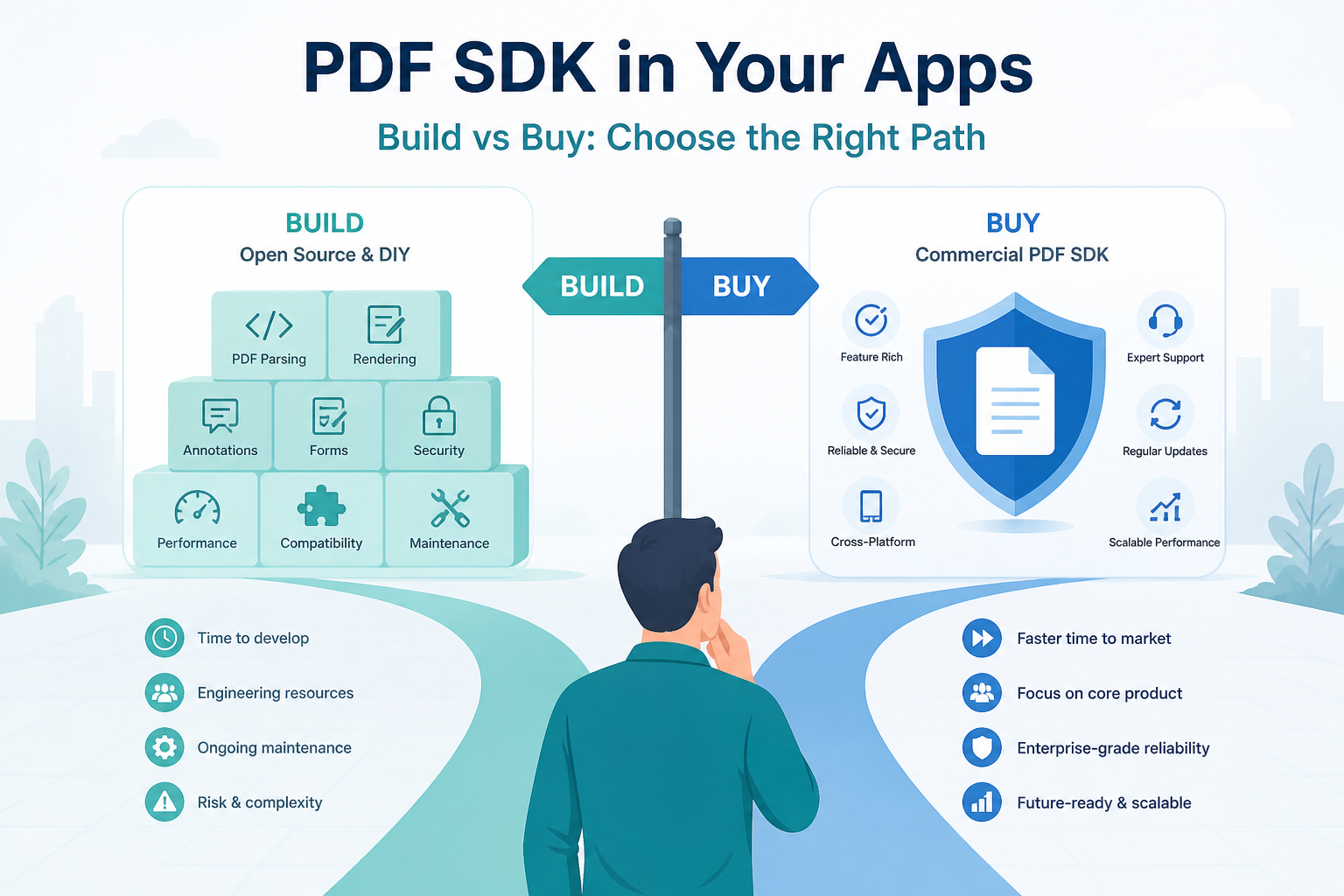
react-native-pdf vs WebView vs commercial PDF SDK
| Approach | Best for | Watch-outs |
|---|---|---|
| react-native-pdf | In-app preview, zoom, page jump, password PDFs | Needs native build; watch New Architecture releases |
| WebView / PDF.js | Expo Go spikes, simple remote preview | Weaker native feel; Android may download instead of render |
| Commercial SDK | Annotate, forms, sign, enterprise viewers | License cost; heavier integration |
Match cost to scope: a “show the invoice” screen rarely needs a paid SDK. Annotation, AcroForm fill, and legally defensible signing usually push teams to buy—or to hand the file to an external reader.
Fix a blank React Native PDF view
Confirm you are not testing inside Expo Go when using
react-native-pdf.Log
onErrorandonLoadComplete—silent blanks often mean a bad URI or a native bridge issue.On React Native New Architecture builds, use a current
react-native-pdfrelease known to support Fabric (blank iOS views were a recurring report on older pairings).Rebuild after upgrading RN/Expo SDK so native binaries match JS.
For large files, enable
cache: true, avoid stuffing megabytes of Base64 into JS, and test low-memory Android devices.
When the in-app view is enough—and when to open in WPS PDF
Ship an in-app react native pdf view when PDF is part of the session (checkout receipts, policy review, ticket boarding passes). Deep-link or “Open with…” to a full suite when users need reliable markup, odd encodings, or mixed Office+PDF work outside your UI.
WPS Office PDF is a practical handoff: users can open the same file with search and markup, then keep Word/Excel nearby without installing a PDF-only toolchain. That does not replace your RN component—it covers the long tail of files lightweight viewers reject.
FAQ
What is the best library for a React Native PDF view?
For most preview screens, react-native-pdf is the common starting point. Pick a commercial SDK when you need production annotation, forms, or signing.
Does react-native-pdf work with Expo Go?
No. It needs native code. Use a development build with config plugins, or a WebView/PDF.js viewer for Expo Go demos only.
How do I open a local PDF file in React Native?
Pass a file:/// URI (or platform asset URI) to the viewer’s source. Test iOS and Android paths separately and avoid oversized Base64 payloads.
Why is my React Native PDF view a blank screen?
Typical causes: running in Expo Go, a bad URI, a stale native binary after an SDK upgrade, or New Architecture compatibility gaps on older library versions.
Should I use a WebView to display PDFs?
WebView/PDF.js is fine for lightweight remote preview. Prefer a native module when you need consistent zoom, caching, and offline local-file behavior.
When should the app open PDFs in WPS instead of in-app?
When PDF is occasional, files are messy/scanned, or users need markup and Office formats together—offer Open with WPS PDF while keeping a simple in-app preview for core flows.
Summary
A solid React Native PDF view usually means react-native-pdf + blob util, a real native build (not Expo Go), and careful URI/caching choices. Use WebView only for light Expo experiments, and budget a commercial SDK when annotation/forms are product-critical. Fix blanks by verifying architecture support and rebuilding after upgrades. For stubborn real-world files, let users finish in WPS PDF while your app keeps a fast in-app preview.



'%3e%3cpath%20d='M19.9911%204.11386V6.471H18.5894C18.0775%206.471%2017.7322%206.57814%2017.5536%206.79243C17.3751%207.00671%2017.2858%207.32814%2017.2858%207.75671V9.44421H19.9019L19.5536%2012.0871H17.2858V18.8639H14.5536V12.0871H12.2769V9.44421H14.5536V7.49779C14.5536%206.39064%2014.8632%205.53201%2015.4822%204.92189C16.1013%204.31177%2016.9257%204.00671%2017.9554%204.00671C18.8304%204.00671%2019.509%204.04243%2019.9911%204.11386Z'%20fill='%23333333'/%3e%3c/g%3e%3cdefs%3e%3cclipPath%20id='clip0_2938_8199'%3e%3crect%20width='16'%20height='16'%20fill='white'%20transform='translate(8%204.00671)'/%3e%3c/clipPath%3e%3c/defs%3e%3c/svg%3e)
'%3e%3cpath%20d='M17.5237%2010.7813L23.4811%204H22.0699L16.8949%209.88693L12.7648%204H8L14.2469%2012.9029L8%2020.0133H9.4112L14.8725%2013.7952L19.2352%2020.0133H24M9.92053%205.04213H12.0885L22.0688%2019.0224H19.9003'%20fill='%23333333'/%3e%3c/g%3e%3cdefs%3e%3cclipPath%20id='clip0_2938_8200'%3e%3crect%20width='16'%20height='16.0134'%20fill='white'%20transform='translate(8%204)'/%3e%3c/clipPath%3e%3c/defs%3e%3c/svg%3e)


