Modern professionals are drowning in busywork, from scouring the web
for reliable data to formatting endless slide decks. Although artificial
intelligence promises to automate these tasks, the market is cluttered
with tools that often feel like glorified chatbots rather than actual
assistants. Finding a solution that can autonomously research, verify
facts, and build tangible outputs, like presentations or reports, is
difficult. This review breaks down Genspark AI, evaluating whether its
Super Agent capabilities truly deliver on their promise.
Genspark AI
What Is Genspark AI – An
Overview
Genspark AI is an AI
Agent Workspace designed to automate complex information retrieval and
content generation tasks. Unlike standard chatbots that rely on
pre-trained data to answer prompts, Genspark utilizes specialized Super
Agents that actively search the web, cross-reference multiple
authoritative sources, and synthesize findings into structured formats.
Its primary function is to serve as an autonomous researcherand creator, targeting students, analysts, and professionals who require
accurate, cited information rather than simple links.
Genspark AI interface
The platform differentiates itself with Sparkpages, ad-free
microsites that consolidate research into dynamic reports. Rather than
requiring users to manually sift through search results, Genspark reads
and summarizes the data, constructing a final document complete with
citations, videos, and data tables. This eliminates manual search and
delivers instant, synthesized insights.
Exploring Genspark AI
– Features, Pros, Cons
Genspark integrates deep search capabilities with generative tools,
consolidating research, writing, and slide creation into a single
interface.
Key Features:
AI Super Agent: Conducts multi-step research by
analyzing authoritative sources to provide fact-checked
answers.
Sparkpages: Generates instant, structured
one-page reports on any topic, including relevant media and
citations.
Genspark AI Slides: Converts research summaries
or uploaded PDFs into downloadable PowerPoint presentations.
Multi-Model Access: Automatically selects
top-tier models (such as GPT-4, Claude, or Gemini) to provide the most
accurate response for each specific query.
Pros:
Automates deep research and source summarization.
Cites real-time sources to ensure factual accuracy.
Generates text, images, and slides in a single
interface.
Cons:
Limited built-in design tools for editing slides.
Heavy usage of advanced features drains credits quickly.
Steeper learning curve for mastering agent prompts.
Understanding
Genspark AI Pricing Plans And Options
Genspark utilizes a freemium model, offering basic access to all
users while reserving high-volume usage and advancedmodels for subscribers.
Plan
Estimated Cost
Best For
Key Inclusions
Free Plan
$0 / month
Casual Research
Daily credit limits, basic agent access,
standard generation speed.
Plus Plan
~$25 / month
Professionals
Higher monthly credit allowance,
priority access to advanced models (GPT-4o, Claude 3.5), faster
processing.
Pro / Team
~$250 / month
Agencies / Teams
Extensive credit limits for heavy
research, priority support, and collaborative team features.
Step-By-Step
Guide To Using Genspark AI Slides
Genspark allows users to transform concepts or documents into visual
presentations, making it an effective tool for drafting pitch decks or
lecture summaries.
Step 1: First, head on over to the Genspark AI website and
create a new account.
Genspark AI interface
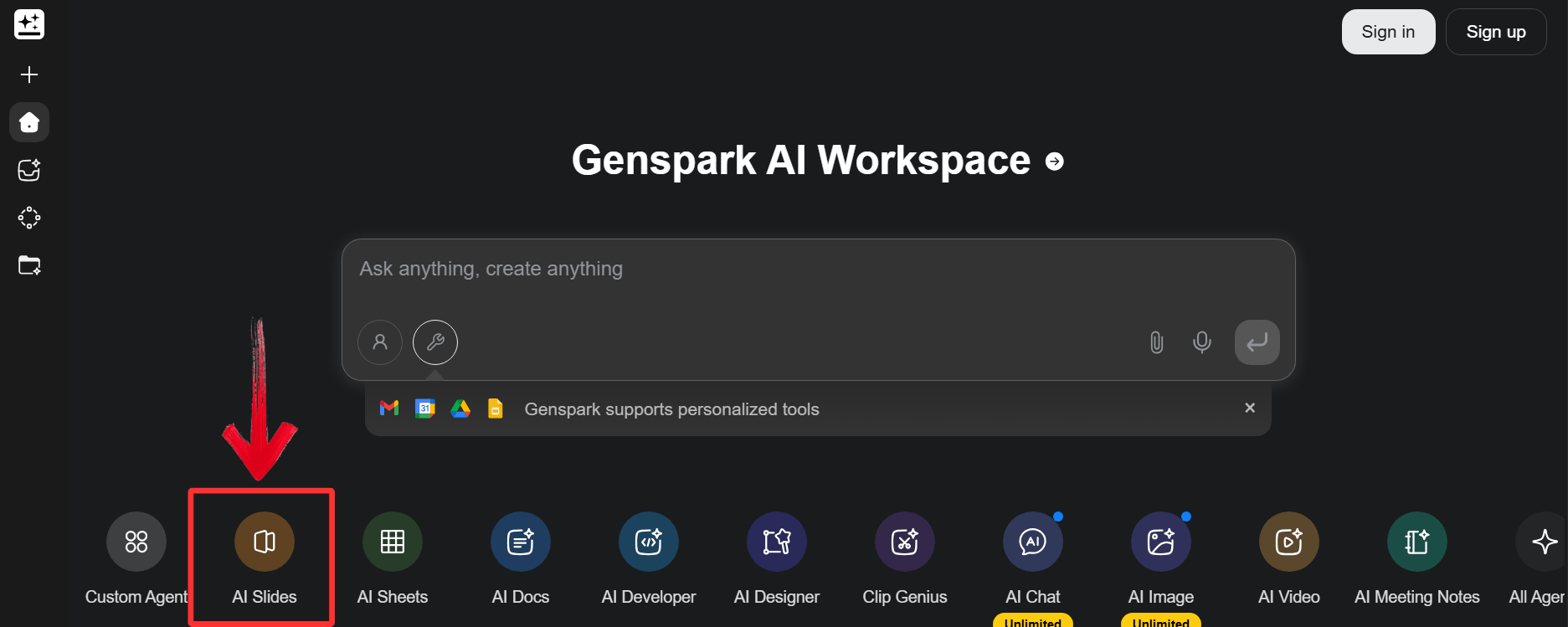
Step 2: Navigate to the Genspark dashboard and
select the "AI Slides" or"Presentation" agent from the menu.
Genspark AI Slides
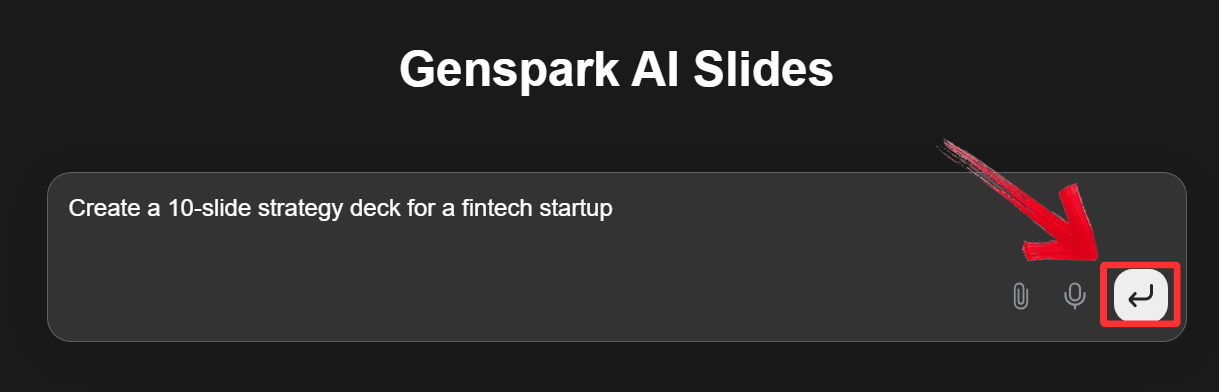
Step 3: Enter a specific request into the chat box
(e.g., "Create a 10-slide strategy deck for a fintech startup") or
upload a source PDF for the AI to analyze.
Generate Presentation
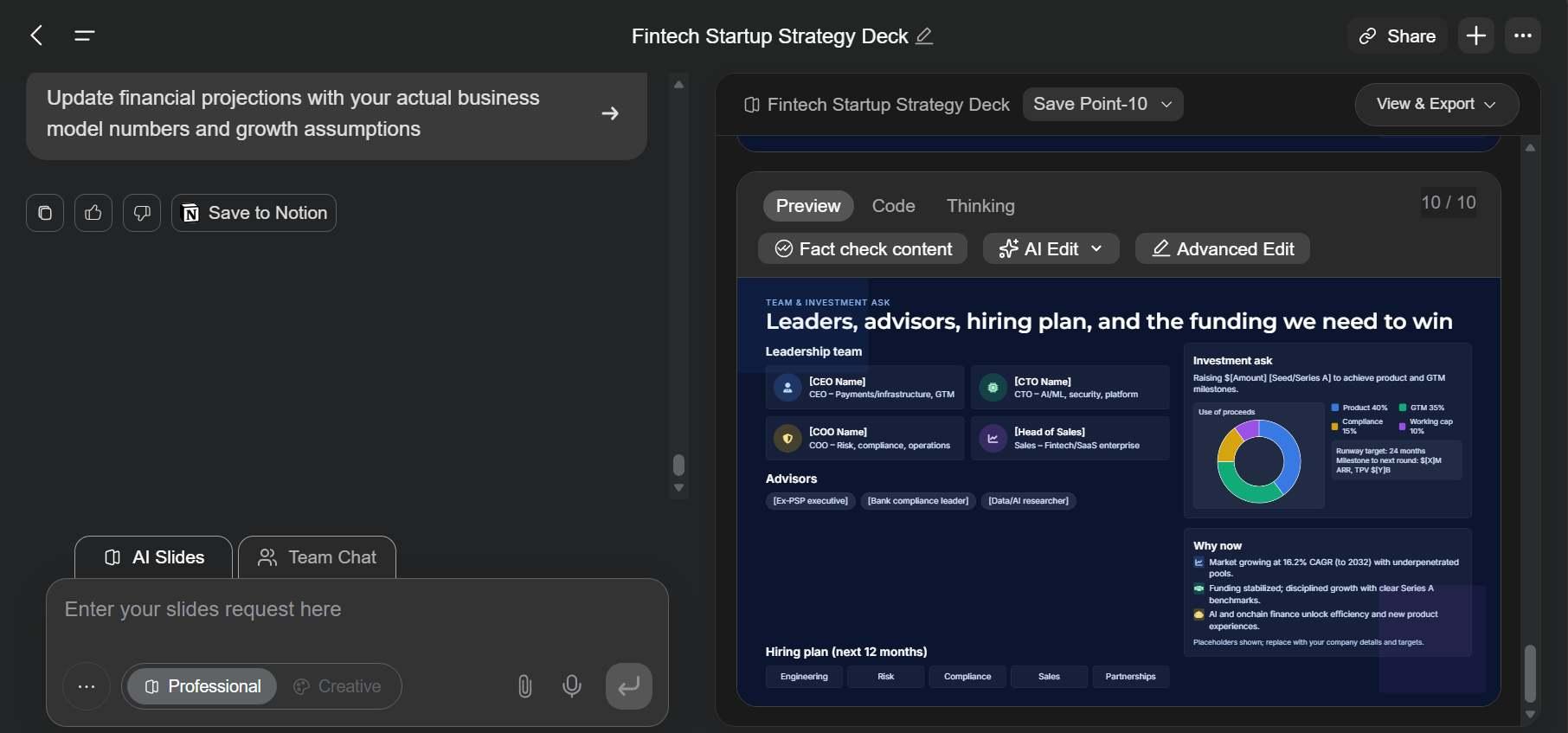
Step 4: Review the structural outline proposed by
the agent. You can approve it as is or request specific adjustments to
the flow.
Review and Edit
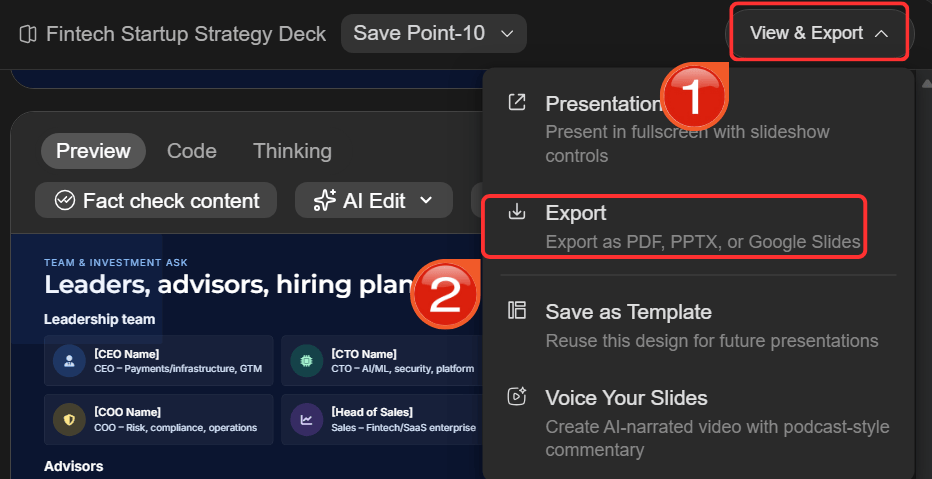
Step 5: Finally, click “View &
Export” and then click “Export” to download
the file as a .pptx (PowerPoint) document.
Export and Download
Step 6: Open the downloaded file in your preferred
presentation software to refine fonts, colors,
and layout details for the final polish.
WPS
AI Slides: Faster, Smarter, and More Versatile Than Genspark AI
Slides
Genspark AI helps quickly turn research into structured presentation
drafts, making early-stage content creation simple. However, moving from
draft to polished, professional slides often reveals its limitations in
layout control and visual refinement. You are frequently forced to
export files to other tools just to correct formatting and ensure
consistency, slowing progress.
WPS AI
Slides solves this problem by embedding AIdirectly inside the presentation editor. This allows users to generate,
edit, and refine slides in one continuous environment without
compatibility issues. As a result, content and design evolve together,
preserving momentum from first draft to final presentation.
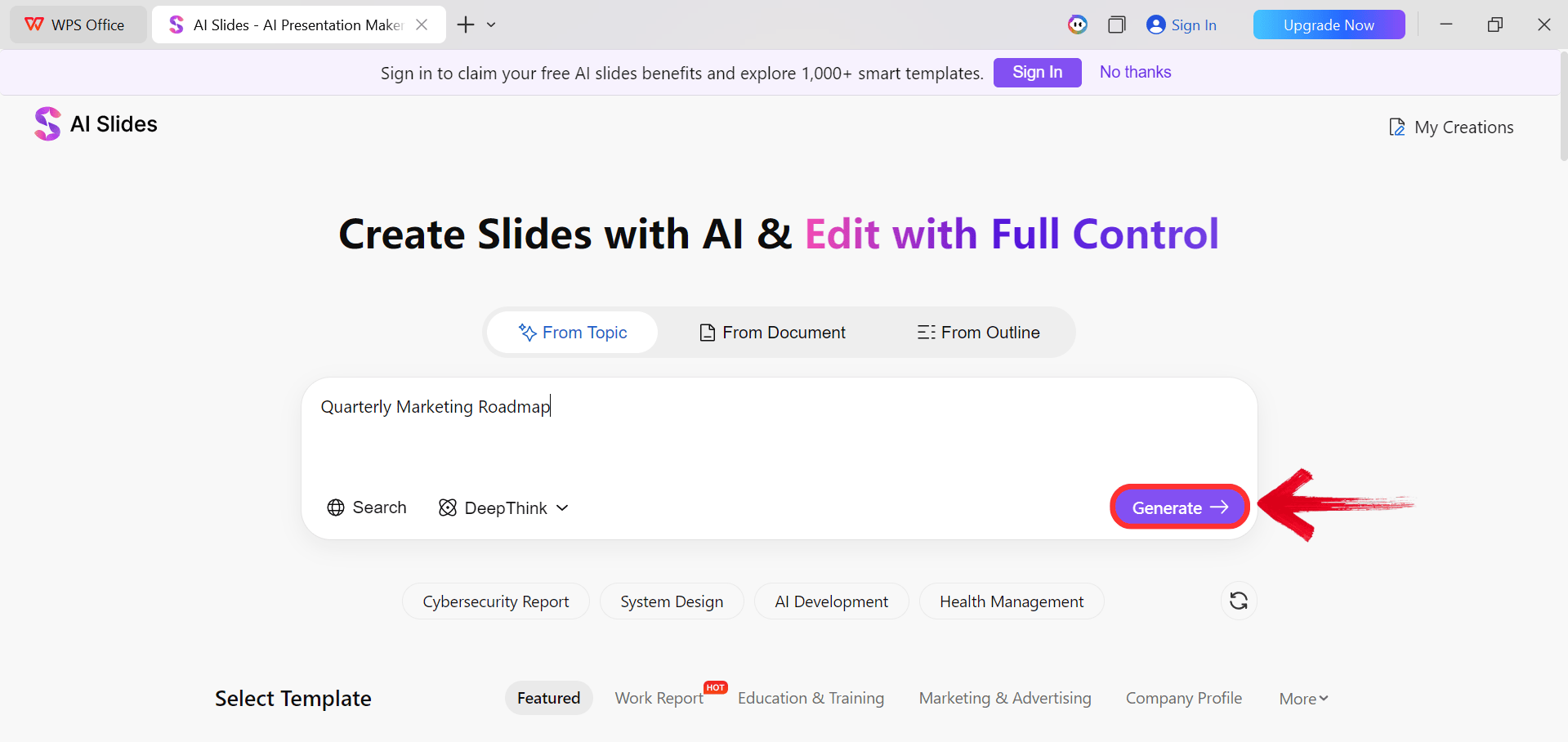
WPS AI Slides
Positioned as a native design partner inside the WPS Office suite, WPS AI Slides is
purpose-built for professional presentation quality. It goes beyond
content generation to intelligently control layouts, enforce consistent
themes, and rewrite text to fit precise design constraints in real time.
Because the AI understands the full context of the document, it can
expand bullet points with visual balance or instantly redesign complex
slides.
How to Create Slide with
WPS AI Slides
Getting started is easy. Instead of struggling with manual
formatting, you can let the AI handle the heavy lifting in just a few
clicks.
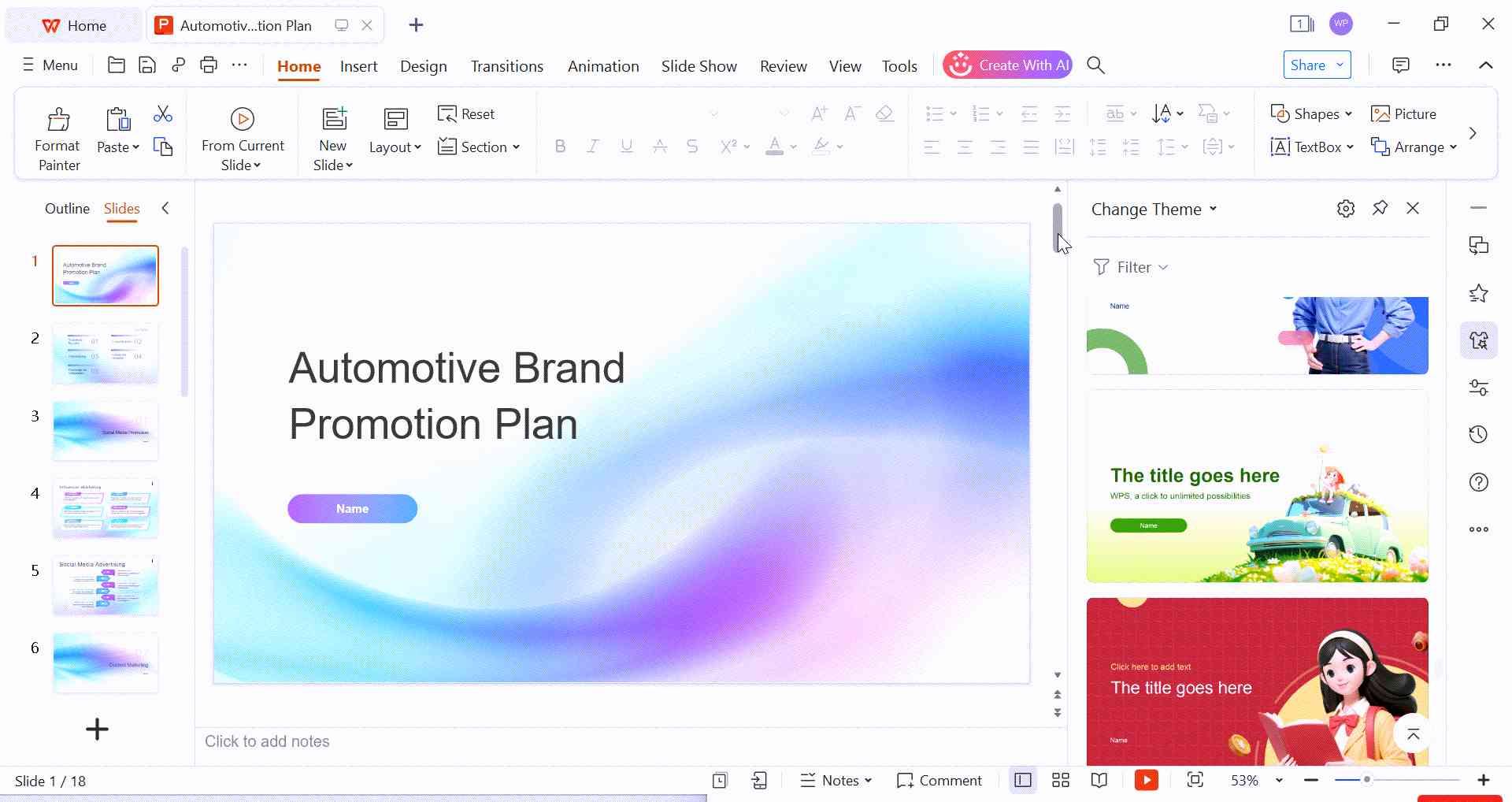
Step 1: Open your browser to visit WPS Office and click the"Free Download" button to start the download.
Download WPS Office
Step 2: The download will finish in a few seconds.
Once done, run the installation file like you would for any other app or
software.
Step 3: WPS Office will show you a few simple terms
and conditions. Accept them, then click the "Install
Now" button to begin the installation.
Install WPS Office
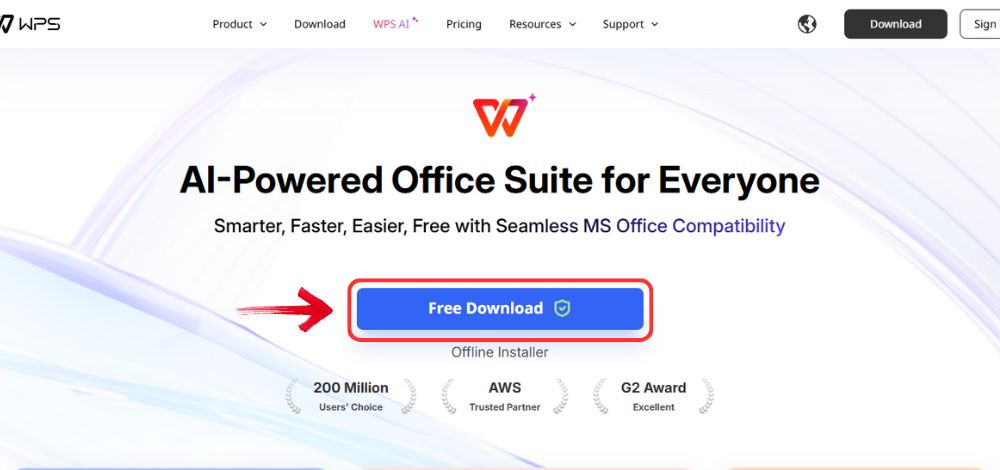
Step 4: After installation, in WPS Office, click“Slides” from the left sidebar.
WPS Slides Dashboard
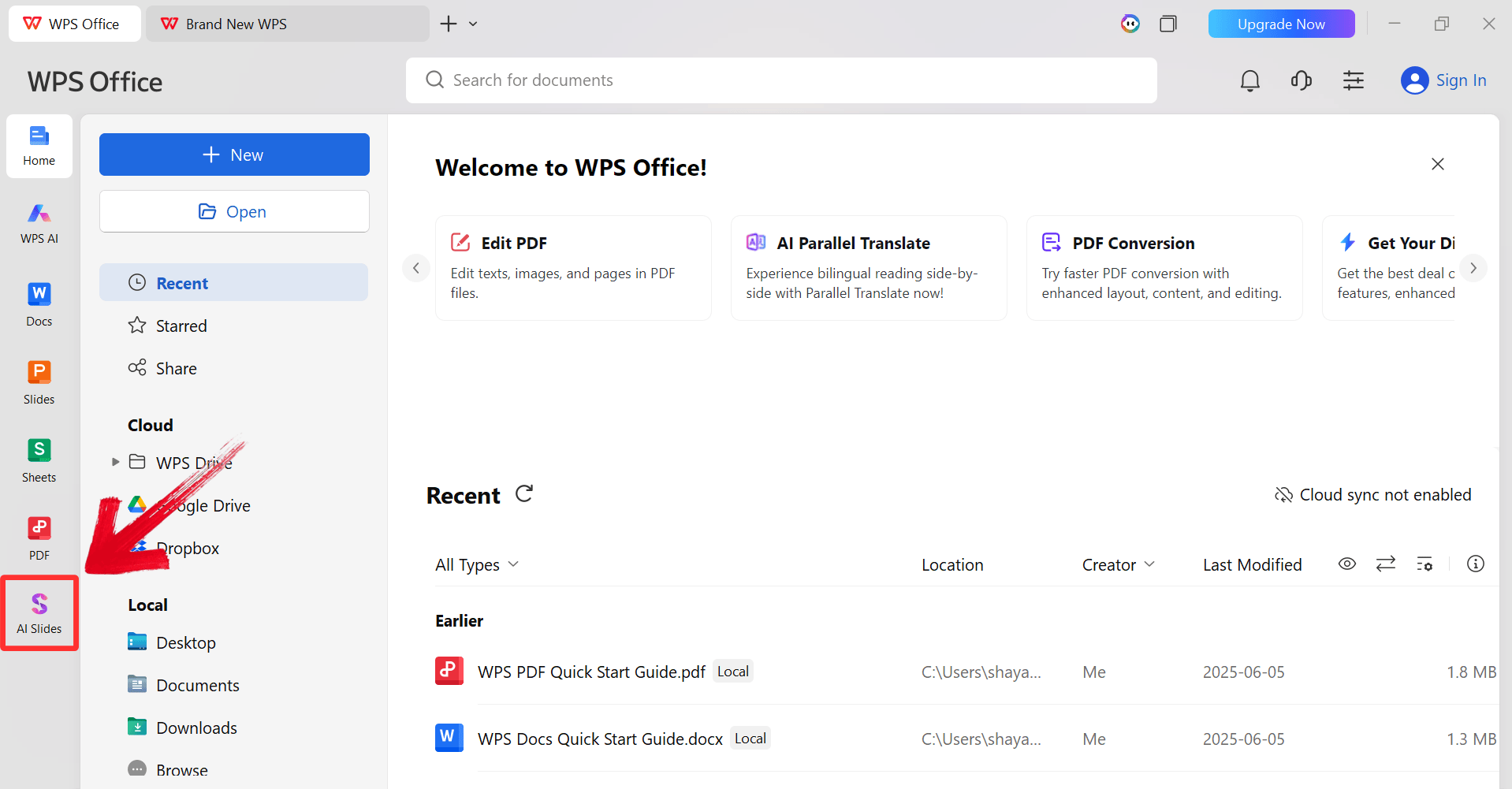
Step 5: Enter your presentation topic (e.g.,
"Quarterly Marketing Roadmap") into the dialogue box and click“Generate” to create the outline.
Click Generate
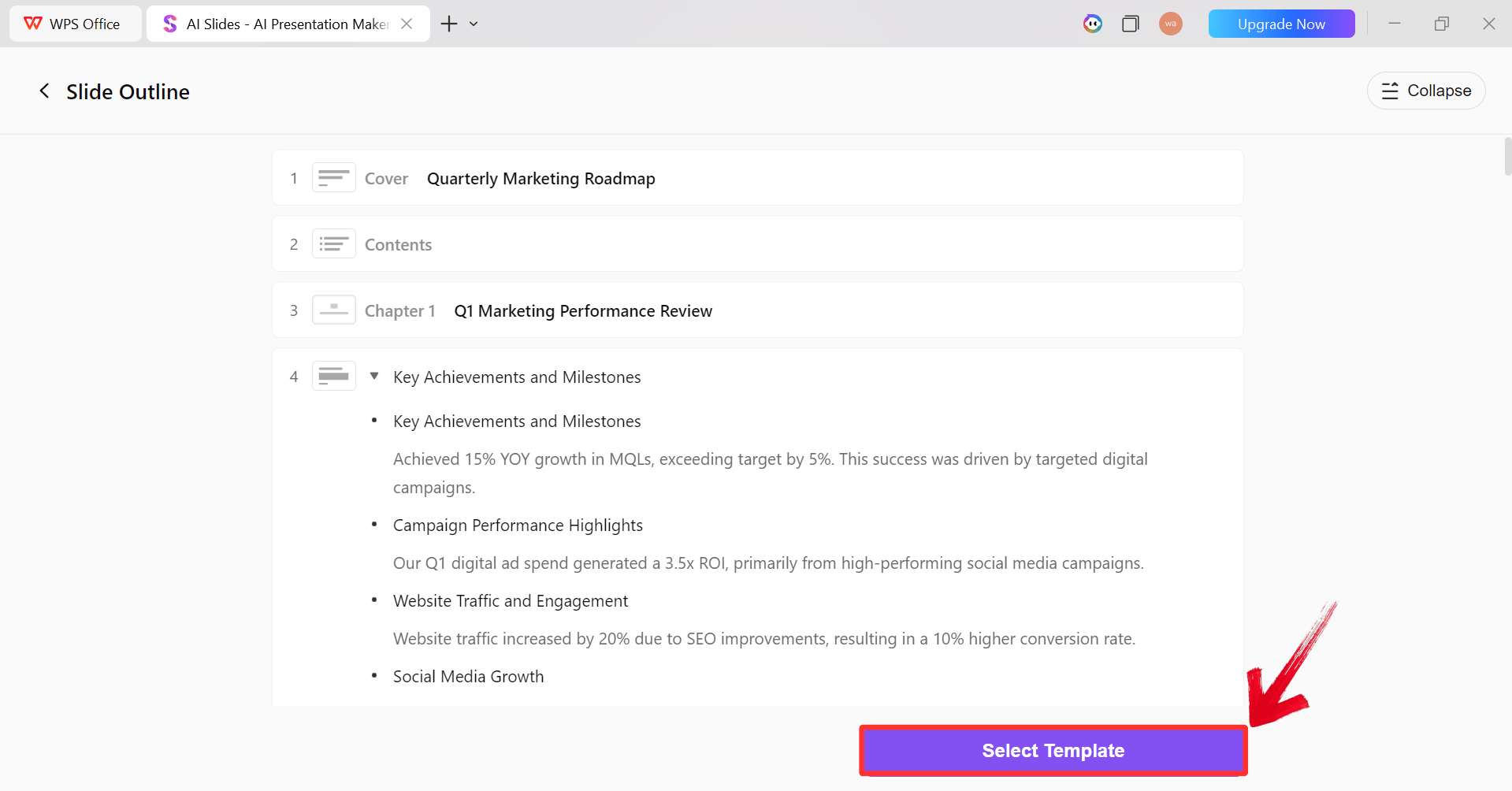
Step 6: After the AI creates the outline,
click “Select Template” to pick a template from the
already available ones.
AI Generated Outline
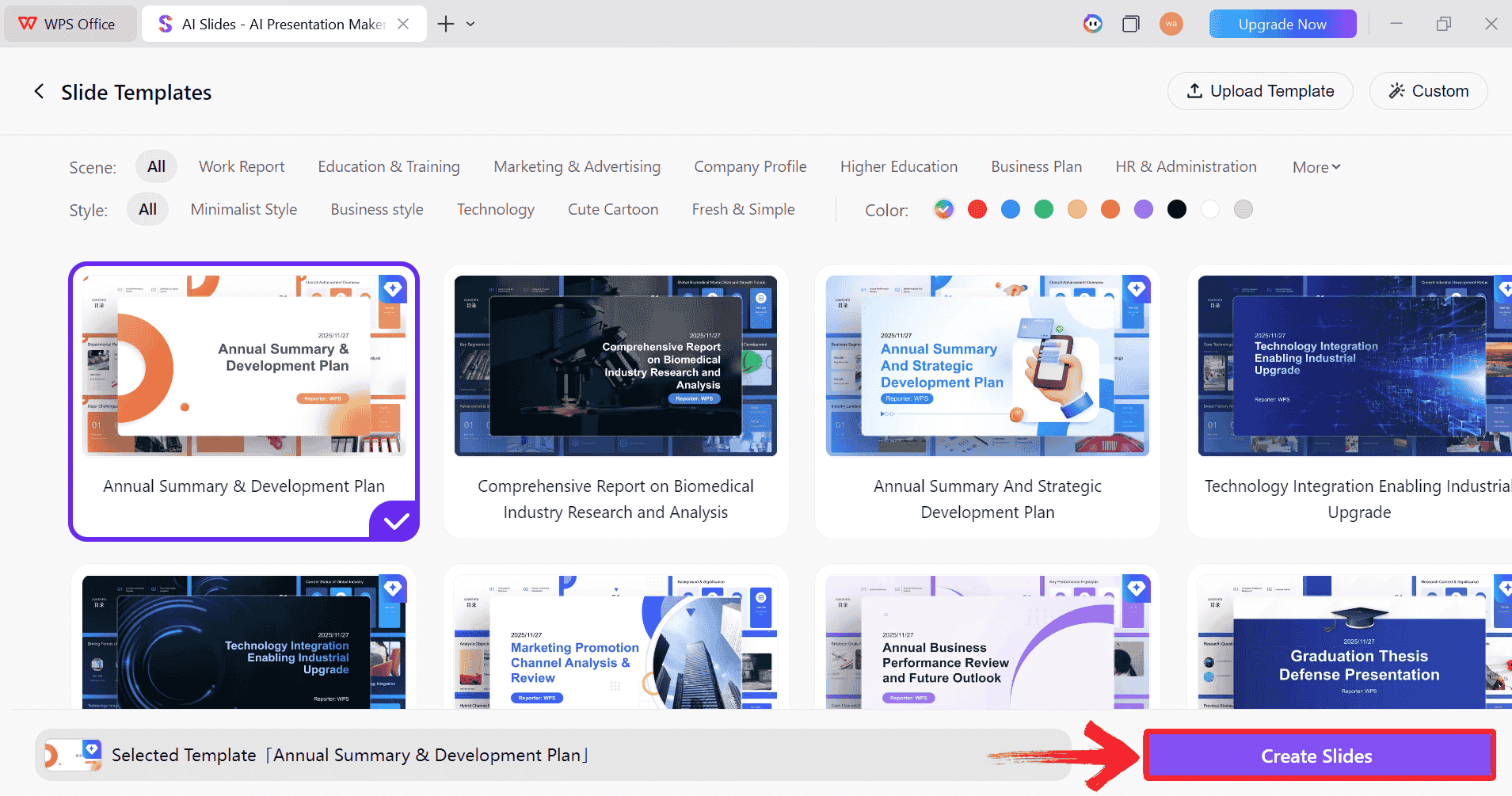
Step 7: Choose from the Wide template library and
click “Create Slides” to generate your
presentation.
Pick a Template
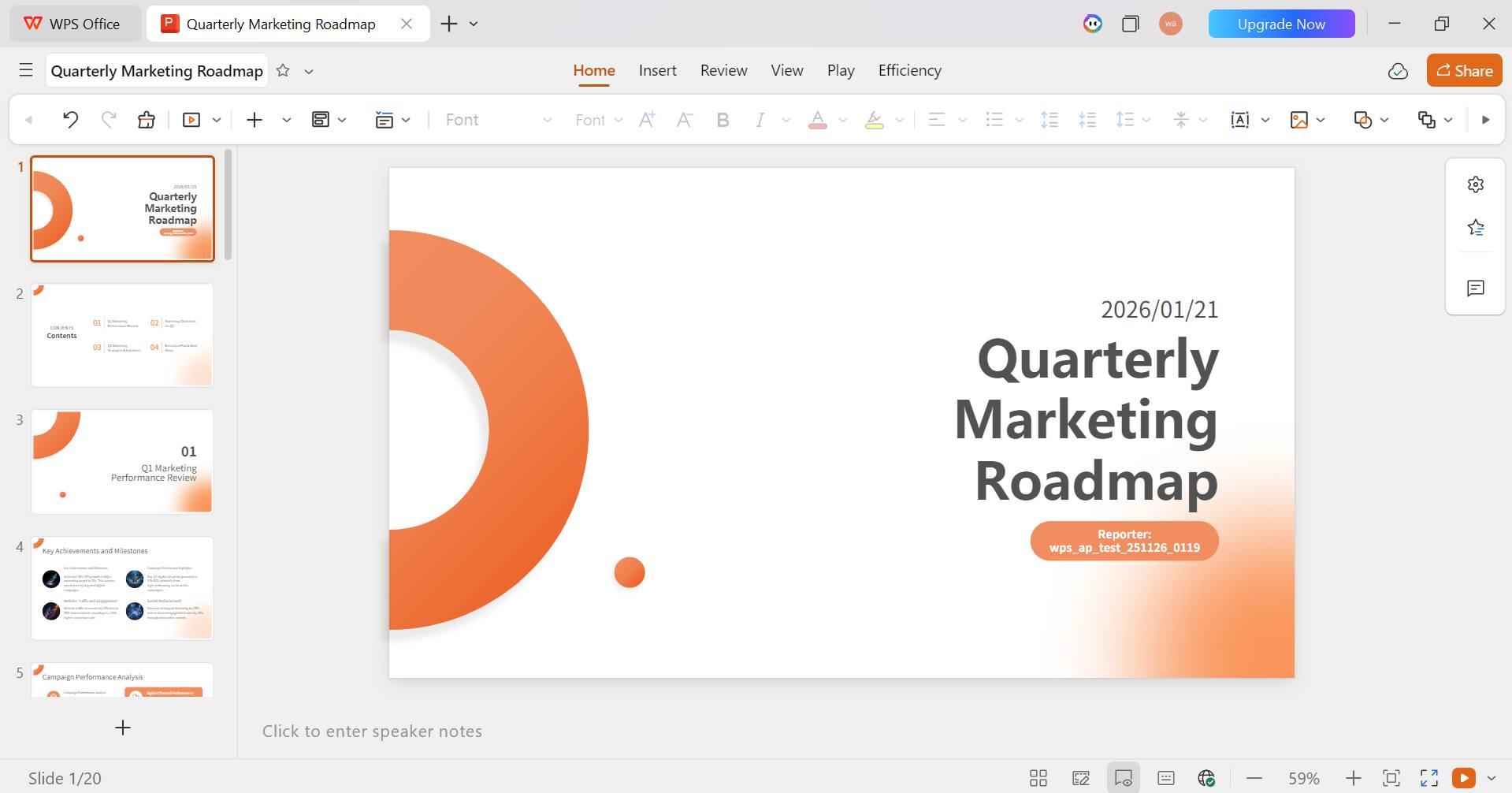
Step 8: Finally, your Slide deck will be generated
with the accurate content.
AI-generated PPT
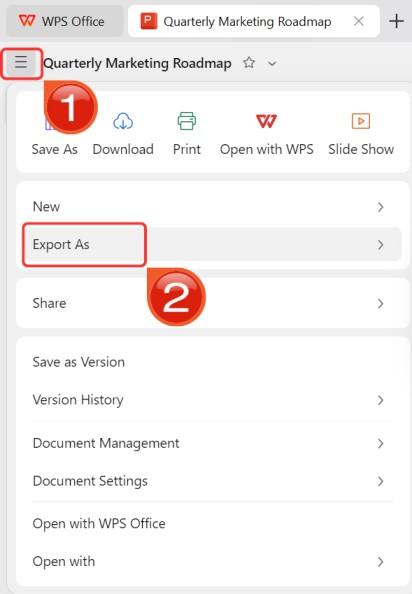
Step 9: Click on the File menu and then click“Export as” to download your PPT.
Export and Download
FAQs
1. What tasks
does Genspark AI handle efficiently?
Genspark AI handles deep research, document summarization, and
content creation. It automates workflows such as answering complex
questions with citations, generating detailed reports (Sparkpages), and
drafting basic slide decks from raw data.
2. Is Genspark
AI suitable for non-technical users?
Yes. The platform uses a natural language interface, allowing users
to interact with agents using conversational English. No coding skills
are required, though specific prompts yield better results.
3.
How does Genspark AI Slides compare to other AI presentation tools?
Genspark AI Slides is best for generating drafts based on
real-time web research. However, it offers limited editingfeatures. Tools like WPS AI Slides are superior for the design and
refinement phase, allowing direct manipulation of layouts and styles
within the presentation software.
4. Can
Genspark AI integrate with other productivity tools?
Genspark functions primarily as a standalone workspace. While it
supports exporting files to PowerPoint or PDF, it lacks deep native
plugins. Users seeking an integrated AI experience within their document
editor may find an office suite like WPS Office more efficient.
5. How
cost-effective is Genspark AI for students?
The Free plan is sufficient for students needing to complete basic
research tasks. For professionals requiring daily slide generation or
deep research analysis, the paid Plus plan is necessary to avoid credit
limits.
6. Can I
use Genspark AI for professional presentations?
Yes, as a starting point. It effectively gathers facts and structures
the narrative. However, for a client-ready result, it is recommended to
export the draft and use WPS AI Slides to refine the design, ensuring
professional font consistency and layout alignment.
From Research to
Presentation-Ready Slides
Genspark AI is a robust productivity tool that automates research and
initial content creation, making it ideal for gathering intelligence and
drafting concepts. However, for users who require polished, professional
presentations, pairing Genspark's research capabilities with the
advanced design features of WPS AI
Slides creates an optimal workflow, delivering accurate data and
superior visual design efficiently.
7+ years in productivity tech. I test and review the latest tools to simplify your workflow. Follow for honest app comparisons, practical guides, and curated tech picks to boost efficiency.


'%3e%3cpath%20d='M8%200C12.4183%200%2016%203.58172%2016%208C16%2012.4183%2012.4183%2016%208%2016C3.58172%2016%200%2012.4183%200%208C0%203.58172%203.58172%200%208%200ZM11.6162%204.38379C11.2257%203.99337%2010.5927%203.99338%2010.2021%204.38379L8%206.58594L5.79785%204.38379C5.40732%203.99334%204.77429%203.99329%204.38379%204.38379C3.99331%204.77429%203.99335%205.40733%204.38379%205.79785L6.58594%208L4.38379%2010.2021C3.99348%2010.5927%203.99341%2011.2257%204.38379%2011.6162C4.77426%2012.0066%205.40734%2012.0065%205.79785%2011.6162L8%209.41406L10.2021%2011.6162C10.5927%2012.0066%2011.2257%2012.0067%2011.6162%2011.6162C12.0067%2011.2257%2012.0066%2010.5927%2011.6162%2010.2021L9.41406%208L11.6162%205.79785C12.0066%205.40735%2012.0066%204.77429%2011.6162%204.38379Z'%20fill='%23080E17'%20fill-opacity='0.46'/%3e%3c/g%3e%3cdefs%3e%3cclipPath%20id='clip0_3761_713'%3e%3crect%20width='16'%20height='16'%20fill='white'/%3e%3c/clipPath%3e%3c/defs%3e%3c/svg%3e)




'%3e%3cpath%20fill-rule='evenodd'%20clip-rule='evenodd'%20d='M21.4999%2010.9993C21.4999%205.20009%2016.7986%200.498901%2010.9993%200.498901C5.19994%200.498901%200.498657%205.20009%200.498657%2010.9993C0.498657%2016.2404%204.33858%2020.5844%209.35855%2021.3722V14.0346H6.69238V10.9993H9.35855V8.68594C9.35855%206.05427%2010.9262%204.60062%2013.3248%204.60062C14.4736%204.60062%2015.6753%204.80571%2015.6753%204.80571V7.38979H14.3512C13.0468%207.38979%2012.64%208.19921%2012.64%209.0296V10.9993H15.5523L15.0867%2014.0346H12.64V21.3722C17.66%2020.5844%2021.4999%2016.2404%2021.4999%2010.9993Z'%20fill='%231568EA'/%3e%3c/g%3e%3c/svg%3e)


'%3e%3cpath%20d='M2.42045%2022.1876H6.31818V12.7217L0.75%208.54553V20.5171C0.75%2021.4414%201.49892%2022.1876%202.42045%2022.1876Z'%20fill='%234285F4'/%3e%3cpath%20d='M19.682%2022.1876H23.5797C24.5041%2022.1876%2025.2502%2021.4387%2025.2502%2020.5171V8.54553L19.682%2012.7217'%20fill='%2334A853'/%3e%3cpath%20d='M19.682%205.48293V12.7216L25.2502%208.54543V6.31816C25.2502%204.25236%2022.8921%203.07469%2021.2411%204.31361'%20fill='%23FBBC04'/%3e%3cpath%20d='M6.31824%2012.7217V5.48303L13.0001%2010.4944L19.6819%205.48303V12.7217L13.0001%2017.733'%20fill='%23EA4335'/%3e%3cpath%20d='M0.75%206.31816V8.54543L6.31818%2012.7216V5.48293L4.75909%204.31361C3.10534%203.07469%200.75%204.25236%200.75%206.31816Z'%20fill='%23C5221F'/%3e%3c/g%3e%3cdefs%3e%3cclipPath%20id='clip0_2954_7305'%3e%3crect%20width='24.5'%20height='18.375'%20fill='white'%20transform='translate(0.75%203.8125)'/%3e%3c/clipPath%3e%3c/defs%3e%3c/svg%3e)






'%3e%3cpath%20d='M19.9911%204.11386V6.471H18.5894C18.0775%206.471%2017.7322%206.57814%2017.5536%206.79243C17.3751%207.00671%2017.2858%207.32814%2017.2858%207.75671V9.44421H19.9019L19.5536%2012.0871H17.2858V18.8639H14.5536V12.0871H12.2769V9.44421H14.5536V7.49779C14.5536%206.39064%2014.8632%205.53201%2015.4822%204.92189C16.1013%204.31177%2016.9257%204.00671%2017.9554%204.00671C18.8304%204.00671%2019.509%204.04243%2019.9911%204.11386Z'%20fill='%23333333'/%3e%3c/g%3e%3cdefs%3e%3cclipPath%20id='clip0_2938_8199'%3e%3crect%20width='16'%20height='16'%20fill='white'%20transform='translate(8%204.00671)'/%3e%3c/clipPath%3e%3c/defs%3e%3c/svg%3e)
'%3e%3cpath%20d='M17.5237%2010.7813L23.4811%204H22.0699L16.8949%209.88693L12.7648%204H8L14.2469%2012.9029L8%2020.0133H9.4112L14.8725%2013.7952L19.2352%2020.0133H24M9.92053%205.04213H12.0885L22.0688%2019.0224H19.9003'%20fill='%23333333'/%3e%3c/g%3e%3cdefs%3e%3cclipPath%20id='clip0_2938_8200'%3e%3crect%20width='16'%20height='16.0134'%20fill='white'%20transform='translate(8%204)'/%3e%3c/clipPath%3e%3c/defs%3e%3c/svg%3e)


