

'%3e%3cpath%20d='M8%200C12.4183%200%2016%203.58172%2016%208C16%2012.4183%2012.4183%2016%208%2016C3.58172%2016%200%2012.4183%200%208C0%203.58172%203.58172%200%208%200ZM11.6162%204.38379C11.2257%203.99337%2010.5927%203.99338%2010.2021%204.38379L8%206.58594L5.79785%204.38379C5.40732%203.99334%204.77429%203.99329%204.38379%204.38379C3.99331%204.77429%203.99335%205.40733%204.38379%205.79785L6.58594%208L4.38379%2010.2021C3.99348%2010.5927%203.99341%2011.2257%204.38379%2011.6162C4.77426%2012.0066%205.40734%2012.0065%205.79785%2011.6162L8%209.41406L10.2021%2011.6162C10.5927%2012.0066%2011.2257%2012.0067%2011.6162%2011.6162C12.0067%2011.2257%2012.0066%2010.5927%2011.6162%2010.2021L9.41406%208L11.6162%205.79785C12.0066%205.40735%2012.0066%204.77429%2011.6162%204.38379Z'%20fill='%23080E17'%20fill-opacity='0.46'/%3e%3c/g%3e%3cdefs%3e%3cclipPath%20id='clip0_3761_713'%3e%3crect%20width='16'%20height='16'%20fill='white'/%3e%3c/clipPath%3e%3c/defs%3e%3c/svg%3e)




'%3e%3cpath%20fill-rule='evenodd'%20clip-rule='evenodd'%20d='M21.4999%2010.9993C21.4999%205.20009%2016.7986%200.498901%2010.9993%200.498901C5.19994%200.498901%200.498657%205.20009%200.498657%2010.9993C0.498657%2016.2404%204.33858%2020.5844%209.35855%2021.3722V14.0346H6.69238V10.9993H9.35855V8.68594C9.35855%206.05427%2010.9262%204.60062%2013.3248%204.60062C14.4736%204.60062%2015.6753%204.80571%2015.6753%204.80571V7.38979H14.3512C13.0468%207.38979%2012.64%208.19921%2012.64%209.0296V10.9993H15.5523L15.0867%2014.0346H12.64V21.3722C17.66%2020.5844%2021.4999%2016.2404%2021.4999%2010.9993Z'%20fill='%231568EA'/%3e%3c/g%3e%3c/svg%3e)


'%3e%3cpath%20d='M2.42045%2022.1876H6.31818V12.7217L0.75%208.54553V20.5171C0.75%2021.4414%201.49892%2022.1876%202.42045%2022.1876Z'%20fill='%234285F4'/%3e%3cpath%20d='M19.682%2022.1876H23.5797C24.5041%2022.1876%2025.2502%2021.4387%2025.2502%2020.5171V8.54553L19.682%2012.7217'%20fill='%2334A853'/%3e%3cpath%20d='M19.682%205.48293V12.7216L25.2502%208.54543V6.31816C25.2502%204.25236%2022.8921%203.07469%2021.2411%204.31361'%20fill='%23FBBC04'/%3e%3cpath%20d='M6.31824%2012.7217V5.48303L13.0001%2010.4944L19.6819%205.48303V12.7217L13.0001%2017.733'%20fill='%23EA4335'/%3e%3cpath%20d='M0.75%206.31816V8.54543L6.31818%2012.7216V5.48293L4.75909%204.31361C3.10534%203.07469%200.75%204.25236%200.75%206.31816Z'%20fill='%23C5221F'/%3e%3c/g%3e%3cdefs%3e%3cclipPath%20id='clip0_2954_7305'%3e%3crect%20width='24.5'%20height='18.375'%20fill='white'%20transform='translate(0.75%203.8125)'/%3e%3c/clipPath%3e%3c/defs%3e%3c/svg%3e)


Need editable slides from a fixed PDF? Searching merge PDF PPT usually means you want to convert PDF to PPT (PowerPoint), not only combine PDF files. With WPS PDF, you can convert PDF to PPT online for free, then open the slides in WPS Presentation or Microsoft PowerPoint.
If your PDF is split across several files, merge PDF first, then convert once. Below is a clear PDF to PPT tutorial: online steps on pdf.wps.com, desktop steps in WPS Office, a quick online vs desktop WPS comparison, plus FAQ answers.
How to Convert PDF to PPT Online on pdf.wps.com
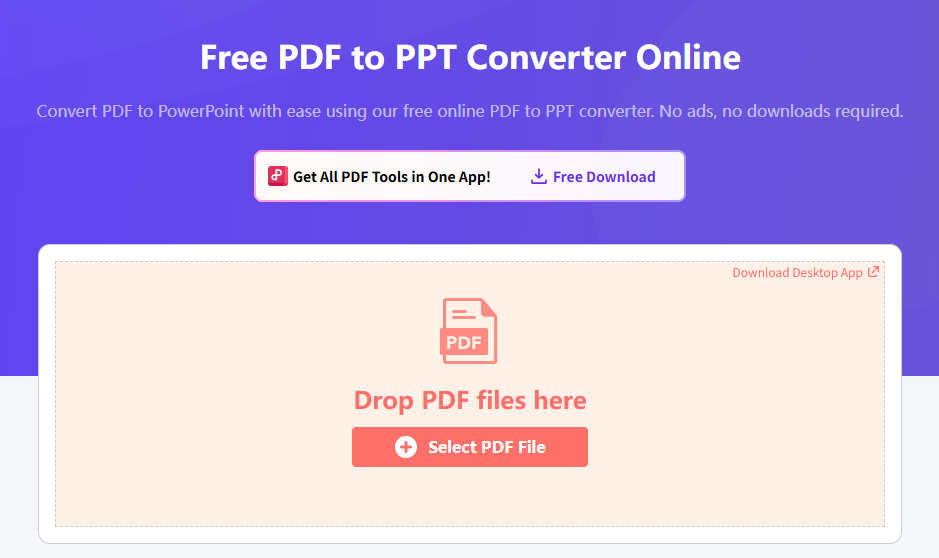
For a quick browser workflow, use the free online converter at pdf.wps.com/convert-pdf-to-ppt. No desktop install is required for a one-off conversion.
Steps:
Open Convert PDF to PPT online in your browser.
Upload the PDF you want to turn into PowerPoint slides.
Start the conversion and wait until processing finishes.
Download the PPT/PPTX file, then edit text, images, and layout in WPS Presentation or PowerPoint.
Tip: If you have several PDFs that belong to one deck, merge PDF files into one document first, then convert PDF to PPT once to keep slide order clean.
How to Convert PDF to PPT in WPS Office (Desktop)
Prefer offline work? Download WPS Office and use the built-in PDF converter to export PDF to PPT on Windows or Mac.
Step 1: Open your PDF in WPS
Launch WPS Office, open the PDF file, and go to the PDF toolkit / Tools area.
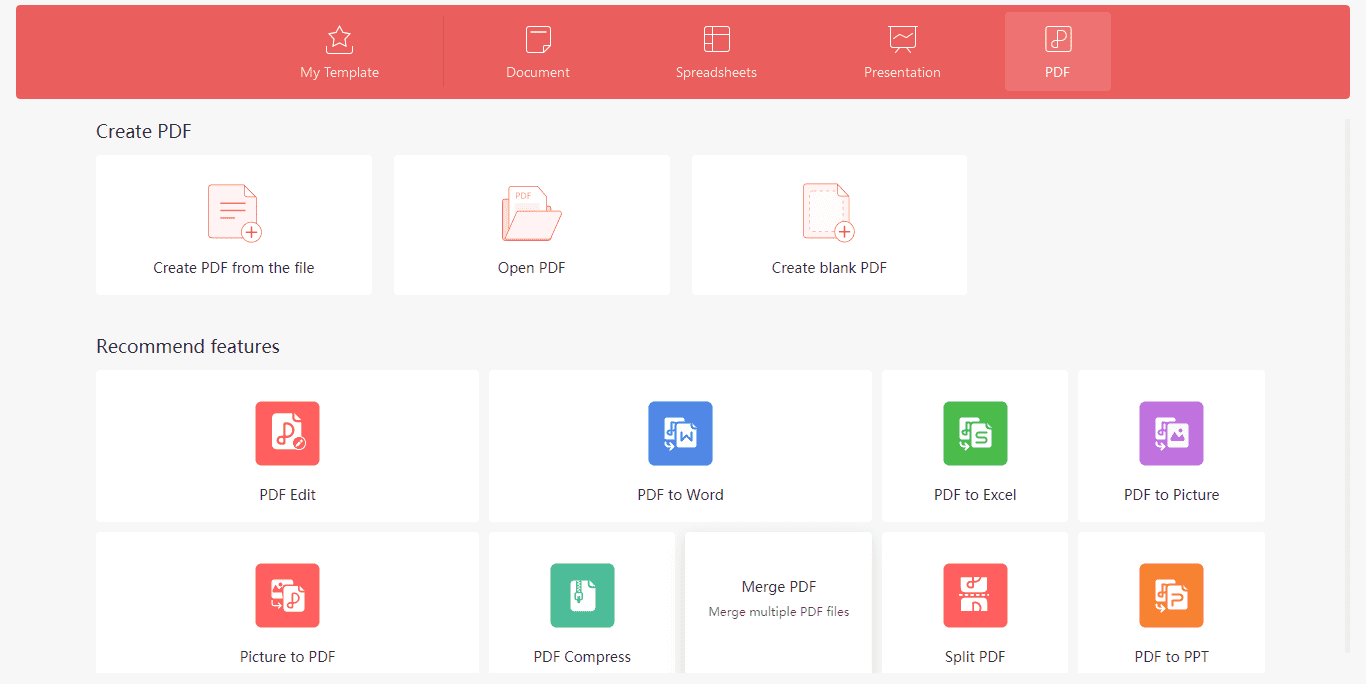
Step 2: Choose PDF to PPT
Select PDF to PPT (not only Merge Files). Merge is for combining PDFs; PDF to PPT creates editable presentation slides.
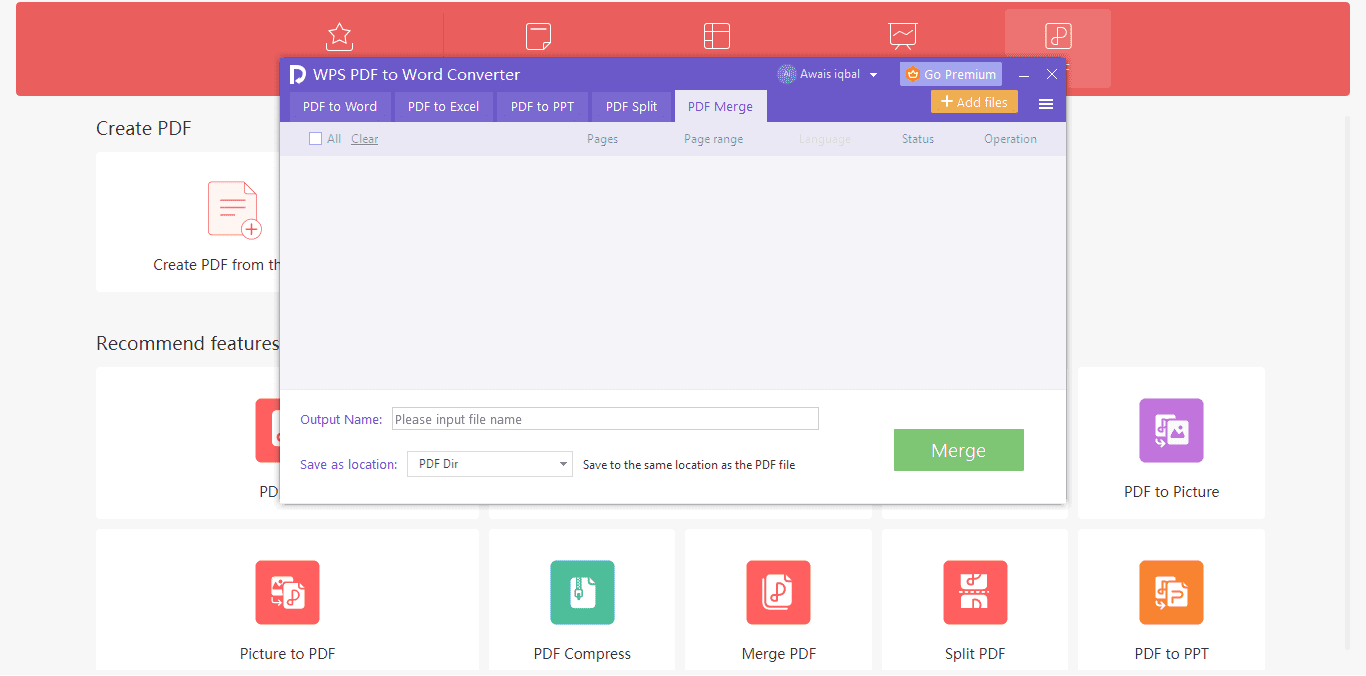
Step 3: Select the PDF and export settings
Add the PDF, choose PPT/PPTX as the output type, and pick a save location.
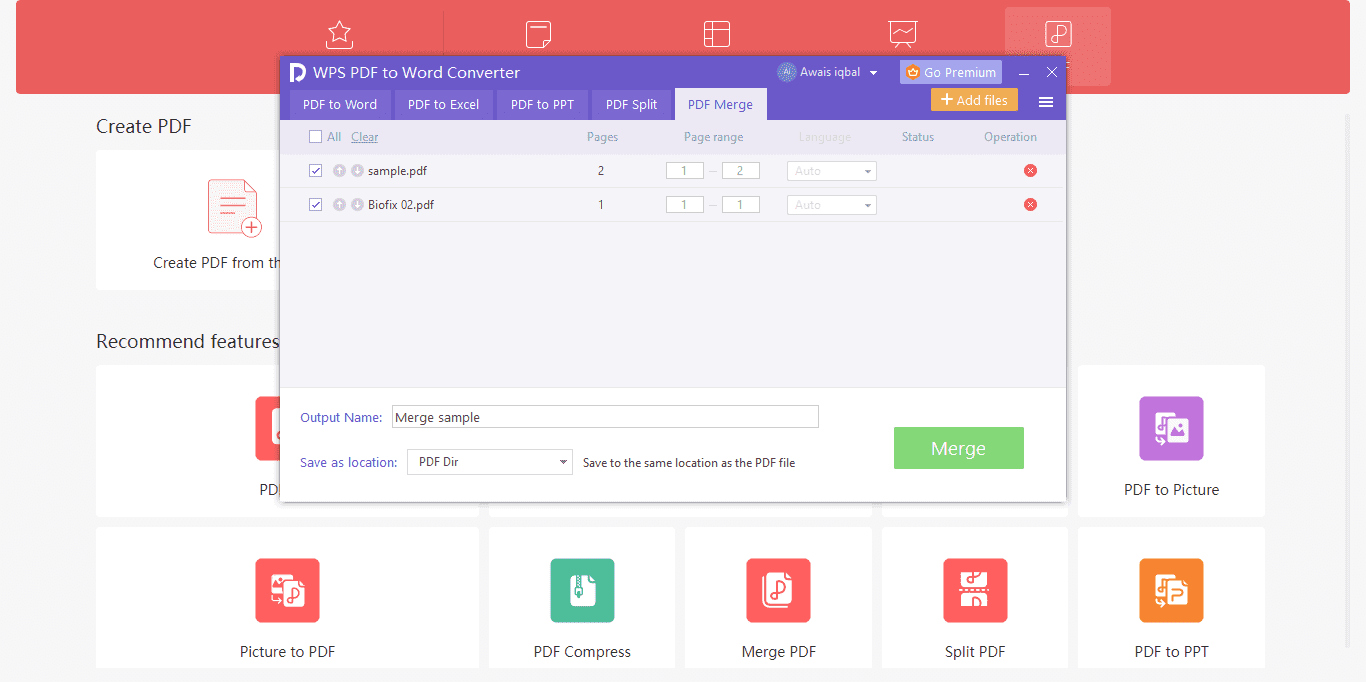
Step 4: Start conversion and edit slides
Click Start / Convert. When finished, open the PPT in WPS Presentation to fix fonts, reorder slides, or add animations.

Optional: If you still need to combine PDFs before converting, use Merge PDF, then run PDF to PPT on the merged file.
Online vs Desktop: Which WPS PDF to PPT Path Should You Choose?
So when should you convert PDF to PPT on the web page, and when is the desktop app the better fit? After the two WPS workflows above, use this quick guide: choose PDF to PPT Online on pdf.wps.com for fast one-off jobs in a browser, or choose Convert PDF to PPT in WPS Office (Desktop) when you want offline work, larger files, and tighter editing afterward.
| Compare | PDF to PPT Online (pdf.wps.com) | Convert PDF to PPT in WPS Office (Desktop) |
|---|---|---|
| How it works | Browser upload → convert → download PPT/PPTX | Open PDF in WPS → PDF toolkit → PDF to PPT → save locally |
| Key features | No install; quick convert; easy share of the result file | Offline convert; merge PDF first; edit slides in WPS Presentation right away |
| Best for | One-off slides, shared PCs, quick handouts | Repeat work, private files, bigger decks, full office workflow |
| Who it suits | Students, guests on a public computer, users who only need convert once | Office users, teachers, teams who already use WPS daily |
| File types / size fit | Typical PDF → PPTX; better for smaller or standard text PDFs | PDF → PPT/PPTX; better for larger PDFs, multi-file merge-then-convert jobs |
| Privacy | File is uploaded to the online tool during conversion | Files stay on your computer for desktop conversion |
| After conversion | Download PPTX, then open in WPS Presentation or PowerPoint to edit | Open and polish slides immediately inside WPS Office |
FAQ
1. Can I merge a PDF and a PPT into one file?
Not as a single mixed “PDF+PPT” container in one click. Practical workflow: convert the PPT to PDF (or convert the PDF to PPT), then merge PDF pages if both are PDFs—or combine content inside PowerPoint after PDF to PPT conversion.
2. How do I convert PDF to PPT online for free?
Open WPS PDF to PPT, upload your PDF, convert, and download the PowerPoint file. Then edit slides in WPS Presentation.
3. Is WPS PDF to PPT free?
Yes for common online/desktop conversion needs. WPS offers free PDF tools and a free office suite; some advanced features may require a premium plan depending on your account.
4. What is the difference between merge PDF and PDF to PPT?
Merge PDF combines multiple PDFs into one PDF. PDF to PPT turns PDF pages into editable PowerPoint slides. If search intent is “merge pdf ppt,” most people actually need PDF to PPT conversion.
5. Will the layout stay the same after converting PDF to PowerPoint?
WPS aims to keep layout and fonts close to the original. Complex scanned pages may need light cleanup after conversion—adjust text boxes and images in Presentation if needed.


'%3e%3cpath%20d='M19.9911%204.11386V6.471H18.5894C18.0775%206.471%2017.7322%206.57814%2017.5536%206.79243C17.3751%207.00671%2017.2858%207.32814%2017.2858%207.75671V9.44421H19.9019L19.5536%2012.0871H17.2858V18.8639H14.5536V12.0871H12.2769V9.44421H14.5536V7.49779C14.5536%206.39064%2014.8632%205.53201%2015.4822%204.92189C16.1013%204.31177%2016.9257%204.00671%2017.9554%204.00671C18.8304%204.00671%2019.509%204.04243%2019.9911%204.11386Z'%20fill='%23333333'/%3e%3c/g%3e%3cdefs%3e%3cclipPath%20id='clip0_2938_8199'%3e%3crect%20width='16'%20height='16'%20fill='white'%20transform='translate(8%204.00671)'/%3e%3c/clipPath%3e%3c/defs%3e%3c/svg%3e)
'%3e%3cpath%20d='M17.5237%2010.7813L23.4811%204H22.0699L16.8949%209.88693L12.7648%204H8L14.2469%2012.9029L8%2020.0133H9.4112L14.8725%2013.7952L19.2352%2020.0133H24M9.92053%205.04213H12.0885L22.0688%2019.0224H19.9003'%20fill='%23333333'/%3e%3c/g%3e%3cdefs%3e%3cclipPath%20id='clip0_2938_8200'%3e%3crect%20width='16'%20height='16.0134'%20fill='white'%20transform='translate(8%204)'/%3e%3c/clipPath%3e%3c/defs%3e%3c/svg%3e)


