



'%3e%3cpath%20fill-rule='evenodd'%20clip-rule='evenodd'%20d='M21.4999%2010.9993C21.4999%205.20009%2016.7986%200.498901%2010.9993%200.498901C5.19994%200.498901%200.498657%205.20009%200.498657%2010.9993C0.498657%2016.2404%204.33858%2020.5844%209.35855%2021.3722V14.0346H6.69238V10.9993H9.35855V8.68594C9.35855%206.05427%2010.9262%204.60062%2013.3248%204.60062C14.4736%204.60062%2015.6753%204.80571%2015.6753%204.80571V7.38979H14.3512C13.0468%207.38979%2012.64%208.19921%2012.64%209.0296V10.9993H15.5523L15.0867%2014.0346H12.64V21.3722C17.66%2020.5844%2021.4999%2016.2404%2021.4999%2010.9993Z'%20fill='%231568EA'/%3e%3c/g%3e%3c/svg%3e)


'%3e%3cpath%20d='M2.42045%2022.1876H6.31818V12.7217L0.75%208.54553V20.5171C0.75%2021.4414%201.49892%2022.1876%202.42045%2022.1876Z'%20fill='%234285F4'/%3e%3cpath%20d='M19.682%2022.1876H23.5797C24.5041%2022.1876%2025.2502%2021.4387%2025.2502%2020.5171V8.54553L19.682%2012.7217'%20fill='%2334A853'/%3e%3cpath%20d='M19.682%205.48293V12.7216L25.2502%208.54543V6.31816C25.2502%204.25236%2022.8921%203.07469%2021.2411%204.31361'%20fill='%23FBBC04'/%3e%3cpath%20d='M6.31824%2012.7217V5.48303L13.0001%2010.4944L19.6819%205.48303V12.7217L13.0001%2017.733'%20fill='%23EA4335'/%3e%3cpath%20d='M0.75%206.31816V8.54543L6.31818%2012.7216V5.48293L4.75909%204.31361C3.10534%203.07469%200.75%204.25236%200.75%206.31816Z'%20fill='%23C5221F'/%3e%3c/g%3e%3cdefs%3e%3cclipPath%20id='clip0_2954_7305'%3e%3crect%20width='24.5'%20height='18.375'%20fill='white'%20transform='translate(0.75%203.8125)'/%3e%3c/clipPath%3e%3c/defs%3e%3c/svg%3e)


Starting a new job usually means your employer asks you to complete Form W-4. Knowing how to fill out a W-4 form correctly helps you set federal income tax withholding so you are less likely to owe a large balance -- or give the IRS an interest-free loan -- when you file taxes.
This guide explains what Form W-4 is, walks through each step on the current IRS form, flags common mistakes, and shows how to quickly fill a W-4 form PDF with WPS Office using AI Form Filler (AI Smart Form) plus a careful final review.
What is Form W-4 and when do you need it?
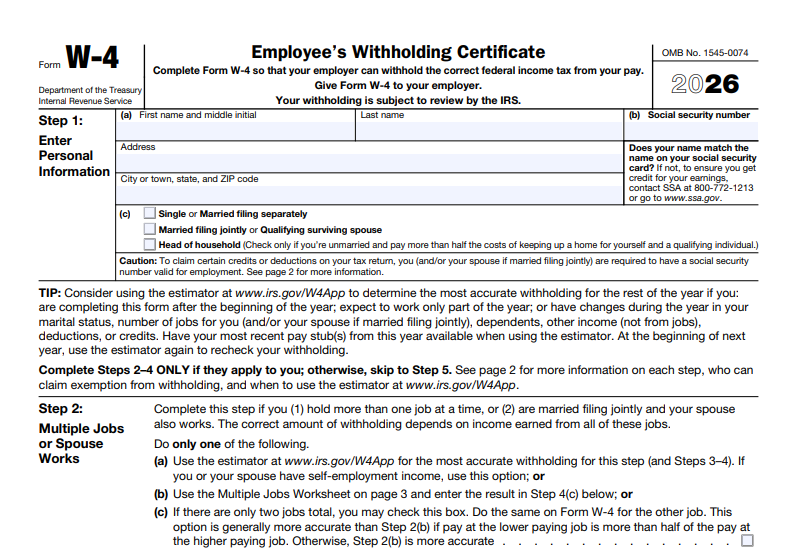
Form W-4 (Employee's Withholding Certificate) tells your employer how much federal income tax to withhold from your paycheck. Payroll uses your answers -- filing status, dependents, other jobs, and optional adjustments -- to estimate tax for each pay period. It is not a tax return, and it is not Form W-9 (contractors use W-9 to give a TIN to a payer).
You typically fill it out when you:
Start a new job
Want to update withholding after a life change (marriage, dependents, second job)
Need to claim exemption from withholding (only if you qualify)
You can also submit a new W-4 mid-year if last season's refund or balance due was far off. Download the current form from IRS.gov as a PDF, then complete it on screen instead of printing and scanning. Give the finished form to your employer (or HR portal) -- not to the IRS in ordinary cases.
Before you start: gather what you need
Have these ready so filling the W-4 goes faster and you avoid stopping halfway through a field:
Legal name and current home address (match your Social Security card and pay records)
Social Security number (SSN)
Filing status you expect to use on your tax return (Single, Married filing jointly, Head of household, etc.)
Number of qualifying dependents (if any), plus ages if that affects credit amounts in the instructions
Details about other jobs or a spouse's income (if applicable)
Estimates of deductions, credits, or extra withholding you want
Optional but helpful: last year's tax return and a recent pay stub if you are adjusting withholding mid-year. If you share finances with a spouse who also works, agree on who will claim dependents and how you will handle Step 2 before either of you submits a form.


How to fill out a W-4 form step by step
The modern W-4 uses five steps. Many employees only complete Step 1 and Step 5; Steps 2-4 are for multiple jobs, dependents, other income, deductions, or extra withholding. Read the IRS instructions for your tax year if your household has side income, large itemized deductions, or more than two jobs between spouses. Completing only the steps that apply is fine -- blank optional lines are normal when they do not fit your situation.
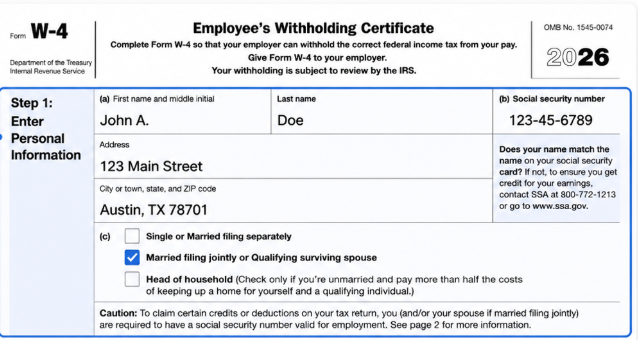
Step 1: Personal information
Enter your name, address, Social Security number, and filing status. Check only one filing-status box. Accuracy here matters -- mismatches can delay payroll setup or cause your employer to follow a default withholding method until the form is fixed. Use the same legal name your employer has on file, and choose the filing status you reasonably expect on your tax return.
Step 2: Multiple jobs or spouse works (if applicable)
Complete Step 2 only if you have more than one job at the same time, or you are married filing jointly and both spouses work. Without Step 2, each employer may withhold as if that job were your only income, which often leaves too little tax taken out -- a common underwithholding risk for dual-income households. Options include:
Using the IRS Tax Withholding Estimator for a personalized annual picture
Using the Multiple Jobs Worksheet in the W-4 instructions
Checking the box if there are only two jobs total and pay is similar
Skipping Step 2 when you should complete it is a frequent reason people under-withhold. If pay levels differ a lot between jobs, the worksheet or estimator usually works better than the simple checkbox.
Step 3: Claim dependents
If you qualify, enter amounts for dependents (the form uses credit-based amounts from the IRS instructions for the tax year). Leave this blank if you have no qualifying dependents. When two working parents share a household, only one of you should claim the same dependent credit amounts on a W-4 so you do not under-withhold.
Step 4: Other adjustments (optional)
Use Step 4 when you want finer control beyond the basic steps:
These lines are optional. Leave them blank if Steps 1-3 already match your plan.
Step 5: Sign and date
Sign and date the form. Without a signature, employers generally cannot treat the W-4 as valid. Then submit it to your employer's HR or payroll team. Ask whether they want a signed PDF by email, an upload to an HR portal, or a printed copy.
How to Quickly Fill Out a W-4 Form PDF with WPS
Above, we covered what Form W-4 is and how Steps 1-5 work. The practical question is how to fill the official W-4 PDF quickly and accurately so payroll can process it without back-and-forth. WPS Office includes AI Form Filler (AI Smart Form) that can extract details from source text or files and populate fields -- so you spend less time typing and more time reviewing the withholding choices that affect your paycheck.
Recommended feature -- AI Form Filler / AI Smart Form: In the WPS PDF Fill&Sign tab, open AI Form or AI Smart Form when WPS detects form fields. Paste text, upload a file, or drag a document into AI Form Filler, then click Extract&Fill. Processing can run locally to help keep usage secure. For general fill workflows, see the WPS pdf filler feature page.
Download the official IRS Form W-4 PDF for the current tax year and save it locally.
Install or open WPS Office, open the W-4 PDF, and go to the PDF tab - Fill&Sign.
Start AI Form / AI Smart Form when WPS detects the form fields (ribbon or prompt bar).
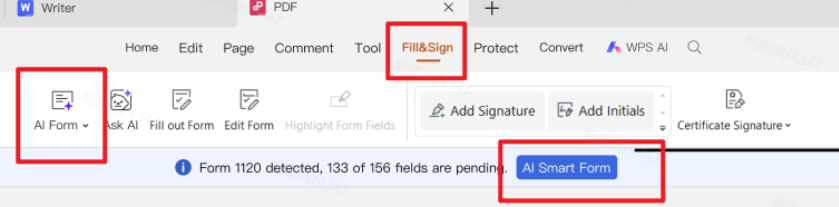
Fill&Sign with automatic form recognition and quick fill In AI Form Filler, paste, upload, or drag source info -- for example a note with your legal name, SSN, address, filing status, dependent amounts, and any Step 2 / Step 4 figures you already calculated -- then click Extract&Fill.
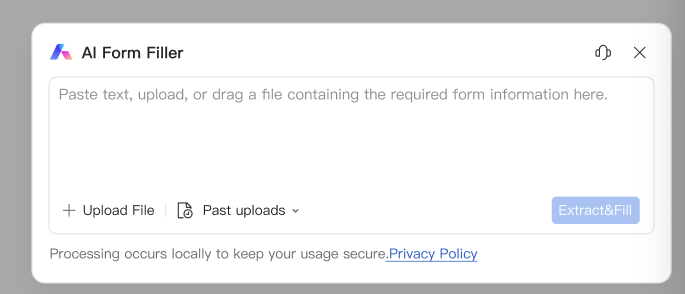
AI Form Filler - paste, upload, or drag source information, then Extract&Fill Review every critical field against your records: name and SSN, filing-status checkbox, Step 2 multi-job treatment, Step 3 dependent amounts, Step 4(a)-(c) adjustments, and Step 5 signature/date readiness.
Sign if required, save the final PDF for your records, and submit it to HR or payroll per your employer's rules (not to the IRS in most cases).
Before you send the file, confirm every checkbox and dollar amount, then keep a personal copy. For a fuller walkthrough of signing workflows, see the Fill and Sign PDF tutorial and Sign PDF feature page.
After withholding is set, many employees also organize year-end wage docs with a W-2 form PDF guide, while freelancers on the side may need a W-9 form PDF guide. If you only need occasional forms, start with a free PDF form fillers workflow.
Common W-4 mistakes to avoid
Most W-4 problems come from rushing Step 1 or skipping Step 2. Watch for these issues before you hit send:
Selecting the wrong filing status
Ignoring Step 2 when you or your spouse have multiple jobs (underwithholding risk)
Claiming dependents you do not qualify for
Forgetting to sign and date Step 5
Submitting an outdated tax-year form instead of the current IRS PDF
Not keeping a personal copy after you send it to HR
Confusing W-4 (employee withholding for your employer) with W-9 (TIN request for contractors)
After you submit: when to update your W-4
Update your W-4 when your situation changes -- new second job, marriage or divorce, a child, large side income, or if your refund/balance due was far from what you expected. You can submit a new W-4 to your employer at any time during the year. Payroll usually applies the new form to future pay periods only. Review withholding after you file your annual return and whenever a spouse starts or leaves a job. If you take on freelance work with little or no withholding, revisit Step 4 or plan estimated taxes so your W-2 form job is not carrying the full load alone.
Why we recommoned WPS Office
Filling a W-4 is rarely “just one PDF.” You gather name, SSN, filing status, and dependent amounts, complete Steps 1–5, then often still need a clean printout for HR, a smaller file for portal upload, or related Word/Excel notes for tax season. Many tools can open the IRS PDF; fewer help you fill it with AI and finish the rest of the job in the same place. That is why we recommend WPS Office — it pairs efficient AI form filling with a full professional office suite you can start for free, so employees and HR get speed, careful review, and usable files without stacking paid apps.

Efficient AI form filling — AI Form Filler / AI Smart Form can extract details from a prepared note or uploaded file (legal name, address, SSN, filing status, Step 2–4 figures) and map them into matching W-4 fields; you still review every checkbox and dollar amount before signing. AI speeds typing; it does not replace your withholding decisions.
A complete office system after the form — Word, Excel, PPT, and PDF stay in one suite for offer letters, pay-stub notes, year-end W-2 packets, and everyday tax paperwork.
Output that matches real office needs — adjust page size for clean printing, compress PDFs for email or HR portal limits, merge supporting pages, and password-protect sensitive tax files before you share them.
Professional tools, free to start — serious Fill & Sign and PDF operations without enterprise Acrobat pricing for a routine employee form, so you can finish Step 5 and keep a personal archive in the same workflow.
Ready to complete your next W-4 with fewer paper steps? Download WPS Office and open Form W-4 in Fill & Sign with AI Smart Form.
FAQ
Do I send Form W-4 to the IRS?
Usually no. You give the completed W-4 to your employer. Keep a copy for yourself. Form W-4 sets paycheck withholding; it does not replace filing a Form 1040 tax return later.
Can I fill out a W-4 form online as a PDF?
Yes. Download the IRS PDF and complete it with WPS Office Fill&Sign and AI Form Filler / AI Smart Form, then submit the file per your employer's process.
What if I claim exempt on the W-4?
You may claim exemption only if you meet IRS conditions (generally no tax liability last year and expect none this year). Recheck eligibility each year; claiming exempt incorrectly can lead to underpayment.
Is Form W-4 the same as a W-9?
No. Employees use W-4 for withholding and give it to the employer. Independent contractors and vendors typically use Form W-9 to provide a TIN to a requester so the payer can issue a 1099 later.

Conclusion
Complete Your W-4 PDF Faster — and Start Paycheck Withholding Right!
Learning how to fill out a W-4 form comes down to accurate Step 1 details, the right choices in Steps 2–4 for your household (especially multi-job underwithholding risk), and a signed Step 5 delivered to your employer — not the IRS. Completing the official W-4 form PDF in WPS with AI Smart Form / AI Form Filler speeds data entry so you can focus on reviewing filing status, dependents, and extra withholding before payroll processes the file. Download the current IRS W-4, fill and review in WPS, keep a personal copy, then submit per HR rules. Ready to skip print-and-scan? Download WPS Office and open your W-4 in Fill & Sign.
'%3e%3cpath%20d='M19.9911%204.11386V6.471H18.5894C18.0775%206.471%2017.7322%206.57814%2017.5536%206.79243C17.3751%207.00671%2017.2858%207.32814%2017.2858%207.75671V9.44421H19.9019L19.5536%2012.0871H17.2858V18.8639H14.5536V12.0871H12.2769V9.44421H14.5536V7.49779C14.5536%206.39064%2014.8632%205.53201%2015.4822%204.92189C16.1013%204.31177%2016.9257%204.00671%2017.9554%204.00671C18.8304%204.00671%2019.509%204.04243%2019.9911%204.11386Z'%20fill='%23333333'/%3e%3c/g%3e%3cdefs%3e%3cclipPath%20id='clip0_2938_8199'%3e%3crect%20width='16'%20height='16'%20fill='white'%20transform='translate(8%204.00671)'/%3e%3c/clipPath%3e%3c/defs%3e%3c/svg%3e)
'%3e%3cpath%20d='M17.5237%2010.7813L23.4811%204H22.0699L16.8949%209.88693L12.7648%204H8L14.2469%2012.9029L8%2020.0133H9.4112L14.8725%2013.7952L19.2352%2020.0133H24M9.92053%205.04213H12.0885L22.0688%2019.0224H19.9003'%20fill='%23333333'/%3e%3c/g%3e%3cdefs%3e%3cclipPath%20id='clip0_2938_8200'%3e%3crect%20width='16'%20height='16.0134'%20fill='white'%20transform='translate(8%204)'/%3e%3c/clipPath%3e%3c/defs%3e%3c/svg%3e)


