



'%3e%3cpath%20fill-rule='evenodd'%20clip-rule='evenodd'%20d='M21.4999%2010.9993C21.4999%205.20009%2016.7986%200.498901%2010.9993%200.498901C5.19994%200.498901%200.498657%205.20009%200.498657%2010.9993C0.498657%2016.2404%204.33858%2020.5844%209.35855%2021.3722V14.0346H6.69238V10.9993H9.35855V8.68594C9.35855%206.05427%2010.9262%204.60062%2013.3248%204.60062C14.4736%204.60062%2015.6753%204.80571%2015.6753%204.80571V7.38979H14.3512C13.0468%207.38979%2012.64%208.19921%2012.64%209.0296V10.9993H15.5523L15.0867%2014.0346H12.64V21.3722C17.66%2020.5844%2021.4999%2016.2404%2021.4999%2010.9993Z'%20fill='%231568EA'/%3e%3c/g%3e%3c/svg%3e)


'%3e%3cpath%20d='M2.42045%2022.1876H6.31818V12.7217L0.75%208.54553V20.5171C0.75%2021.4414%201.49892%2022.1876%202.42045%2022.1876Z'%20fill='%234285F4'/%3e%3cpath%20d='M19.682%2022.1876H23.5797C24.5041%2022.1876%2025.2502%2021.4387%2025.2502%2020.5171V8.54553L19.682%2012.7217'%20fill='%2334A853'/%3e%3cpath%20d='M19.682%205.48293V12.7216L25.2502%208.54543V6.31816C25.2502%204.25236%2022.8921%203.07469%2021.2411%204.31361'%20fill='%23FBBC04'/%3e%3cpath%20d='M6.31824%2012.7217V5.48303L13.0001%2010.4944L19.6819%205.48303V12.7217L13.0001%2017.733'%20fill='%23EA4335'/%3e%3cpath%20d='M0.75%206.31816V8.54543L6.31818%2012.7216V5.48293L4.75909%204.31361C3.10534%203.07469%200.75%204.25236%200.75%206.31816Z'%20fill='%23C5221F'/%3e%3c/g%3e%3cdefs%3e%3cclipPath%20id='clip0_2954_7305'%3e%3crect%20width='24.5'%20height='18.375'%20fill='white'%20transform='translate(0.75%203.8125)'/%3e%3c/clipPath%3e%3c/defs%3e%3c/svg%3e)


IRS Form 1040 is the U.S. Individual Income Tax Return. Most people who file federal income taxes use Form 1040 (or a related version) to report wages, other income, deductions, credits, and whether they get a refund or owe a balance. This guide explains what Form 1040 is, how to get the official PDF, how to gather supporting documents, and how to quickly fill a draft digitally with WPS Office so your packet stays editable until you are ready to file through an IRS-approved channel.
Whether you prepare a simple wage return or a packet with several schedules, starting from the correct IRS PDF and a clear checklist reduces last-minute scrambling. The steps below focus on document preparation -- not on choosing every tax strategy for your household, and not on transmitting the return (WPS does not file with the IRS).
What is Form 1040?
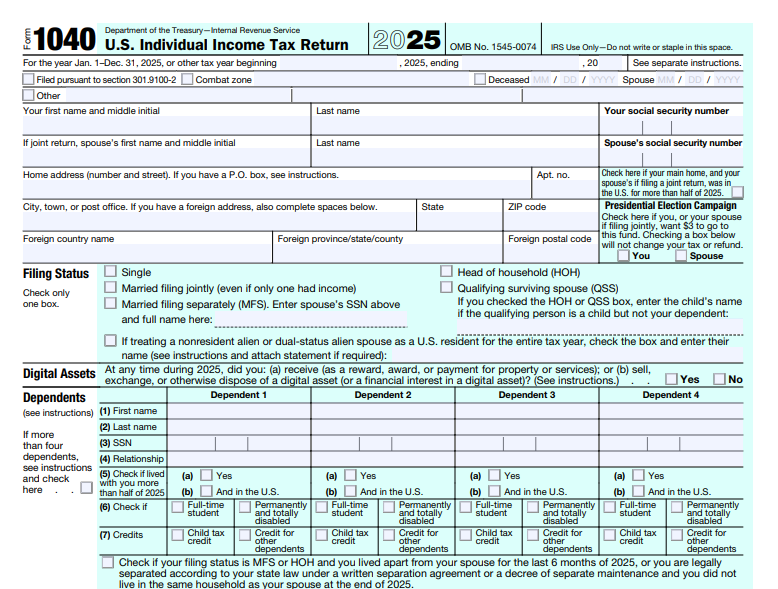
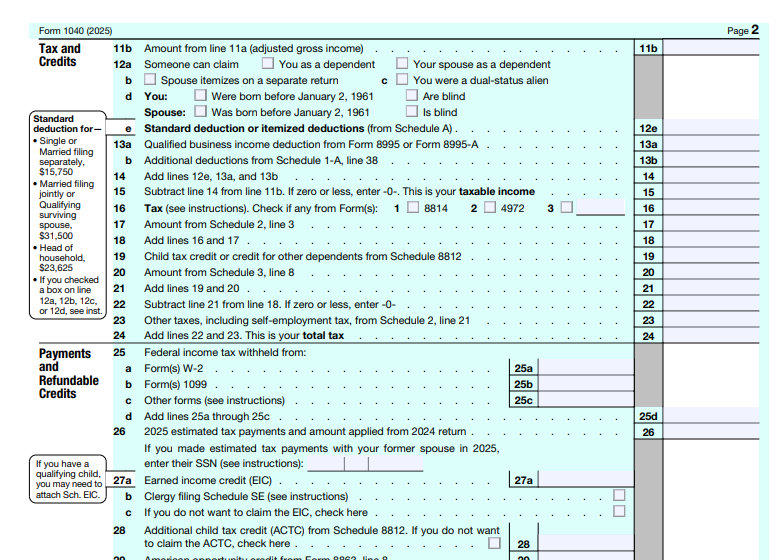
Form 1040 is the main federal income tax return for individuals. You use it to report income, claim deductions and credits, and calculate the bottom line: refund versus amount owed. The front and back of the form pull together wages, interest, dividends, business or gig income (often through schedules), adjustments, tax, payments, and the final refund or balance due.
Depending on your situation, you may also attach schedules such as Schedule 1 (additional income and adjustments), Schedule A (itemized deductions), or Schedule C (sole proprietor business). Some taxpayers need Form 1040-SR or other variants; always match the form title and tax year to the return you are filing. Think of Form 1040 as the summary page -- supporting schedules and information returns (W-2s, 1099s) explain the numbers behind each line. If you e-file later, the same line logic still applies; a carefully filled PDF draft helps you catch missing schedules before software validation does.
Who needs to file Form 1040?
Filing rules depend on gross income, filing status, age, and other IRS tests for the tax year. In broad terms, you may need to file if you are in one of these groups:
Most U.S. citizens and resident aliens who meet IRS filing thresholds for the tax year
People who want to claim a refund even when no tax is owed
Self-employed workers and freelancers who report business income on attached schedules
Anyone required by IRS rules for their filing status, age, and income
Filing thresholds change by year and filing status. Confirm the current requirements in the official Form 1040 instructions before you start. Even when income is below a filing threshold, you may still want to file to claim a refund of withheld tax or certain credits. Self-employed filers often need to file when net earnings cross self-employment tax thresholds, even if wage income alone would not require a return. Nonresident situations and special filing statuses can use different forms -- check IRS guidance if that applies to you.
How to get the official Form 1040 PDF
Always start from the IRS source for the tax year you are filing. Do not reuse a prior-year PDF or a random blank form from an unverified site.
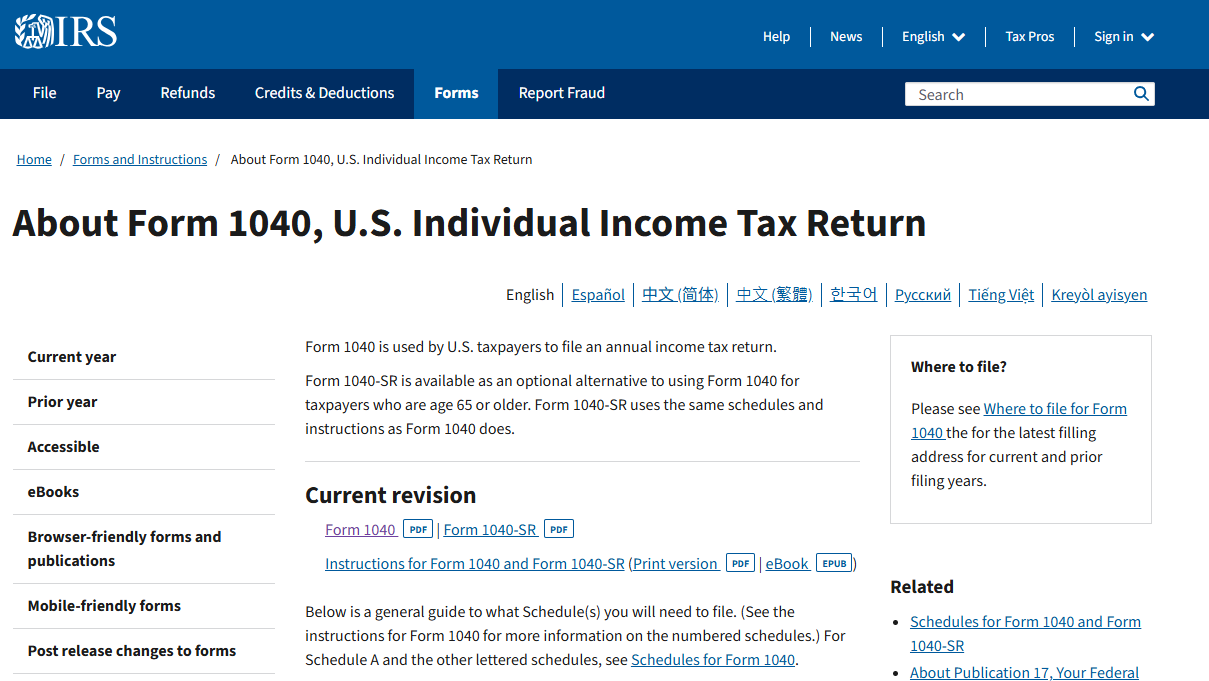
Go to IRS.gov and open the About Form 1040 page.
Download the current-year Form 1040 PDF and the matching instructions.
Also gather related forms you may need, such as Schedule 1 or other schedules listed in the instructions.
Save the blank PDF locally so you can fill it offline.
Keep the instructions PDF next to the form. Line numbers and worksheet references change between years, and the instructions explain which schedules support each entry. Download any worksheets you expect to need (for example, for credits or additional tax) at the same time so you are not hunting mid-session. If you use tax software later, your filled PDF can still serve as a worksheet and archive of the figures you planned to report.
Documents to gather before you fill
Build a folder (digital or physical) before you type the first Form 1040 line. Typical items include:
W-2 forms from employers (see our W-2 form PDF guide)
1099 forms for contractor, interest, dividend, or other reportable income
Records for deductions and credits you plan to claim
Prior-year return and Social Security numbers for yourself, spouse, and dependents
Bank account details if you want direct deposit for a refund
Also pull health coverage forms, education statements, property-tax or mortgage interest records, charitable receipts, and brokerage summaries if they apply. Sort everything by type before you open Form 1040 so you are not flipping between inboxes while typing SSNs. If you pay contractors, you may also keep a W-9 form PDF guide nearby for TIN collection during the year. Matching every W-2 and 1099 amount to Form 1040 lines before you sign saves time when software or a preparer asks for source documents -- and helps you see early whether you are headed toward a refund or an amount owed.
How to Quickly Fill Out Form 1040 PDF with WPS
Above, we covered what Form 1040 is, who may need to file, and which documents to gather. The practical question is how to fill the Form 1040 PDF quickly and accurately while you still plan to transmit the return through tax software, an IRS-approved e-file channel, or a tax professional. WPS Office includes AI Form Filler (AI Smart Form) that can extract details from source text or files and populate fields -- so you spend less time retyping names and income figures and more time reviewing schedules, refund versus amount owed, and math against your W-2s and 1099s.
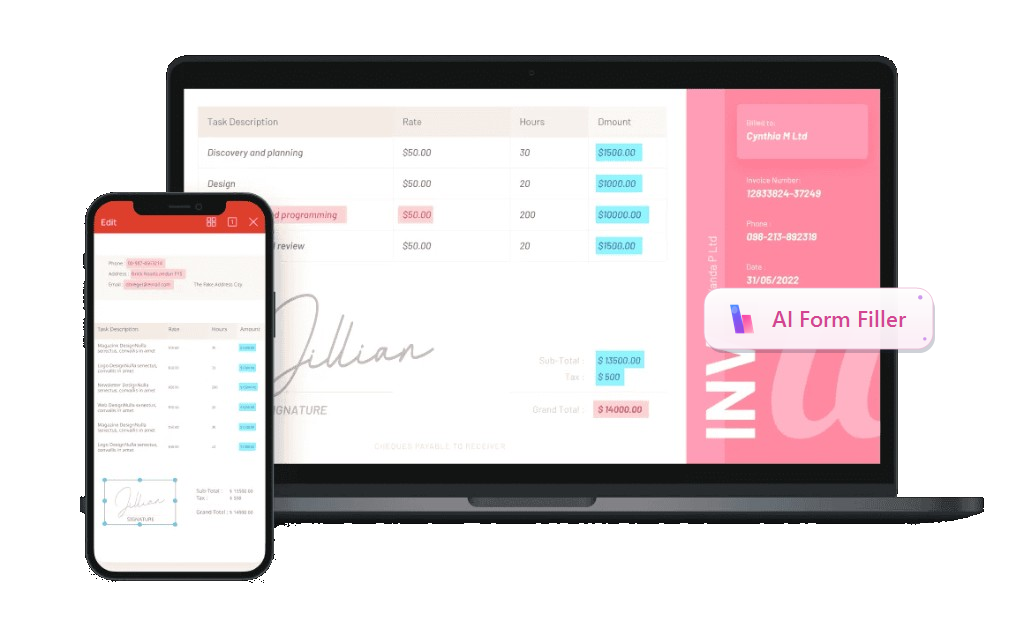
Recommended feature -- AI Form Filler / AI Smart Form: In the WPS PDF Fill&Sign tab, open AI Form or AI Smart Form when WPS detects form fields. Paste text, upload a file, or drag a document into AI Form Filler, then click Extract&Fill. Processing can run locally to help keep usage secure. For general fill workflows, see the WPS pdf filler feature page.
Download the official IRS Form 1040 PDF (and any schedules you need) for the tax year you are filing, then save them locally.
Install or open WPS Office, open the Form 1040 PDF, and go to the PDF tab - Fill&Sign.
Start AI Form / AI Smart Form when WPS detects the form fields (ribbon or prompt bar).
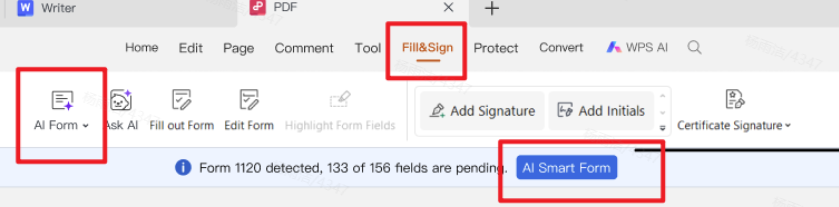
Fill&Sign with automatic form recognition and quick fill In AI Form Filler, paste, upload, or drag source info -- for example a summary of filing status, SSNs, W-2 wage and withholding totals, 1099 income, dependent details, and bank routing/account numbers for a refund -- then click Extract&Fill.
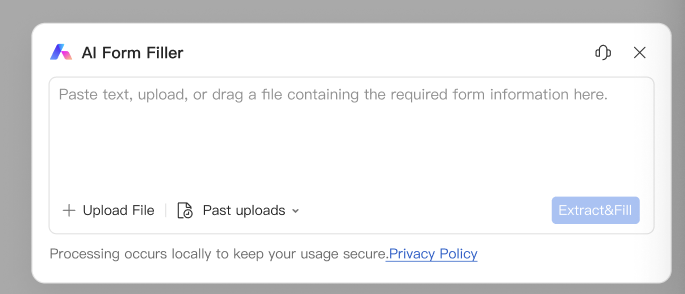
AI Form Filler - paste, upload, or drag source information, then Extract&Fill Review every critical field against your records: names and SSNs, filing status, income lines tied to each W-2/1099, deductions and credits, tax and payments, refund or amount owed, and direct-deposit digits if you expect a refund.
Sign and date where required, save working and final PDF copies, then submit or hand off through your chosen filing path (WPS prepares documents; it does not file the return with the IRS).
Work top to bottom, and fill supporting schedules before you finalize related Form 1040 totals. If a line depends on a worksheet in the instructions, complete that worksheet first so you are not guessing. When spouses file jointly, agree on who enters shared figures so one person is not overwriting the other's draft. Name draft files clearly (include tax year and "draft" vs "final") and keep a final locked copy once numbers are set.
If you only need occasional tax paperwork, a free PDF form fillers roundup can help you compare options; for day-to-day work inside one suite, WPS Fill&Sign plus AI Smart Form is usually enough for draft preparation.
Store bank login details separately from the PDF when you can, and share passwords through a secure channel your preparer already uses. Put schedules in the same order the Form 1040 instructions list them so reviewers can flip pages quickly. Keep an offline backup of the final return PDF and key information returns for at least as long as you keep other tax records.
Common mistakes to avoid
These issues cause delays, rejected e-files, or incorrect refunds more often than people expect:
Using an outdated tax-year Form 1040 PDF
Mismatched names or SSNs across pages and W-2s
Leaving dependent information incomplete
Entering refund bank details incorrectly
Forgetting required schedules that support income or deduction lines
Skipping a final review of math, withholding, and the refund versus amount-owed result
Also watch transposed digits in SSNs, skipped signature lines, and income entered on the wrong line when a 1099 belongs on a schedule first. Confirm direct-deposit routing and account numbers against a voided check or bank app screen -- a single wrong digit can send a refund to the wrong place or force a paper check. A slow second pass with your source documents open side by side is worth the extra minutes.
Why we recommend WPS Office
A Form 1040 packet is rarely one page. You gather W-2s and 1099s, fill income and credit lines, attach schedules, then still need a tidy printout, a smaller upload for a portal, or a password-protected draft for your preparer. Many tools can open the IRS PDF; fewer help you fill it with AI and finish the rest of the job in the same place. That is why we recommend WPS Office — it pairs efficient AI form filling with a full professional office suite you can start for free, so you get speed, careful review, and usable tax files without stacking paid apps. (WPS prepares documents; filing still goes through an IRS-approved path.)
Efficient AI form filling — AI Smart Form can extract details from a source note or uploaded summary (filing status, SSNs, wage and withholding totals, 1099 income, dependents, direct-deposit digits) and map them into matching Form 1040 fields; you still review every line against your W-2s and 1099s before signing. AI speeds typing; it does not replace tax decisions or IRS instructions.
A complete office system after the form — Word, Excel, PPT, and PDF stay in one suite for worksheets, schedule notes, prior-year comparisons, and year-round tax paperwork.
Output that matches real office needs — adjust page size for clean printing, compress large packets for portal limits, merge schedules into order, and password-protect files that contain SSNs before you email a preparer.
Professional tools, free to start — serious Fill & Sign and PDF operations without enterprise Acrobat pricing for a seasonal return draft, so you can extract, review, save, and hand off a tidy packet in one workflow.
Ready to fill Form 1040 without printing? Download WPS Office and open your IRS PDF in Fill & Sign with AI Smart Form.



FAQ
Can I fill Form 1040 for free in WPS?
Yes. WPS Office includes PDF fill and sign tools, plus AI Form Filler / AI Smart Form, that you can use to complete Form 1040 PDF drafts. Always verify you downloaded the official IRS PDF for the tax year you are filing. Free tools help you prepare documents; they do not replace reading the IRS instructions for lines that apply to you.
Does WPS file my tax return with the IRS?
No. WPS helps you prepare, fill, sign, and organize PDF documents. Filing is done through IRS-approved e-file channels, tax software, or your tax professional. Use WPS to build a clean packet, then follow your chosen filing path to transmit the return.
What if I also received Form 1099 income?
Report that income on the correct Form 1040 lines and schedules. Keep every 1099 with your tax packet and match amounts to your records before you finalize the PDF. Contractor and gig income often needs Schedule C or other forms -- confirm the path in the Form 1040 instructions for your tax year.
'%3e%3cpath%20d='M19.9911%204.11386V6.471H18.5894C18.0775%206.471%2017.7322%206.57814%2017.5536%206.79243C17.3751%207.00671%2017.2858%207.32814%2017.2858%207.75671V9.44421H19.9019L19.5536%2012.0871H17.2858V18.8639H14.5536V12.0871H12.2769V9.44421H14.5536V7.49779C14.5536%206.39064%2014.8632%205.53201%2015.4822%204.92189C16.1013%204.31177%2016.9257%204.00671%2017.9554%204.00671C18.8304%204.00671%2019.509%204.04243%2019.9911%204.11386Z'%20fill='%23333333'/%3e%3c/g%3e%3cdefs%3e%3cclipPath%20id='clip0_2938_8199'%3e%3crect%20width='16'%20height='16'%20fill='white'%20transform='translate(8%204.00671)'/%3e%3c/clipPath%3e%3c/defs%3e%3c/svg%3e)
'%3e%3cpath%20d='M17.5237%2010.7813L23.4811%204H22.0699L16.8949%209.88693L12.7648%204H8L14.2469%2012.9029L8%2020.0133H9.4112L14.8725%2013.7952L19.2352%2020.0133H24M9.92053%205.04213H12.0885L22.0688%2019.0224H19.9003'%20fill='%23333333'/%3e%3c/g%3e%3cdefs%3e%3cclipPath%20id='clip0_2938_8200'%3e%3crect%20width='16'%20height='16.0134'%20fill='white'%20transform='translate(8%204)'/%3e%3c/clipPath%3e%3c/defs%3e%3c/svg%3e)


