



'%3e%3cpath%20fill-rule='evenodd'%20clip-rule='evenodd'%20d='M21.4999%2010.9993C21.4999%205.20009%2016.7986%200.498901%2010.9993%200.498901C5.19994%200.498901%200.498657%205.20009%200.498657%2010.9993C0.498657%2016.2404%204.33858%2020.5844%209.35855%2021.3722V14.0346H6.69238V10.9993H9.35855V8.68594C9.35855%206.05427%2010.9262%204.60062%2013.3248%204.60062C14.4736%204.60062%2015.6753%204.80571%2015.6753%204.80571V7.38979H14.3512C13.0468%207.38979%2012.64%208.19921%2012.64%209.0296V10.9993H15.5523L15.0867%2014.0346H12.64V21.3722C17.66%2020.5844%2021.4999%2016.2404%2021.4999%2010.9993Z'%20fill='%231568EA'/%3e%3c/g%3e%3c/svg%3e)


'%3e%3cpath%20d='M2.42045%2022.1876H6.31818V12.7217L0.75%208.54553V20.5171C0.75%2021.4414%201.49892%2022.1876%202.42045%2022.1876Z'%20fill='%234285F4'/%3e%3cpath%20d='M19.682%2022.1876H23.5797C24.5041%2022.1876%2025.2502%2021.4387%2025.2502%2020.5171V8.54553L19.682%2012.7217'%20fill='%2334A853'/%3e%3cpath%20d='M19.682%205.48293V12.7216L25.2502%208.54543V6.31816C25.2502%204.25236%2022.8921%203.07469%2021.2411%204.31361'%20fill='%23FBBC04'/%3e%3cpath%20d='M6.31824%2012.7217V5.48303L13.0001%2010.4944L19.6819%205.48303V12.7217L13.0001%2017.733'%20fill='%23EA4335'/%3e%3cpath%20d='M0.75%206.31816V8.54543L6.31818%2012.7216V5.48293L4.75909%204.31361C3.10534%203.07469%200.75%204.25236%200.75%206.31816Z'%20fill='%23C5221F'/%3e%3c/g%3e%3cdefs%3e%3cclipPath%20id='clip0_2954_7305'%3e%3crect%20width='24.5'%20height='18.375'%20fill='white'%20transform='translate(0.75%203.8125)'/%3e%3c/clipPath%3e%3c/defs%3e%3c/svg%3e)


IRS Form 1120 is the U.S. Corporation Income Tax Return for domestic corporations taxed as C corporations. It reports corporate income, gains, losses, deductions, and credits, then figures the corporation's income tax. This guide focuses on what Form 1120 is, who must file it (versus Form 1120-S), which schedules often attach, and how to prepare a fillable Form 1120 PDF quickly with WPS Office before you hand the draft to a CPA or e-file workflow.
What is Form 1120?
Form 1120 is the main federal income tax return for C corporations. Unlike a personal Form 1040 , it centers on the entity: legal name, EIN, tax year, officer signature, and a full walk-through of gross receipts, cost of goods sold, other income, deductions, tax and payments. Many returns also attach schedules that disclose how the books map to the tax return -- for example Schedule C (dividends), Schedule J (tax computation), Schedule K (other information), Schedule L (balance sheet), and Schedule M-1 or M-2 (book-to-tax reconciliations) when required.
Accuracy here is a books problem first, a PDF problem second. Line amounts should tie to your general ledger, trial balance, depreciation reports, and supporting workpapers. Keep those source files next to the Form 1120 draft so a reviewer can open the return and the backup in one sitting instead of chasing missing exhibits later.
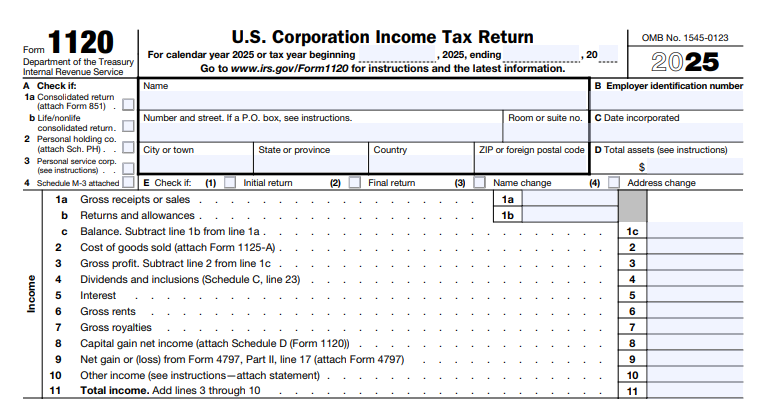
Who needs to file Form 1120?
Domestic C corporations (including corporations in bankruptcy)
Certain entities that elect or are required to file as corporations
Corporations that must report even when little or no tax is due (confirm with IRS instructions)
S corporations generally file Form 1120-S, not Form 1120. Confirm entity classification before you invest time in fields. Filing the wrong corporate return can mean rejected e-files, amended returns, or delayed credits. If the company recently incorporated, converted from a sole proprietorship or partnership, or elected S status, verify the correct return with your tax professional first.
Due dates, extensions, estimated tax, and e-file options depend on the tax year and entity facts. Use the official instructions for those rules. Keep dated draft PDFs so you can show your CPA what changed between bookkeeping close and the signed package.
How to get the official Form 1120 PDF
Go to IRS.gov and open the About Form 1120 page.
Download the current-year Form 1120 PDF and the matching instructions.
Save a blank local copy so you can fill it offline.
Match the form year to the tax year you are filing. Do not reuse last year's filled PDF as a template unless you intentionally carry over non-amount fields and still replace every figure. Prefer a fresh blank from IRS.gov each season, and download the instructions PDF with it -- many lines only make sense with the matching instruction pages, which also list which schedules to attach.
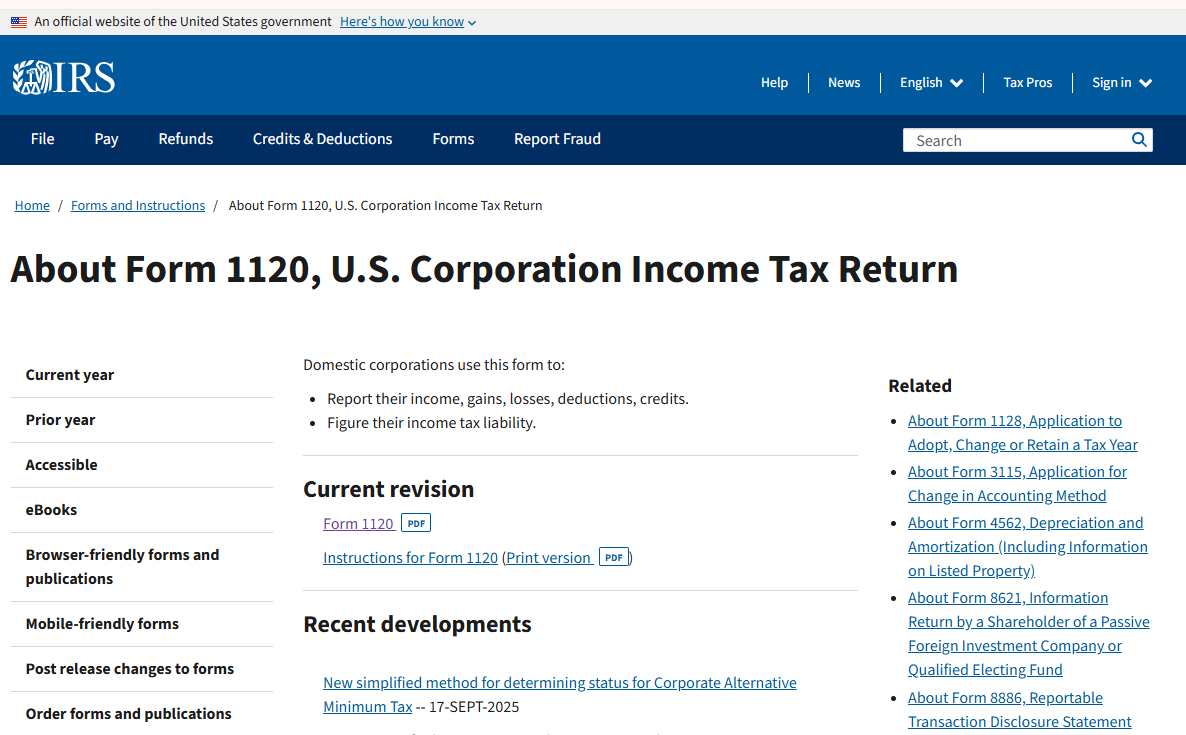
Name the blank clearly (for example, Form-1120-2025-blank.pdf) so it is never mixed with a partial draft. If several people touch the return, store blanks and drafts in a shared folder with access rules that fit your team. That habit prevents someone from filling an outdated edition or overwriting the only signed copy.
How to Quickly Fill Out Form 1120 PDF with WPS
Once you know which C corporation return you need and which schedules apply, the practical goal is to fill the Form 1120 PDF quickly and accurately. WPS Office includes an AI Form Filler (AI Smart Form) that can extract details from pasted text or uploaded files -- such as a trial-balance export, workpaper summary, or prior-year identifying block -- and populate matching fields. You spend less time retyping the EIN and header lines and more time reviewing tax-sensitive amounts before CPA handoff.
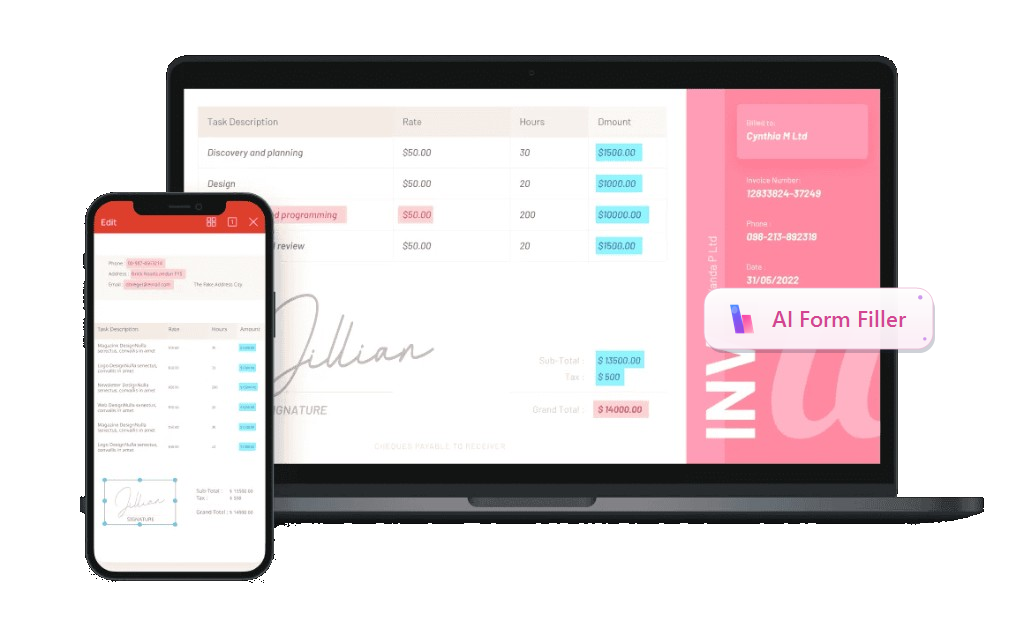
Recommended feature - AI Form Filler : In WPS PDF's Fill&Sign tab, open AI Form or click AI Smart Form when WPS detects pending form fields. Paste text, upload a file, or drag a document with the required information into AI Form Filler, then click Extract&Fill. Processing can run locally to help keep corporate tax data more secure.
Download the official IRS Form 1120 PDF (and instructions) for the correct tax year, then save the blank locally.
Open the PDF in WPS Office and switch to the PDF tab -> Fill&Sign. Use the built-in pdf filler tools so interactive fields highlight.
Start AI Form / AI Smart Form. When WPS detects form fields, click AI Form in the ribbon or AI Smart Form on the prompt bar.
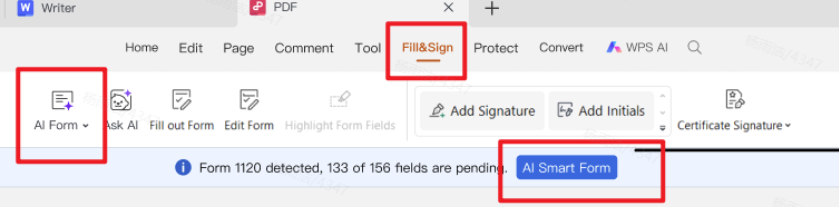
Fill&Sign with automatic form recognition and quick fill Add source information in AI Form Filler by pasting text, clicking + Upload File, or dragging books/workpapers that contain the corporation name, EIN, address, tax year, and draft line figures. Then click Extract&Fill.
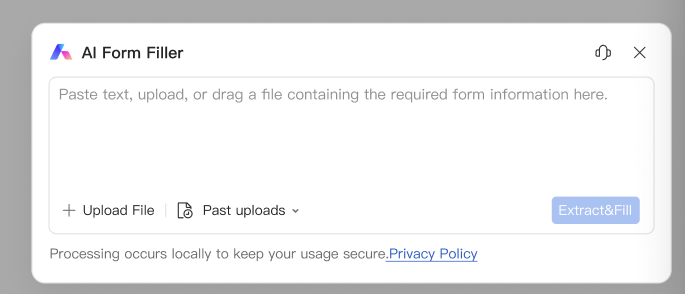
AI Form Filler - paste, upload, or drag source information, then Extract&Fill Review critical fields against your trial balance and schedules: legal name, EIN, tax year dates, income and deduction totals, tax and payments, and officer signature area. AI accelerates entry; it does not replace a preparer or CPA review.
Sign or leave for the officer/CPA, save incremental drafts, then export a clean final PDF. Merge supporting schedules into an ordered packet when your preparer asks for one file.
Work from reliable sources: year-end trial balance, depreciation reports, payroll summaries, Form 1099 totals, and prior-year carryovers. Enter the EIN and legal name exactly as they appear on IRS records. Double-check short-year begin and end dates. When a field will not accept a value cleanly, use Add Text for a short note and flag it for your preparer rather than forcing a wrong entry.
Corporate packets often include contractor or payroll docs too -- bookmark a W-9 form PDF guide, a W-2 form PDF guide, and a free PDF form fillers option for overflow schedules. Keeping those related PDFs in the same WPS workspace makes it easier to cross-check vendor EINs, wage totals, and supporting exhibits before you lock the Form 1120 draft.
After the main return pages look complete, confirm attached schedule totals match. Save a new draft whenever books change, then export a clean final PDF when the return is ready for signature.
Tips for cleaner Form 1120 packets
Name files clearly (for example, Form-1120-2025-draft.pdf).
Merge supporting schedules into one ordered packet with WPS Merge PDF when required.
Compress large attachments before portal upload.
Password-protect sensitive drafts before emailing your CPA.
Why we recommend WPS Office
A Form 1120 package is rarely one page. You fill the corporate return, attach schedules, name clear drafts, then still need a merged packet for your CPA, a smaller upload for a portal, or a password-protected share that contains EIN and financials. Many tools can open an IRS PDF; fewer help you fill it with AI, finish the packet, and work across devices in the same suite. That is why we recommend WPS Office — efficient AI form filling plus a full professional office system you can start for free, built for real C-corporation document prep.
Efficient AI form filling — AI Form Filler / AI Smart Form can extract details from trial-balance notes or workpapers (legal name, EIN, tax year, draft line figures) and map them into matching Form 1120 fields; you still review every tax-sensitive amount before CPA handoff. AI speeds typing; it does not replace a preparer.
Multi-device workflow that fits how tax season actually works — use desktop when confidentiality matters and you prefer local-first handling of corporate drafts; switch to mobile when something urgent changes and you need a quick fix on the go; use online when you need browser access. Same Fill & Sign and PDF toolkit across ends, so you are not rebuilding the packet in a different app.
A complete office system after the form — Word, Excel, PPT, and PDF stay together for workpapers, notes, and year-end exhibits beside the return.
Packet tools matched to Form 1120 tips — name files clearly (for example, Form-1120-2025-draft.pdf); put Form 1120 first, then schedules in instruction order, then CPA workpapers; Merge PDF with comparatively small / loose merge limits so larger schedule sets are easier to assemble into one ordered packet; compress bulky exhibits before portal upload (keep an uncompressed archive locally, and avoid compressing the signed return itself when possible); password-protect sensitive drafts before emailing your CPA and send the password on a separate channel. Prefer crisp digital exports over low-resolution phone photos of statements.
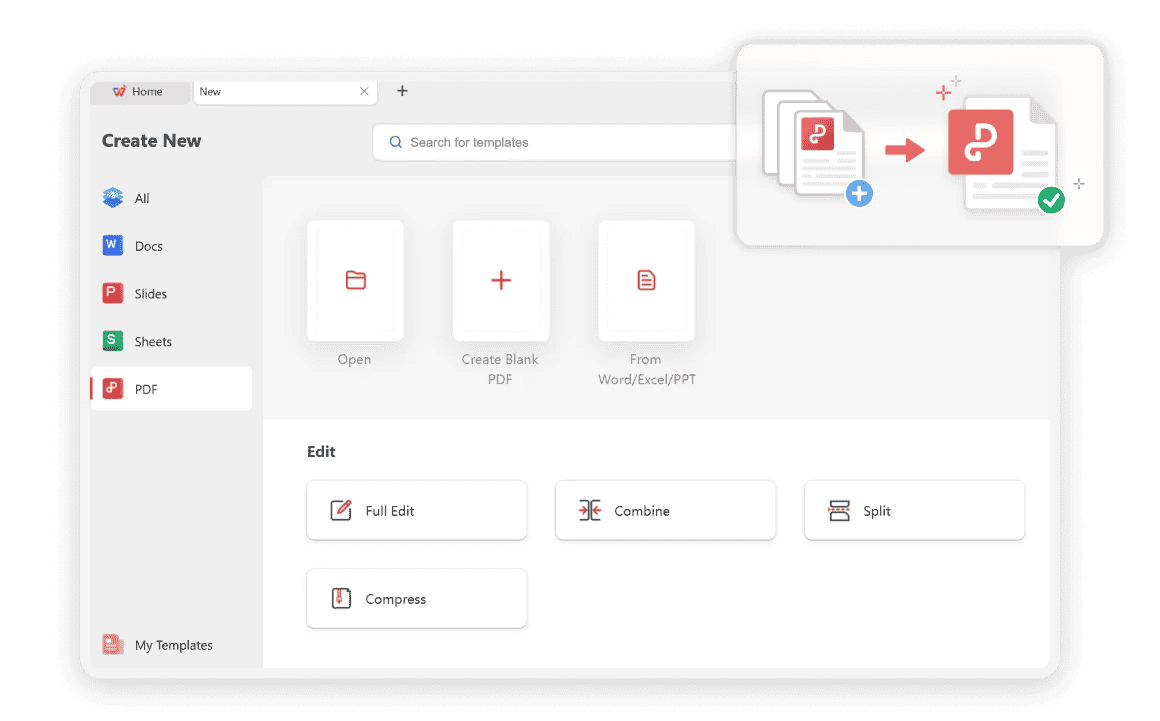
Merge PDFs Without Limits
These steps keep the C corporation package organized and safer to handle — they do not replace professional review. Ready to fill Form 1120 and assemble the packet in one place? Download WPS Office and open your IRS PDF in Fill & Sign with AI Smart Form.
FAQ
Can I fill Form 1120 for free in WPS?
Yes. WPS Office includes PDF fill and sign tools, including AI Form Filler / AI Smart Form, that you can use to complete Form 1120 PDFs. Always verify the official IRS PDF version for the tax year you are filing. Free-to-start tools help you prepare drafts and organize attachments; your filing method still depends on IRS rules and your tax professional's process.
Does WPS file my corporate return?
No. WPS helps you prepare, fill, sign, and organize PDF documents. Filing is done through IRS-approved channels or your tax professional. Think of WPS as the document workspace around Form 1120 -- not a substitute for tax software or a CPA engagement.



Conclusion
Filling Form 1120 well starts with the right return (1120 vs 1120-S), current IRS PDFs, and books that tie to every line before you invest time in fields. Completing a Form 1120 PDF draft in WPS with AI Smart Form / AI Form Filler speeds header and data entry so you can focus on reviewing EIN accuracy, income and deduction totals, and schedule attachments. Remember: WPS helps you prepare, organize, merge, compress, and protect documents — it does not file your corporate return with the IRS. When the draft is ready, hand a clean, ordered packet to your CPA or IRS-approved filing path. Ready to draft without printing? Download WPS Office and open Form 1120 in Fill & Sign.
'%3e%3cpath%20d='M19.9911%204.11386V6.471H18.5894C18.0775%206.471%2017.7322%206.57814%2017.5536%206.79243C17.3751%207.00671%2017.2858%207.32814%2017.2858%207.75671V9.44421H19.9019L19.5536%2012.0871H17.2858V18.8639H14.5536V12.0871H12.2769V9.44421H14.5536V7.49779C14.5536%206.39064%2014.8632%205.53201%2015.4822%204.92189C16.1013%204.31177%2016.9257%204.00671%2017.9554%204.00671C18.8304%204.00671%2019.509%204.04243%2019.9911%204.11386Z'%20fill='%23333333'/%3e%3c/g%3e%3cdefs%3e%3cclipPath%20id='clip0_2938_8199'%3e%3crect%20width='16'%20height='16'%20fill='white'%20transform='translate(8%204.00671)'/%3e%3c/clipPath%3e%3c/defs%3e%3c/svg%3e)
'%3e%3cpath%20d='M17.5237%2010.7813L23.4811%204H22.0699L16.8949%209.88693L12.7648%204H8L14.2469%2012.9029L8%2020.0133H9.4112L14.8725%2013.7952L19.2352%2020.0133H24M9.92053%205.04213H12.0885L22.0688%2019.0224H19.9003'%20fill='%23333333'/%3e%3c/g%3e%3cdefs%3e%3cclipPath%20id='clip0_2938_8200'%3e%3crect%20width='16'%20height='16.0134'%20fill='white'%20transform='translate(8%204)'/%3e%3c/clipPath%3e%3c/defs%3e%3c/svg%3e)


