



'%3e%3cpath%20fill-rule='evenodd'%20clip-rule='evenodd'%20d='M21.4999%2010.9993C21.4999%205.20009%2016.7986%200.498901%2010.9993%200.498901C5.19994%200.498901%200.498657%205.20009%200.498657%2010.9993C0.498657%2016.2404%204.33858%2020.5844%209.35855%2021.3722V14.0346H6.69238V10.9993H9.35855V8.68594C9.35855%206.05427%2010.9262%204.60062%2013.3248%204.60062C14.4736%204.60062%2015.6753%204.80571%2015.6753%204.80571V7.38979H14.3512C13.0468%207.38979%2012.64%208.19921%2012.64%209.0296V10.9993H15.5523L15.0867%2014.0346H12.64V21.3722C17.66%2020.5844%2021.4999%2016.2404%2021.4999%2010.9993Z'%20fill='%231568EA'/%3e%3c/g%3e%3c/svg%3e)


'%3e%3cpath%20d='M2.42045%2022.1876H6.31818V12.7217L0.75%208.54553V20.5171C0.75%2021.4414%201.49892%2022.1876%202.42045%2022.1876Z'%20fill='%234285F4'/%3e%3cpath%20d='M19.682%2022.1876H23.5797C24.5041%2022.1876%2025.2502%2021.4387%2025.2502%2020.5171V8.54553L19.682%2012.7217'%20fill='%2334A853'/%3e%3cpath%20d='M19.682%205.48293V12.7216L25.2502%208.54543V6.31816C25.2502%204.25236%2022.8921%203.07469%2021.2411%204.31361'%20fill='%23FBBC04'/%3e%3cpath%20d='M6.31824%2012.7217V5.48303L13.0001%2010.4944L19.6819%205.48303V12.7217L13.0001%2017.733'%20fill='%23EA4335'/%3e%3cpath%20d='M0.75%206.31816V8.54543L6.31818%2012.7216V5.48293L4.75909%204.31361C3.10534%203.07469%200.75%204.25236%200.75%206.31816Z'%20fill='%23C5221F'/%3e%3c/g%3e%3cdefs%3e%3cclipPath%20id='clip0_2954_7305'%3e%3crect%20width='24.5'%20height='18.375'%20fill='white'%20transform='translate(0.75%203.8125)'/%3e%3c/clipPath%3e%3c/defs%3e%3c/svg%3e)


Form I-9 (Employment Eligibility Verification) is the USCIS form U.S. employers use to verify each new hire's identity and work authorization. It is an HR compliance record with strict timing and document-examination rules -- not a tax form and not a general onboarding survey. This guide explains who completes Section 1 versus Section 2, when Supplement B applies, how to keep I-9 PDFs secure, and how to fill Form I-9 quickly with WPS Office while still meeting review and retention expectations.
What is Form I-9?
Form I-9 documents that each employee is authorized to work in the United States. Section 1 is the employee's attestation; Section 2 is the employer's (or authorized representative's) certification after examining original acceptable documents. Supplement A may apply when a preparer or translator helps with Section 1. Supplement B is used for reverification or rehire events. The PDF is short compared with many immigration forms, but process mistakes -- late completion, wrong document recording, backdated signatures -- are where employers get into trouble.
Employers generally must complete Form I-9 for each person hired to perform labor or services in the United States, with limited exceptions described by USCIS. The file is a compliance record you may need years later during an audit. Treat every field, checkbox, and signature date as part of that record, not as disposable onboarding paperwork.
Because USCIS updates the form and Lists of Acceptable Documents over time, always download the current edition and review the M-274 when your process changes. Do not rely on an old Word copy or a photocopied packet from a prior year. Starting from the official PDF keeps field labels and Lists A/B/C aligned with current rules.
Who fills which section?
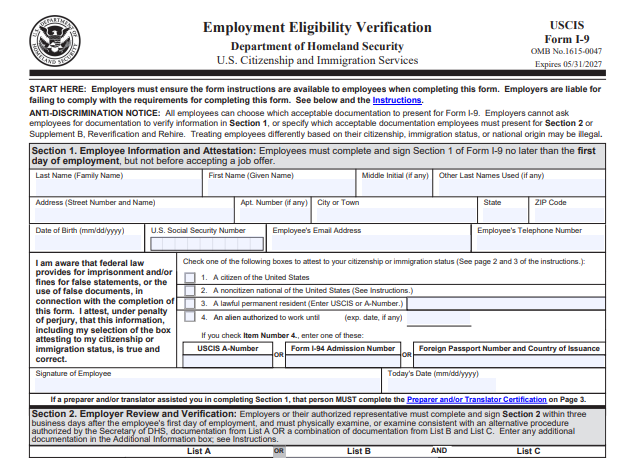
Employee (Section 1): personal info, citizenship or immigration status attestation, signature and date
Employer (Section 2): document title, issuing authority, number, and expiration from List A or Lists B+C, then certification, signature, and date
Reverification or rehire: use Supplement B when required instead of rewriting historical Section 2 entries
Keep roles separate. Employees should not complete employer certification fields, and employers should not pre-select Section 1 attestation choices for the worker. If a preparer or translator helps with Section 1, complete the appropriate supplement so the assistance is documented.
Train hiring managers on which documents they may accept and how to record titles, issuing authorities, document numbers, and expiration dates. Employees choose valid document combinations; employers examine originals (or follow current remote/alternative procedure rules if they apply to your organization). When in doubt, consult HR counsel or the M-274 rather than guessing on the PDF.
How to Quickly Fill Out Form I-9 PDF with WPS
Once roles and timing are clear, the practical goal is to fill the Form I-9 PDF quickly and accurately. WPS Office includes an AI Form Filler (AI Smart Form) that can extract details from pasted text or uploaded files -- for example a new-hire info sheet for Section 1, or an HR note with document titles and numbers for Section 2 -- and populate matching fields. You still examine original documents in person (or under an approved alternative procedure); AI helps with speed of data entry, then you carefully review before signatures and secure storage.
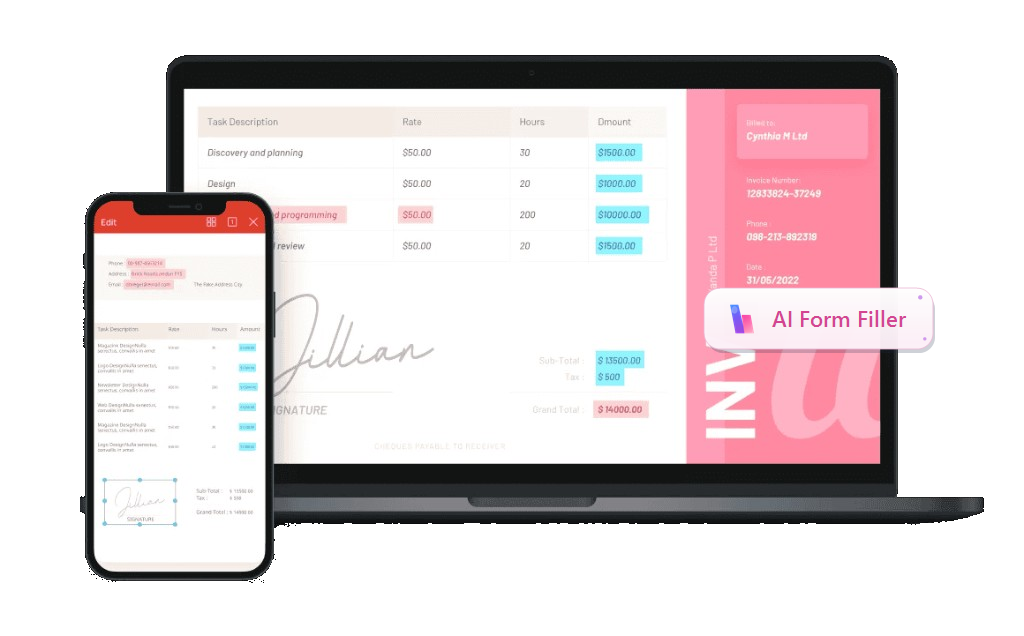
Recommended feature - AI Form Filler / AI Smart Form: In WPS PDF's Fill&Sign tab, open AI Form or click AI Smart Form when WPS detects pending form fields. Paste text, upload a file, or drag a document with the required information into AI Form Filler, then click Extract&Fill. Processing can run locally to help keep employee identity data more secure.
Download the latest Form I-9 PDF from USCIS (include Lists of Acceptable Documents) and save a controlled blank for HR use.
Open the PDF in WPS Office and switch to the PDF tab -> Fill&Sign. Use the built-in pdf filler tools so interactive fields highlight.
Start AI Form / AI Smart Form. When WPS detects form fields, click AI Form in the ribbon or AI Smart Form on the prompt bar.
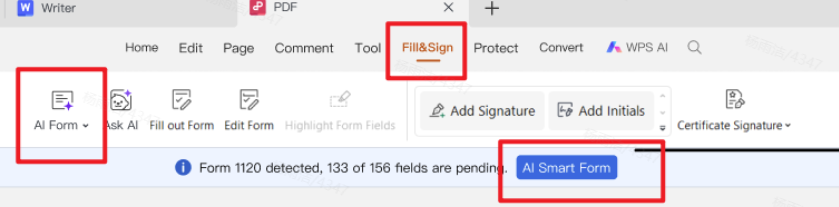
Fill&Sign with automatic form recognition and quick fill Add source information in AI Form Filler by pasting text, clicking + Upload File, or dragging a new-hire worksheet or document inventory note. Then click Extract&Fill. Keep employee Section 1 and employer Section 2 as separate steps when different people complete them.
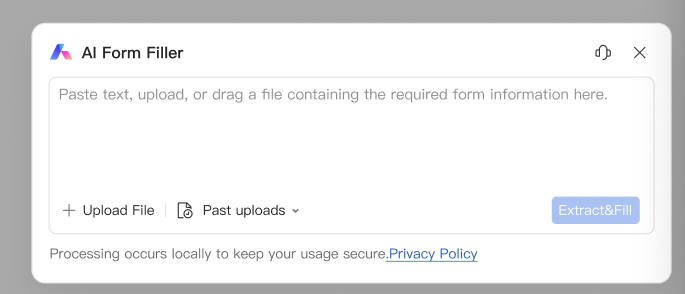
AI Form Filler - paste, upload, or drag source information, then Extract&Fill Review critical fields against the employee and the original documents: legal name, attestation selection, document title/number/expiration, employer business details, and actual completion dates. Never backdate. AI does not replace physical document examination.
Capture signatures for the correct section, save a restricted HR copy, and use Supplement B later for reverification or rehire instead of altering old Section 2 history.
Have the employee enter their legal name, address, date of birth, and Social Security number if provided, then select the correct citizenship or immigration status attestation. Dates should reflect when Section 1 was actually completed. After the employer reviews original identity and work authorization documents, enter Section 2 details exactly as they appear on those documents. Do not invent document titles. Complete the employer certification with the business name, address, and the name/title of the person who reviewed the documents.
Save the completed Form I-9 to a restricted HR location with a consistent filename, such as I-9_Lastname_Firstname_HireDate.pdf. If you must share a copy internally, password-protect the PDF or use an approved secure channel. Retention rules differ for active and terminated employees -- follow USCIS retention guidance and your counsel's policy, and keep the file retrievable for audits.
Best practices for digital I-9 PDFs
Never backdate signatures.
Keep employee and employer sections clearly separated by role.
Store completed I-9s in a restricted folder; encrypt if shared internally.
When auditing, export clean PDFs and keep a consistent naming scheme.
Digital convenience should not weaken compliance. Avoid casual email threads with completed I-9 attachments. Limit folder permissions to HR staff who need access. If you correct a mistake, follow USCIS guidance on how to line out errors, initial, and date -- do not obscure the original entry in a way that hides the history of the form.
For multi-location employers, standardize the blank Form I-9 PDF source so every site uses the same current edition. Periodically purge outdated blanks from shared drives. During internal audits, confirm signatures, document recording, and any Supplement B reverification deadlines. Clear naming and version control make those reviews faster.
If onboarding also involves tax or payroll PDFs, keep those workflows nearby but stored under their own retention and privacy rules. Form I-9 files are often kept separate from personnel files as a best practice -- confirm what your counsel recommends for your organization.
Why we recommend WPS Office
A typical Form I-9 day is more than one PDF: you collect new-hire details, complete Section 1 and Section 2, then still need a clean printout, a smaller file for secure sharing, or related Word and Excel follow-ups. Many tools can open the form; fewer help you fill it with AI and finish the rest of the job in the same place. That is why we recommend WPS Office — it pairs efficient AI form filling with a full professional office suite you can start for free, so HR teams get speed, compliance-minded review, and usable files without stacking paid apps.
Efficient AI form filling — AI Form Filler / AI Smart Form can extract details from pasted notes or uploaded new-hire sheets and map them into matching I-9 fields; you review against original documents before signatures. AI speeds data entry; it does not replace document examination or accurate attestation.
A complete office system after the form — Word, Excel, PPT, and PDF stay in one suite for offer letters, schedules, supplements, and everyday onboarding paperwork.
Output that matches real office needs — adjust page size for clean printing, compress PDFs for email or portal limits, merge pages, and password-protect sensitive I-9 copies for restricted HR storage.
Professional tools, free to start — serious Fill & Sign and PDF operations without enterprise Acrobat pricing for routine hiring work, so every hiring manager can use the same workflow.
Ready to fill Form I-9 faster without printing? Download WPS Office and open Form I-9 in Fill & Sign with AI Smart Form.



FAQ
Can employees fill Form I-9 on their phone?
Yes. WPS can open the PDF on mobile or desktop, but employers must still follow USCIS rules for document examination and timing. Mobile completion can help Section 1 get done on day one, yet Section 2 still depends on proper document review by the employer or authorized representative under current rules. Do not treat a phone screenshot as a substitute for examining acceptable documents.
Is a typed signature OK on Form I-9?
Follow current USCIS guidance for electronic I-9 systems. For a standard PDF workflow, use a clear e-signature and keep records according to your policy. If your company uses a dedicated electronic I-9 platform, that system may have its own compliance design; a filled PDF in WPS is a document-preparation approach and must still meet applicable signature, retention, and audit standards for your workplace.
When onboarding packets also include wage docs, keep a W-2 form PDF guide handy. For overflow forms, a free PDF form fillers or download a PDF filler workflow helps HR stay paperless.
'%3e%3cpath%20d='M19.9911%204.11386V6.471H18.5894C18.0775%206.471%2017.7322%206.57814%2017.5536%206.79243C17.3751%207.00671%2017.2858%207.32814%2017.2858%207.75671V9.44421H19.9019L19.5536%2012.0871H17.2858V18.8639H14.5536V12.0871H12.2769V9.44421H14.5536V7.49779C14.5536%206.39064%2014.8632%205.53201%2015.4822%204.92189C16.1013%204.31177%2016.9257%204.00671%2017.9554%204.00671C18.8304%204.00671%2019.509%204.04243%2019.9911%204.11386Z'%20fill='%23333333'/%3e%3c/g%3e%3cdefs%3e%3cclipPath%20id='clip0_2938_8199'%3e%3crect%20width='16'%20height='16'%20fill='white'%20transform='translate(8%204.00671)'/%3e%3c/clipPath%3e%3c/defs%3e%3c/svg%3e)
'%3e%3cpath%20d='M17.5237%2010.7813L23.4811%204H22.0699L16.8949%209.88693L12.7648%204H8L14.2469%2012.9029L8%2020.0133H9.4112L14.8725%2013.7952L19.2352%2020.0133H24M9.92053%205.04213H12.0885L22.0688%2019.0224H19.9003'%20fill='%23333333'/%3e%3c/g%3e%3cdefs%3e%3cclipPath%20id='clip0_2938_8200'%3e%3crect%20width='16'%20height='16.0134'%20fill='white'%20transform='translate(8%204)'/%3e%3c/clipPath%3e%3c/defs%3e%3c/svg%3e)


