



'%3e%3cpath%20fill-rule='evenodd'%20clip-rule='evenodd'%20d='M21.4999%2010.9993C21.4999%205.20009%2016.7986%200.498901%2010.9993%200.498901C5.19994%200.498901%200.498657%205.20009%200.498657%2010.9993C0.498657%2016.2404%204.33858%2020.5844%209.35855%2021.3722V14.0346H6.69238V10.9993H9.35855V8.68594C9.35855%206.05427%2010.9262%204.60062%2013.3248%204.60062C14.4736%204.60062%2015.6753%204.80571%2015.6753%204.80571V7.38979H14.3512C13.0468%207.38979%2012.64%208.19921%2012.64%209.0296V10.9993H15.5523L15.0867%2014.0346H12.64V21.3722C17.66%2020.5844%2021.4999%2016.2404%2021.4999%2010.9993Z'%20fill='%231568EA'/%3e%3c/g%3e%3c/svg%3e)


'%3e%3cpath%20d='M2.42045%2022.1876H6.31818V12.7217L0.75%208.54553V20.5171C0.75%2021.4414%201.49892%2022.1876%202.42045%2022.1876Z'%20fill='%234285F4'/%3e%3cpath%20d='M19.682%2022.1876H23.5797C24.5041%2022.1876%2025.2502%2021.4387%2025.2502%2020.5171V8.54553L19.682%2012.7217'%20fill='%2334A853'/%3e%3cpath%20d='M19.682%205.48293V12.7216L25.2502%208.54543V6.31816C25.2502%204.25236%2022.8921%203.07469%2021.2411%204.31361'%20fill='%23FBBC04'/%3e%3cpath%20d='M6.31824%2012.7217V5.48303L13.0001%2010.4944L19.6819%205.48303V12.7217L13.0001%2017.733'%20fill='%23EA4335'/%3e%3cpath%20d='M0.75%206.31816V8.54543L6.31818%2012.7216V5.48293L4.75909%204.31361C3.10534%203.07469%200.75%204.25236%200.75%206.31816Z'%20fill='%23C5221F'/%3e%3c/g%3e%3cdefs%3e%3cclipPath%20id='clip0_2954_7305'%3e%3crect%20width='24.5'%20height='18.375'%20fill='white'%20transform='translate(0.75%203.8125)'/%3e%3c/clipPath%3e%3c/defs%3e%3c/svg%3e)


A 1099 form is an IRS information return used to report many kinds of income that are not regular W-2 wages. Freelancers, contractors, landlords, and investors often receive one or more 1099s each tax season, while businesses that pay them must prepare and distribute the correct type. This guide explains what a 1099 is, which type you may get or issue, how to review the boxes, how payers should collect W-9 data first, and how to quickly fill and organize 1099 PDFs with WPS Office AI Form Filler (AI Smart Form).
What is a 1099 form?
Form 1099 is a family of IRS tax forms that report income paid outside a typical employee paycheck. The payer (client, platform, bank, or broker) usually sends a copy to the recipient and to the IRS. Recipients use those amounts when preparing a tax return; payers use them to satisfy information-reporting duties. Because the IRS also receives a copy, mismatches between a return and a 1099 can trigger notices -- so TIN accuracy and box totals matter on both sides.
Unlike Form W-2, a 1099 generally means taxes were not fully withheld the same way as employee wages -- so recipients may need to track income, deductions, and estimated taxes carefully. Some 1099s show federal or state withholding in specific boxes; many show none. Plan cash flow accordingly if most of your income arrives on 1099s rather than paychecks with withholding. Keep a running year-to-date total from invoices or bank deposits so a late or missing form does not leave you guessing in March.
Common types of 1099 forms
People often say "1099 form" when they mean one of these distinct information returns:
Form 1099-NEC - Nonemployee compensation (common for freelancers and independent contractors).
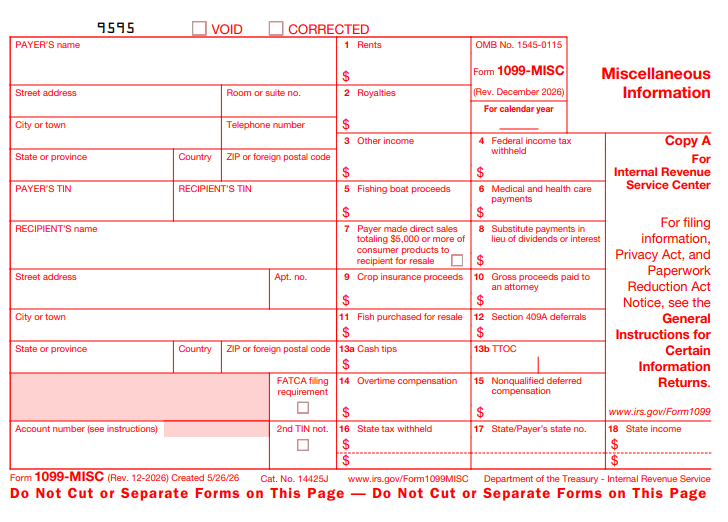
Form 1099-MISC - Miscellaneous income (rents, prizes, and certain other payments).
Form 1099-INT - Interest income.
Form 1099-DIV - Dividends and distributions.
Form 1099-K - Payment card and third-party network transactions (marketplaces and payment apps).
Form 1099-B - Proceeds from broker and barter exchange transactions.
Always check the form title and tax year printed at the top. Box numbers and filing rules differ by type. A contractor who also earns bank interest and sells stock may receive several different 1099s for the same year -- each belongs on different parts of a tax return. Older habits can mislead you too: nonemployee compensation moved to Form 1099-NEC for many payers, while Form 1099-MISC still covers other categories. When in doubt, read the form instructions for that exact 1099 type rather than assuming every "1099" works the same way.
How to read and check a 1099 form
Treat each 1099 as a checklist item, not just another PDF to file away. Recipients and payers both benefit from catching TIN and amount errors before filing season peaks:
Confirm name, address, and TIN (SSN or EIN). Errors here can delay processing or cause IRS mismatch notices.
Match payer details with invoices, bank deposits, and contracts.
Review income boxes for the form type (for example, Box 1 on many 1099-NEC forms shows nonemployee compensation).
Note federal and state withholding if any amounts appear in withholding boxes.
Contact the payer quickly if numbers look wrong so they can issue a corrected 1099.
Compare the form to your own books. If a client paid you $8,000 but the 1099-NEC shows $6,000, request a correction and keep email proof of the request. If the form is correct and your books are wrong, update your records before you file. For investment 1099s, also check cost-basis and wash-sale details on broker statements that accompany Form 1099-B. Note any state copies or state tax ID fields if you file in multiple states -- those details often matter when you prepare state returns later.
Payer workflow: collect Form W-9 before you issue 1099s
If you are the business that must issue 1099s, start early and treat TINs as sensitive data from day one. The conceptual sequence is more important than speed alone:
Collect a completed Form W-9 from each payee before payment when required -- this is how you get the legal name and TIN that must appear on the 1099.
Choose the correct 1099 type (NEC, MISC, INT, DIV, K, B, or another) for the payment category; do not force contractor pay onto the wrong form.
Reconcile year-end payment totals against invoices and accounting records before you touch the IRS PDF.
Prepare recipient copies and IRS filing copies on the schedule required for that form and tax year.
Build a simple checklist: W-9 on file, correct form type, box totals tied to payments, TIN matches the W-9, and recipient copy delivered on time. If you issue many forms, keep a spreadsheet of payee names, TINs, and payment totals, then transfer final amounts into each PDF only after the year-end books close.
Payers usually keep a W-9 form PDF guide nearby before issuing 1099s, and employees still rely on a W-2 form PDF guide for wage income. Keep a free PDF form fillers roundup handy when you need to annotate recipient copies.
How to Quickly Fill Out a 1099 Form PDF with WPS
Above, we covered what 1099 forms are, how recipients should check them, and why payers should collect a W-9 first. The practical question is how to fill a 1099 PDF quickly and accurately -- especially when you are issuing several NEC or MISC copies and cannot afford TIN typos. WPS Office includes AI Form Filler (AI Smart Form) that can extract details from source text or files and populate fields -- so you spend less time typing payer and recipient lines and more time reviewing box totals against your books.
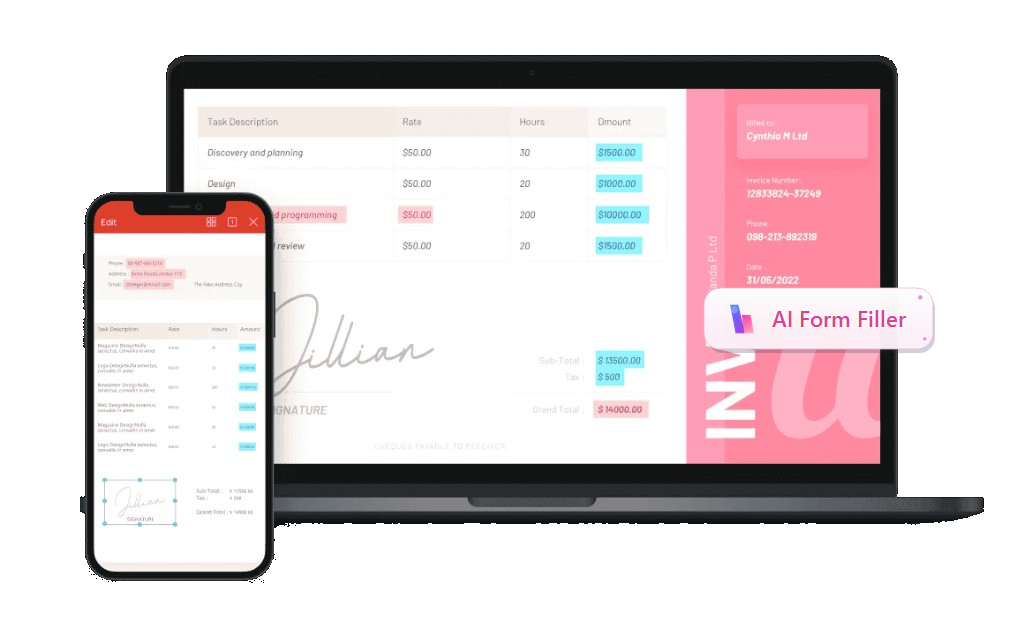
Recommended feature -- AI Form Filler / AI Smart Form: In the WPS PDF Fill&Sign tab, open AI Form or AI Smart Form when WPS detects form fields. Paste text, upload a file, or drag a document into AI Form Filler, then click Extract&Fill. Processing can run locally to help keep usage secure. For general fill workflows, see the WPS pdf filler feature page.
Download the official IRS PDF for the correct 1099 type (NEC, MISC, INT, DIV, K, B, or other) and save it locally -- or open a recipient copy you need to annotate for your records.
Install or open WPS Office, open the 1099 PDF, and go to the PDF tab - Fill&Sign.
Start AI Form / AI Smart Form when WPS detects the form fields (ribbon or prompt bar).
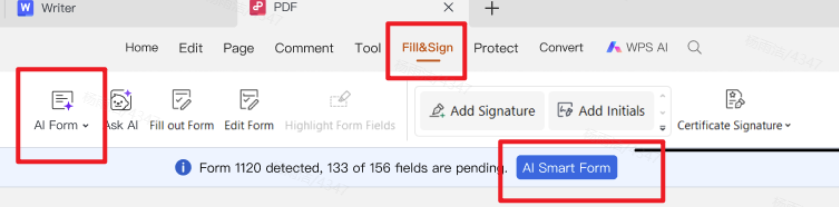
Fill&Sign with automatic form recognition and quick fill In AI Form Filler, paste, upload, or drag source info -- for payers, a W-9 plus a payment summary with payer name/EIN, recipient name/TIN/address, and box amounts; for recipients, a note matching the form to invoices -- then click Extract&Fill.
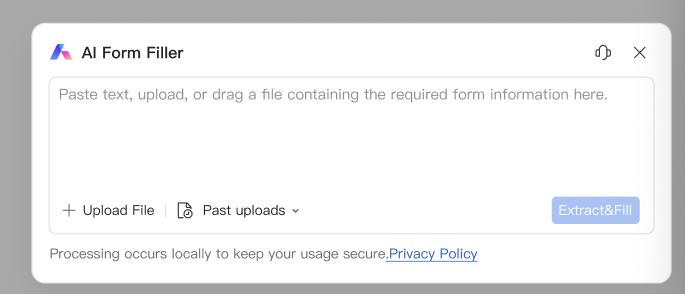
AI Form Filler - paste, upload, or drag source information, then Extract&Fill Review every critical field against your records: payer and recipient names, TIN/EIN accuracy, addresses, form type, income boxes (for example 1099-NEC Box 1), any withholding boxes, and account or state fields if present.
Sign if a workflow requires it, save the final PDF, then distribute recipient copies and file with the IRS (or your e-file service) according to that form's rules. Recipients should merge, protect, and store copies with their tax packet.
After autofill, use WPS to keep forms readable and safer to share: Sign PDF when a signature is required, Merge PDF for related statements, Compress PDF before portal upload, and Password Protect PDF for files that contain TINs.
Name files with the tax year, form type, and payer or payee so January folders stay searchable -- for example, 2025-1099-NEC-AcmeClient.pdf. When you email a copy, prefer a password-protected PDF and send the password separately. Recipients can merge all 1099s plus a notes page into one packet before sharing with a tax preparer, which reduces back-and-forth about missing forms.
Why we recommend WPS Office
1099 season is rarely “one form and done.” Payers move from W-9 data to NEC or MISC copies; recipients collect several different 1099s, then still need a tidy packet for a preparer, a smaller upload for a portal, or a password-protected share that contains TINs. Many tools can open an IRS PDF; fewer help you fill it with AI and finish the rest of the job in the same place. That is why we recommend WPS Office — it pairs efficient AI form filling with a full professional office suite you can start for free, so freelancers, small businesses, and HR/finance teams get speed, careful review, and usable tax files without stacking paid apps.

Efficient AI form filling — AI Form Filler / AI Smart Form can extract details from a W-9, payment summary, or notes (payer/recipient names, TIN/EIN, addresses, box amounts) and map them into matching 1099 fields; you still review every TIN and income box before you send copies. AI speeds typing; it does not replace IRS rules or your books.
A complete office system after the form — Word, Excel, PPT, and PDF stay in one suite for invoice lists, year-end payment spreadsheets, Form 1040 drafts, and everyday tax paperwork.
Output that matches real office needs — adjust page size for clean printing, compress PDFs for portal limits, merge related 1099s and statements into one ordered packet, and password-protect files that contain TINs before email.
Professional tools, free to start — serious Fill & Sign and PDF operations without enterprise Acrobat pricing for seasonal information returns, so you can extract, review, save, and hand off a tidy 1099 workflow in one place.
Ready to fill, organize, and secure your next 1099 PDF? Download WPS Office and open it in Fill & Sign with AI Smart Form.



FAQ
Is a 1099 the same as a W-2?
No. A W-2 reports employee wages. A 1099 reports other income categories such as contractor pay, interest, or dividends. Employment status drives which form you receive; do not treat a 1099-NEC as proof that you are an employee for benefits or labor-law purposes.
Do I need every 1099 to file my taxes?
You should include all reportable income, even if a form is late or missing. Use bank records and invoices as backups while you request a corrected copy. Waiting forever for a missing form can push you past filing deadlines -- report what your records show and amend later if a corrected 1099 changes the numbers.
Can I fill a 1099 PDF on my computer?
Yes. Official IRS PDFs can be completed digitally with WPS Office Fill&Sign and AI Form Filler / AI Smart Form, then saved and printed or e-filed according to IRS instructions. Digital copies are easier to archive and to correct before you distribute recipient copies. Always verify TIN accuracy before sending.
'%3e%3cpath%20d='M19.9911%204.11386V6.471H18.5894C18.0775%206.471%2017.7322%206.57814%2017.5536%206.79243C17.3751%207.00671%2017.2858%207.32814%2017.2858%207.75671V9.44421H19.9019L19.5536%2012.0871H17.2858V18.8639H14.5536V12.0871H12.2769V9.44421H14.5536V7.49779C14.5536%206.39064%2014.8632%205.53201%2015.4822%204.92189C16.1013%204.31177%2016.9257%204.00671%2017.9554%204.00671C18.8304%204.00671%2019.509%204.04243%2019.9911%204.11386Z'%20fill='%23333333'/%3e%3c/g%3e%3cdefs%3e%3cclipPath%20id='clip0_2938_8199'%3e%3crect%20width='16'%20height='16'%20fill='white'%20transform='translate(8%204.00671)'/%3e%3c/clipPath%3e%3c/defs%3e%3c/svg%3e)
'%3e%3cpath%20d='M17.5237%2010.7813L23.4811%204H22.0699L16.8949%209.88693L12.7648%204H8L14.2469%2012.9029L8%2020.0133H9.4112L14.8725%2013.7952L19.2352%2020.0133H24M9.92053%205.04213H12.0885L22.0688%2019.0224H19.9003'%20fill='%23333333'/%3e%3c/g%3e%3cdefs%3e%3cclipPath%20id='clip0_2938_8200'%3e%3crect%20width='16'%20height='16.0134'%20fill='white'%20transform='translate(8%204)'/%3e%3c/clipPath%3e%3c/defs%3e%3c/svg%3e)


