



'%3e%3cpath%20fill-rule='evenodd'%20clip-rule='evenodd'%20d='M21.4999%2010.9993C21.4999%205.20009%2016.7986%200.498901%2010.9993%200.498901C5.19994%200.498901%200.498657%205.20009%200.498657%2010.9993C0.498657%2016.2404%204.33858%2020.5844%209.35855%2021.3722V14.0346H6.69238V10.9993H9.35855V8.68594C9.35855%206.05427%2010.9262%204.60062%2013.3248%204.60062C14.4736%204.60062%2015.6753%204.80571%2015.6753%204.80571V7.38979H14.3512C13.0468%207.38979%2012.64%208.19921%2012.64%209.0296V10.9993H15.5523L15.0867%2014.0346H12.64V21.3722C17.66%2020.5844%2021.4999%2016.2404%2021.4999%2010.9993Z'%20fill='%231568EA'/%3e%3c/g%3e%3c/svg%3e)


'%3e%3cpath%20d='M2.42045%2022.1876H6.31818V12.7217L0.75%208.54553V20.5171C0.75%2021.4414%201.49892%2022.1876%202.42045%2022.1876Z'%20fill='%234285F4'/%3e%3cpath%20d='M19.682%2022.1876H23.5797C24.5041%2022.1876%2025.2502%2021.4387%2025.2502%2020.5171V8.54553L19.682%2012.7217'%20fill='%2334A853'/%3e%3cpath%20d='M19.682%205.48293V12.7216L25.2502%208.54543V6.31816C25.2502%204.25236%2022.8921%203.07469%2021.2411%204.31361'%20fill='%23FBBC04'/%3e%3cpath%20d='M6.31824%2012.7217V5.48303L13.0001%2010.4944L19.6819%205.48303V12.7217L13.0001%2017.733'%20fill='%23EA4335'/%3e%3cpath%20d='M0.75%206.31816V8.54543L6.31818%2012.7216V5.48293L4.75909%204.31361C3.10534%203.07469%200.75%204.25236%200.75%206.31816Z'%20fill='%23C5221F'/%3e%3c/g%3e%3cdefs%3e%3cclipPath%20id='clip0_2954_7305'%3e%3crect%20width='24.5'%20height='18.375'%20fill='white'%20transform='translate(0.75%203.8125)'/%3e%3c/clipPath%3e%3c/defs%3e%3c/svg%3e)


USCIS Form I-485 (Application to Register Permanent Residence or Adjust Status) is the core Green Card application for many people who qualify to adjust status while inside the United States. It is a long, multi-part immigration PDF -- not a tax return -- and it usually travels with a thick evidence packet. This guide explains what Form I-485 is, what to gather before you type, how to avoid edition-date and name-consistency errors, and how to fill the PDF quickly with WPS Office while leaving room for careful review or attorney input.
What is the I-485 form?
Form I-485, Application to Register Permanent Residence or Adjust Status, is the USCIS form used to apply for lawful permanent residence (a Green Card) while in the United States. Across its parts you typically enter biographical data, address history, immigration history, eligibility category, and a long set of yes/no admissibility questions. Officers and systems read the PDF as a structured personal record, so every answer must stay consistent with your passport, I-94, petition, and civil documents.
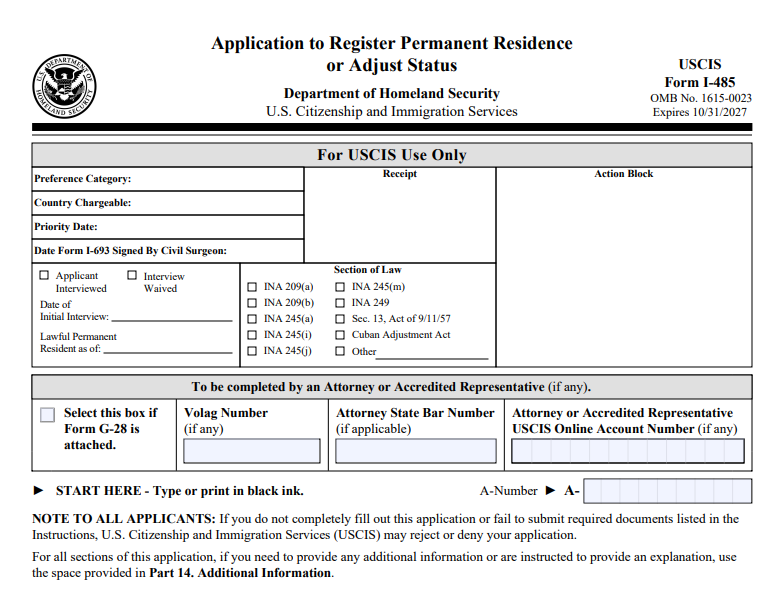
Your category — family-based, employment-based, or another eligible path — drives which related forms, fees, photos, translations, and exhibits you attach. Treat the I-485 PDF as the spine of the package: each exhibit should map back to a question or evidence list in the instructions. If eligibility is unclear, get legal advice before you spend hours filling fields; neat formatting cannot fix a filing that should not have been submitted.
Filing options and Form I-693. USCIS now allows online filing of Form I-485 for certain applicants and their representatives; others still file by mail. In either path, applicants generally must submit Form I-693, Report of Immigration Medical Examination and Vaccination Record, with the I-485. A civil surgeon completes and signs Form I-693 and places it in a sealed envelope.
Edition date matters as much as content. USCIS rejects or delays packages built on expired editions even when the story is otherwise complete. Confirm the current Form I-485, Form I-693 rules, and instructions on USCIS.gov before you start a new draft in WPS, and check the edition date printed on page 1 of your blank PDF.
Before you start the PDF
Confirm you are using the current edition of Form I-485 from USCIS.
Gather passport biographic pages, I-94, employment or sponsor documents, and civil records.
Decide who will sign (applicant, interpreter, preparer) so signature blocks stay correct.
How to Quickly Fill Out I-485 Form PDF with WPS
After you confirm the current edition and assemble your evidence list, the practical goal is to fill the I-485 PDF quickly and accurately. WPS Office includes an AI Form Filler (AI Smart Form) that can extract details from pasted text or uploaded files -- for example passport data, an address history note, or a civil-document summary -- and populate matching fields. You spend less time retyping the same biographic lines across parts and more time reviewing consistency before you sign or send the draft to counsel.
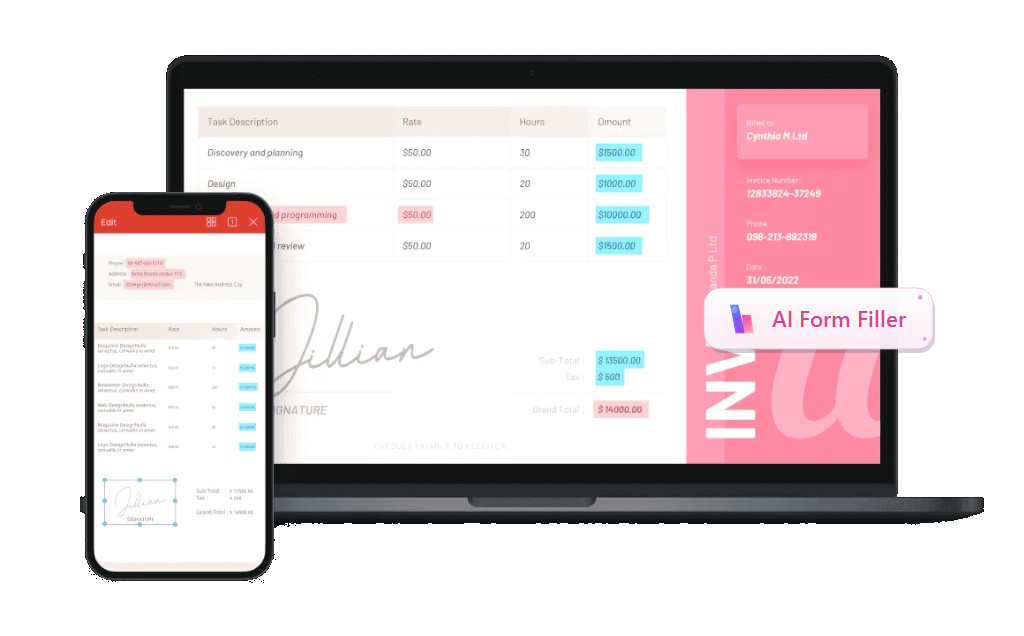
Recommended feature - AI Form Filler / AI Smart Form: In WPS PDF's Fill&Sign tab, open AI Form or click AI Smart Form when WPS detects pending form fields. Paste text, upload a file, or drag a document with the required information into AI Form Filler, then click Extract&Fill. Processing can run locally to help keep sensitive immigration details more secure.
Download the official Form I-485 PDF from USCIS and confirm the edition date matches the current instructions.
Open the PDF in WPS Office and switch to the PDF tab -> Fill&Sign. Use the built-in pdf filler tools so interactive fields highlight.
Start AI Form / AI Smart Form. When WPS detects form fields, click AI Form in the ribbon or AI Smart Form on the prompt bar.
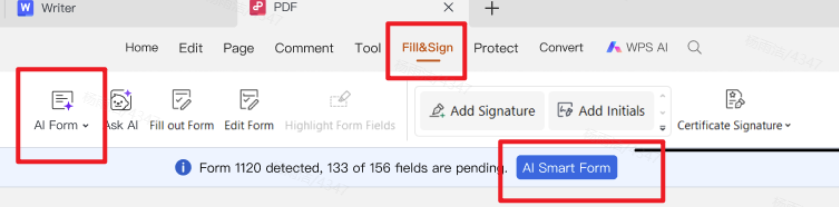
Fill&Sign with automatic form recognition and quick fill Add source information in AI Form Filler by pasting text, clicking + Upload File, or dragging files that contain passport biographic data, A-number, addresses, and other facts you already compiled. Then click Extract&Fill.
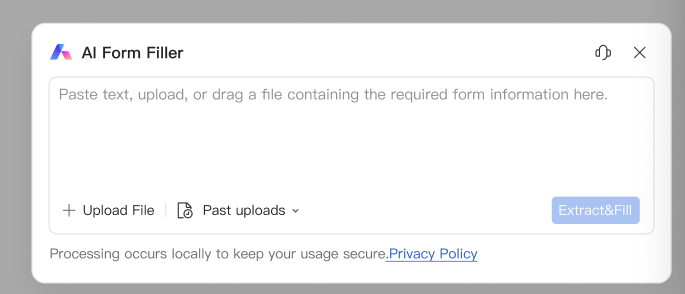
AI Form Filler - paste, upload, or drag source information, then Extract&Fill Review critical fields part by part: names and dates exactly as on the passport, A-number, immigration history, eligibility category, and every yes/no answer. Use Additional Information pages when an answer needs more space. Leave attorney or preparer sections blank unless those parties complete them.
Sign where required, save dated drafts, then export a final PDF and merge supporting evidence into a labeled packet for filing or attorney review.
Start with names, dates of birth, A-numbers, and addresses. Match passport spelling, including middle names and suffixes. Enter dates in the format the form requests. Answer every required item; do not leave intentional blanks unless the instructions allow "N/A." If a checkbox is stubborn, place a clear mark with the symbol tools rather than printing the page. After each major part, save a new draft version so you can roll back if a later edit introduces an error.
Related immigration paperwork often travels with I-485: review an Form I-130 PDF guide, a DS-160 form PDF walkthrough, or a DS-260 form PDF checklist when your path involves petition or consular PDFs alongside the adjustment application.
When the form content looks complete, run a full-screen review: search for empty required fields, confirm signatures and dates, and check that exhibit labels match your cover index. Only then create a final filled PDF and merge evidence in a logical order -- form first, then key civil documents, then supporting letters and extras as your attorney or the instructions recommend.
Common mistakes to avoid
Using an outdated form edition
Inconsistent name spellings across pages and evidence
Skipping Additional Information pages when answers need more space
Submitting low-quality scans: convert clear photos to PDF first
Other frequent issues include mismatched addresses between Form I-485 and supporting I-94 or petition records, unsigned pages, and unlabeled evidence. Build a one-page exhibit list that numbers each PDF attachment, then name files to match (for example, Ex-03-marriage-certificate.pdf). If you translate a foreign document, keep the original and the translation together in the packet.
Do not flatten or lock the PDF before every reviewer has finished edits. Keep a signed final only when you are ready to file. If USCIS later asks for more evidence, you can reuse your organized exhibit folder and export new clear PDFs without rebuilding the whole package from scratch.
Why we recommend WPS Office

Form I-485 is the spine of an adjustment-of-status package: biographical data, history, eligibility, and long yes/no answers that must match your passport, I-94, petition, and civil documents. USCIS also offers online filing for certain applicants and representatives — start from the official page athttps://www.uscis.gov/i-485 to confirm whether you can file online, which edition to use, and how Form I-693 must be handled (open and upload for online filing; keep the sealed original until a final decision).
If you are eligible to file online, that path often fits a document workflow that stays digital from draft to upload. WPS Office supports that with online-ready office tools for you.
Confirm eligibility and the current edition on USCIS first — then draft in WPS so you are not rebuilding an expired form.
Prefer online filing when USCIS says you qualify — prepare upload-ready PDFs (I-485 draft, exhibits, and I-693 scan after you open the civil surgeon’s sealed envelope for online upload; keep the physical original and envelope).
Online + desktop tools in one suite — edit, merge, compress, and convert formats without stacking extra apps; AI Smart Form helps populate fields from prepared notes, then you review every answer.
Packet habits that prevent RFEs — clear scans, numbered exhibit lists, consistent names/addresses, unsigned pages caught before submit, and a signed final only when you are ready to file.
Ready to organize your I-485 draft and exhibits? Download WPS Office or use WPS online tools, then open the current Form I-485 PDF in Fill & Sign with AI Smart Form.
FAQ
Can I edit Form I-485 after I sign?
Yes while it is still a draft. After you finalize and submit to USCIS, follow USCIS rules for corrections or updated evidence. In practice, keep an editable working copy in WPS until the package is truly ready, then export the signed filing set. Once USCIS has your submission, do not casually alter that same file and resend it unless official guidance or counsel tells you how to correct the record.
Why use WPS for I-485 PDFs?
WPS lets you fill fields with AI Form Filler, add signatures, merge exhibits, and compress large evidence packs in one suite. That matters because I-485 packages often combine a long multi-part form with dozens of supporting pages. Staying in one tool reduces version confusion and helps you keep a clean, portable PDF set for attorney review or filing.



Conclusion
Form I-485 is your application to register permanent residence or adjust status. Keep answers consistent with your passport, I-94, petition, and civil documents; attach only what your category and the instructions require; and never start from an expired edition. Check https://www.uscis.gov/i-485 for the current form, online-filing eligibility, and Form I-693 rules before you draft. Avoid common failures — mismatched names, skipped Additional Information pages, low-quality scans, unlabeled evidence, and locking the PDF too early. Use WPS Office to fill with AI assist, convert clear photos to PDF, merge and compress exhibits, and keep an organized folder you can reuse if USCIS asks for more evidence. Neat files help; they do not replace legal advice when eligibility is unclear.
When your packet is review-ready, file online if you qualify, or by mail with a sealed I-693 if that is your path — and keep originals until USCIS decides. Try WPS Office to draft, organize, and export a cleaner I-485 package.
'%3e%3cpath%20d='M19.9911%204.11386V6.471H18.5894C18.0775%206.471%2017.7322%206.57814%2017.5536%206.79243C17.3751%207.00671%2017.2858%207.32814%2017.2858%207.75671V9.44421H19.9019L19.5536%2012.0871H17.2858V18.8639H14.5536V12.0871H12.2769V9.44421H14.5536V7.49779C14.5536%206.39064%2014.8632%205.53201%2015.4822%204.92189C16.1013%204.31177%2016.9257%204.00671%2017.9554%204.00671C18.8304%204.00671%2019.509%204.04243%2019.9911%204.11386Z'%20fill='%23333333'/%3e%3c/g%3e%3cdefs%3e%3cclipPath%20id='clip0_2938_8199'%3e%3crect%20width='16'%20height='16'%20fill='white'%20transform='translate(8%204.00671)'/%3e%3c/clipPath%3e%3c/defs%3e%3c/svg%3e)
'%3e%3cpath%20d='M17.5237%2010.7813L23.4811%204H22.0699L16.8949%209.88693L12.7648%204H8L14.2469%2012.9029L8%2020.0133H9.4112L14.8725%2013.7952L19.2352%2020.0133H24M9.92053%205.04213H12.0885L22.0688%2019.0224H19.9003'%20fill='%23333333'/%3e%3c/g%3e%3cdefs%3e%3cclipPath%20id='clip0_2938_8200'%3e%3crect%20width='16'%20height='16.0134'%20fill='white'%20transform='translate(8%204)'/%3e%3c/clipPath%3e%3c/defs%3e%3c/svg%3e)


